

The Big Moving Adventure APK Screenshots




The Big Moving Adventure App Information
Download Sources
Device Configuration
Split APKs Installation Guide
Some apps are distributed as Split APKs (multiple .apk files packaged together) to optimize resources. Standard Android installers cannot open them.
What's New in The Big Moving Adventure
Added devices support
About The Big Moving Adventure
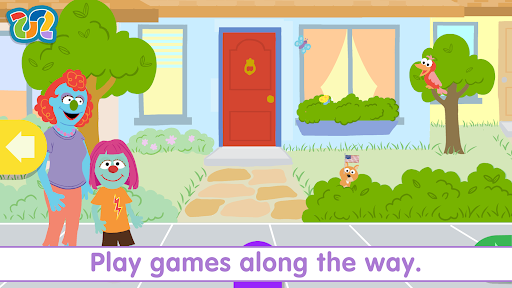
This is an app for families coping with a recent or pending move, which will help teach your child about what to expect when relocating.
Make moving fun with Sesame Street's The Big Moving Adventure! Your young child (ages 2–5) can create his own Muppet friend and help him or her through the moving process, including: Hearing the news, packing, saying goodbye, expressing feelings, traveling, exploring the new home, and making new friends. The Parents Section contains more detailed tips and suggestions on these same topics to help families who are in the process of relocating. Even take pictures of real places from within the app to help your child realize their community grows with every move they make.
FEATURES
• Customize a Muppet friend and help him/her move to a new home.
• Decide which toys and books to pack in a box, and which special comfort items to bring along in a backpack.
• Interactive photo tool, to take pictures of the people and places you are saying goodbye to.
• Explore different ways to say goodbye to people, places, and things at the old home.
• Choose how the Muppet friend could be feeling about the big move.
• Color in a postcard from toys as they travel on the moving truck to the new house.
• Explore the new home and unpack toys and books from the moving truck.
• Go on an American flag scavenger hunt.
• Meet new friends at the new home, including some familiar, furry faces!
LEARN ABOUT
The average military child moves about 6 to 9 times between kindergarten and high school. Moving can be stressful for all family members, but children are especially vulnerable to changes in routine and environment. The Big Moving Adventure app was created to help children prepare both physical and emotionally for any type of move.
• Familiarizes children with important moving steps like packing, traveling over a distance, and getting used to a new room.
• Models different ways to say goodbye to people and places.
• Helps children explore their feelings about moving.
• Introduces strategies for making new friends.
ABOUT US
• Sesame Workshop is the nonprofit educational organization that revolutionized children’s media with the landmark Sesame Street. Learn more at www.sesameworkshop.org
• This app is part of Sesame Workshop’s ongoing efforts to support military families
User Reviews

The app is a little buggy. I'm on an s22 ultra galaxy and it won't let me save any pictures. When I tap the green reel button it just glitches out. Please help to fix if I am going to be recommending this to military families

I have had this app for a while. All of a sudden the screen is not center and there is no access to the buttons. I deleted it from my phone and reloaded it. Problem not resolved. I am going to delete it again. I might try to load it at a different time.
Amazing way to help children learn about moving. Great animation and easy to use controls.

I decided to take a look at this game again because I used to love when I was a toddler, it is how remembered it as expected it I was a little cringe and not as fun as I remember but it was still a decent game although the mom looks screwed up
How to Download The Big Moving Adventure APK
- Enter the package name
air.com.sesameworkshop.MilitaryMovingAppon the APK Downloader. - Select your device architecture (ARM64 recommended for modern devices).
- Click Download to get the merged APK file.
- Transfer and install the APK on your Android device.
- Keep Updated: Visit APKDER.COM regularly to search for and download the latest secure versions of your favorite apps.
Frequently Asked Questions
Yes! Every APK download provided by APKDER undergoes rigorous security verification. We verify that the cryptographic signature of the APK file matches the official signature from the developer, ensuring the APK is original, untouched, and free from any modifications.
To install it, you first need to enable "Unknown Sources" in your Android device's security settings. After downloading the APK file from APKDER, tap it to begin the installation and follow the on-screen prompts.
Yes! As soon as the developer releases a new version of The Big Moving Adventure, we will update and provide the updated APK on APKDER. You can simply download and install the new APK over the existing installation without losing your app data.
Yes. APKDER allows you to bypass geographic restrictions and download official APK files directly, even if the app or game is not officially available in your country's store.
A standard APK is a single installation package. An XAPK or Split APK contains multiple resource files (like OBB expansions or device-specific layout parts) packaged together. To install them, you can download splits individually or use dynamic helper tools like Split APKs Installer (SAI).
Security & Signature Verification
This APK download is 100% safe. We verify that the cryptographic signature of the file matches the official developer credentials. No modifications or adware are injected.


