

Meal Planner: Recipes APK Screenshots
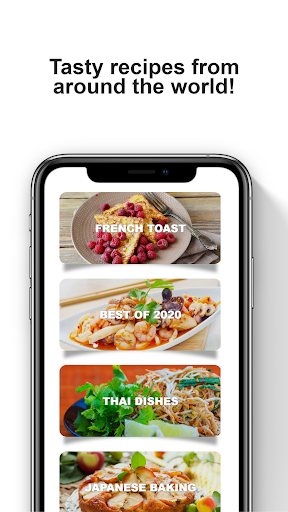


Meal Planner: Recipes App Information
Download Sources
Device Configuration
Split APKs Installation Guide
Some apps are distributed as Split APKs (multiple .apk files packaged together) to optimize resources. Standard Android installers cannot open them.
About Meal Planner: Recipes
Simplify weekly meal planning with intelligent menus, automated shopping lists, and voice-guided cooking. Plan everything from Father's Day BBQ dinners to quick weeknight meals, discover global recipes, and cook confidently with hands-free instructions in this comprehensive meal planner.
Smart Weekly Meal Planning
Create personalized weekly meal plans tailored to your schedule and preferences. Our intelligent menu planner suggests balanced recipes that mix quick weeknight dinners with adventurous weekend cooking. Plan Father's Day grilling menus, summer party spreads, or simple family meals with ease. The system learns your taste preferences and organizes meal plans around your busiest days.
Automated Grocery Shopping Lists
Every meal plan generates organized shopping lists that make grocery trips efficient and budget-conscious. Ingredients are grouped by store section, quantities calculated automatically, and pantry tracking prevents duplicate purchases. Share lists with family members and check items off from your Wear OS smartwatch while shopping.
Global Recipe Discovery
Explore authentic international recipes from Mediterranean classics to Asian fusion dishes. Each recipe includes step-by-step cooking instructions, preparation timelines, and ingredient substitution suggestions. Filter by cooking time, skill level, or dietary preferences to find recipes that match your comfort zone.
Hands-Free Cooking Mode
Voice-guided recipe instructions walk you through each cooking step without touching your phone with messy hands. Wear OS integration lets you advance steps, set timers, and check ingredients from your smartwatch. Perfect for busy grilling sessions or holiday meal preparation.
Meal Prep Made Simple
Batch cooking strategies help you prepare multiple meals efficiently. Smart suggestions identify recipes sharing ingredients, reducing waste and maximizing your grocery budget. Track nutritional information across your weekly menu.
Whether planning special occasion menus or solving daily dinner decisions, this meal planner app adapts to your lifestyle. Upload family favorites, coordinate cooking responsibilities, and master new recipes with confidence.
Customize your weekly meal plans based on dietary preferences, cooking skill level, and available time. The smart algorithm learns your taste preferences, suggesting new global dishes that expand your culinary horizons while respecting your comfort zone. Track nutritional information effortlessly and maintain balanced eating habits without complicated calculations.
Join home cooks who've discovered the joy of stress-free meal planning. Upload your family favorites to create personalized recipe collections, share meal plans with household members, and coordinate cooking responsibilities seamlessly. Smart pantry management tracks what you have on hand, preventing food waste and suggesting recipes that use ingredients you already own.
From Mediterranean feast planning to Asian fusion experiments, from traditional comfort foods to modern healthy alternatives, this comprehensive cooking companion adapts to your evolving tastes and schedules. Master international cooking techniques with video tutorials, understand ingredient substitutions for dietary needs, and build confidence with foolproof recipe scaling for any group size.
Wear OS Support
Access your favorite recipes, search for new recipes and even shop using your Wear OS supported smartwatch.
Start your culinary journey today and transform mealtime from a daily challenge into an exciting adventure your whole family will love.
Featured by leading culinary magazines as an essential tool for modern home cooking. Food technology experts praise the innovative approach to meal planning efficiency. Recommended by registered dietitians for balanced meal planning. Recognized by parenting publications for solving dinnertime challenges.
User Reviews

kindly value Thanks.

👍

well done💯

Saya mimpi Jeddah N A Mama Babah Kota Kinabalu Pantai Jerudong Specialist Centre
How to Download Meal Planner: Recipes APK
- Enter the package name
all.free.recipes.cookon the APK Downloader. - Select your device architecture (ARM64 recommended for modern devices).
- Click Download to get the merged APK file.
- Transfer and install the APK on your Android device.
- Keep Updated: Visit APKDER.COM regularly to search for and download the latest secure versions of your favorite apps.
Frequently Asked Questions
Yes! Every APK download provided by APKDER undergoes rigorous security verification. We verify that the cryptographic signature of the APK file matches the official signature from the developer, ensuring the APK is original, untouched, and free from any modifications.
To install it, you first need to enable "Unknown Sources" in your Android device's security settings. After downloading the APK file from APKDER, tap it to begin the installation and follow the on-screen prompts.
Yes! As soon as the developer releases a new version of Meal Planner: Recipes, we will update and provide the updated APK on APKDER. You can simply download and install the new APK over the existing installation without losing your app data.
Yes. APKDER allows you to bypass geographic restrictions and download official APK files directly, even if the app or game is not officially available in your country's store.
A standard APK is a single installation package. An XAPK or Split APK contains multiple resource files (like OBB expansions or device-specific layout parts) packaged together. To install them, you can download splits individually or use dynamic helper tools like Split APKs Installer (SAI).
Security & Signature Verification
This APK download is 100% safe. We verify that the cryptographic signature of the file matches the official developer credentials. No modifications or adware are injected.


