Video Downloader : Save Video APK Screenshots



Video Downloader : Save Video App Information
Download Sources
Device Configuration
Split APKs Installation Guide
Some apps are distributed as Split APKs (multiple .apk files packaged together) to optimize resources. Standard Android installers cannot open them.
What's New in Video Downloader : Save Video
1. Optimize social video download.
2. Improve video download experience.
3. Improve the video player.
About Video Downloader : Save Video
All video downloader is a very convenient video download tool. Downloading videos and music to your phone from the Internet is simple and convenient. it would be the best video downloader choice for you.
🚀 Features:🚀
* HD video downloader
*The website shortcut on the homepage is more convenient for you.
*With just one click, you can download HD quality videos from all websites.
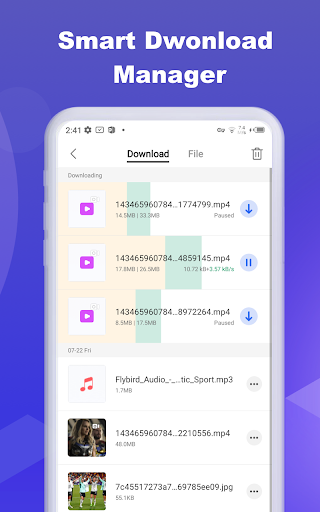
* A fully functional download manager that can pause, resume and delete downloads.
*The fastest speed: download the video as fast as the downloader
*Support all download formats, MP3, M4A, MP4, M4V, MOV, AVI, WMV, DOC, XLS, PDF, TXT, etc.
* Auto detect videos and easily download
* Download video, music and pictures
*Using the built-in video player, the video can be played offline without internet buffering.
*Check the progress in the download bar.
* Share the downloaded video with friends.
How to Use This Video Downloader
* Browse website with the built-in browser
* Auto detect videos, and tap the download button
* Choose which video you want to download
* Done!
Video Downloader Manager
If you are looking for powerful video downloader manager, try this video downloader manager to download video.
Browser Private Downloader
The best browser private downloader and browser downloader. This browser downloader can keep your videos safe.
Disclaimer:
* Please get permission from the content owner before you repost videos.
* We are not responsible for any intellectual property violation that results from unauthorized reposts of videos.
* Downloading files protected by copyright is prohibited and regulated by the law of the country.
* This app doesn't support downloading Youtube videos due to the policy of the Play Store.
User Reviews

The app has worked well for years, but just recently, the download button disappeared and I have not found a way to continue downloading videos. Is there any way to fix this? 3 stars until a fix

Can't download anything. I played videos on YouTube and Facebook but still the download button doesn't glow or activate. Why?? Please fix. I love the interface and fast loading of sites but the downloading part is not working.

This Video downloader is very good or an excellent downloader to browse for website that you want download👇 the video 📷 and also is a very fast browser your Opera, Chrome or Firefox.

The best app to download videos from anywhere. Very nice ! And the beauty of this app is that it is very simple and friendly for use ! Use definetly my dear friends !👍💐😍
How to Download Video Downloader : Save Video APK
- Enter the package name
all.video.downloader.video.saveron the APK Downloader. - Select your device architecture (ARM64 recommended for modern devices).
- Click Download to get the merged APK file.
- Transfer and install the APK on your Android device.
- Keep Updated: Visit APKDER.COM regularly to search for and download the latest secure versions of your favorite apps.
Frequently Asked Questions
Yes! Every APK download provided by APKDER undergoes rigorous security verification. We verify that the cryptographic signature of the APK file matches the official signature from the developer, ensuring the APK is original, untouched, and free from any modifications.
To install it, you first need to enable "Unknown Sources" in your Android device's security settings. After downloading the APK file from APKDER, tap it to begin the installation and follow the on-screen prompts.
Yes! As soon as the developer releases a new version of Video Downloader : Save Video, we will update and provide the updated APK on APKDER. You can simply download and install the new APK over the existing installation without losing your app data.
Yes. APKDER allows you to bypass geographic restrictions and download official APK files directly, even if the app or game is not officially available in your country's store.
A standard APK is a single installation package. An XAPK or Split APK contains multiple resource files (like OBB expansions or device-specific layout parts) packaged together. To install them, you can download splits individually or use dynamic helper tools like Split APKs Installer (SAI).
Security & Signature Verification
This APK download is 100% safe. We verify that the cryptographic signature of the file matches the official developer credentials. No modifications or adware are injected.