
Tuxedoku: Zen Wooden Sudoku APK Screenshots



Tuxedoku: Zen Wooden Sudoku Game Information
Download Sources
Device Configuration
Split APKs Installation Guide
Some apps are distributed as Split APKs (multiple .apk files packaged together) to optimize resources. Standard Android installers cannot open them.
About Tuxedoku: Zen Wooden Sudoku
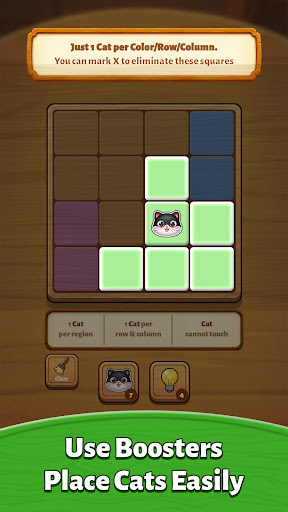
Tuxedoku: Zen Wooden Sudoku is a calm brain game about placing cute Tuxedo cats, acting like queens, on a wooden grid using pure logic. Every wooden board is split into colored regions. You must follow three clear rules: only 1 cute Tuxedo cat queen per region, only 1 cute Tuxedo cat queen per row and column, and cute Tuxedo cat queens cannot touch each other, not even diagonally. Tap tiles to mark X on unsafe spots, double tap safe tiles to place your cute Tuxedo cats, and slowly watch the zen wooden board fall into place. Tuxedoku is an easy to learn sudoku style logic puzzle that feels relaxing but still gives your brain something smart to chew on.
How to play:
• Tap a grid tile to mark an X and rule that wooden square out.
• Double tap a grid tile to place a cute Tuxedo cat queen when you are sure it is safe.
• Remember the three rules: 1 cute Tuxedo cat queen per region, 1 cute Tuxedo cat queen per row and column, cute Tuxedo cat queens cannot touch.
• Use these rules like sudoku clues to eliminate tiles and find the only possible cute Tuxedo cat queen spots.
• Clear the board by placing all cute Tuxedo cat queens correctly and enjoy that quiet aha moment in this zen wooden sudoku puzzle game Tuxedoku.
Key features:
• Cozy zen wooden logic gameplay – a fresh twist on sudoku queens and chess puzzles, all played on a warm wooden grid board in Tuxedoku.
• Simple tap controls – tap to mark X, double tap to place cute Tuxedo cats as chess queens; perfect for one hand play on the sofa or in bed.
• No timer, no pressure – solve each wooden sudoku cat puzzle at your own pace, with calm, no timer gameplay ideal for adults and seniors who enjoy Tuxedoku style brain games.
• More than 5,000 handcrafted levels – plenty of smart sudoku style wooden boards in Tuxedoku to keep your logic sharp day after day.
• Daily challenge – come back for a fresh zen wooden sudoku puzzle every day and build a relaxing brain training habit with Tuxedoku.
• Boosters and hints – stuck on a tricky grid? Use helpful boosts to highlight tiles or guide your next smart move in this brain puzzle game.
• Soft wooden art style – warm wood textures, gentle colors and clean tiles that feel like a real tabletop logic puzzle with cute Tuxedo cats.
• Relax and train your brain – designed especially for players who want calm sudoku logic puzzles, not stress or reflex tests, in a cozy Tuxedoku experience.
• Offline friendly – enjoy your zen wooden sudoku with cute Tuxedo cats anywhere: on the train, in a cafe, or during a quiet break at home.
If you enjoy sudoku, number puzzles, chess problems, Star Battle, brain games or other relaxing logic grid tile games, Tuxedoku: Zen Wooden Sudoku is made for you. Tuxedoku combines the clear rules of sudoku with the charm of cute Tuxedo cat queens and the comfort of a zen wooden board, creating a smart yet soothing logic puzzle experience.
Download Tuxedoku: Zen Wooden Sudoku, place your cute Tuxedo cat queens on the wooden grid, and give your brain a calm, clever workout every day.
How to Download Tuxedoku: Zen Wooden Sudoku APK
- Enter the package name
and.lihuhu.smartqueenson the APK Downloader. - Select your device architecture (ARM64 recommended for modern devices).
- Click Download to get the merged APK file.
- Transfer and install the APK on your Android device.
- Keep Updated: Visit APKDER.COM regularly to search for and download the latest secure versions of your favorite apps.
Frequently Asked Questions
Yes! Every APK download provided by APKDER undergoes rigorous security verification. We verify that the cryptographic signature of the APK file matches the official signature from the developer, ensuring the APK is original, untouched, and free from any modifications.
To install it, you first need to enable "Unknown Sources" in your Android device's security settings. After downloading the APK file from APKDER, tap it to begin the installation and follow the on-screen prompts.
Yes! As soon as the developer releases a new version of Tuxedoku: Zen Wooden Sudoku, we will update and provide the updated APK on APKDER. You can simply download and install the new APK over the existing installation without losing your app data.
Yes. APKDER allows you to bypass geographic restrictions and download official APK files directly, even if the app or game is not officially available in your country's store.
A standard APK is a single installation package. An XAPK or Split APK contains multiple resource files (like OBB expansions or device-specific layout parts) packaged together. To install them, you can download splits individually or use dynamic helper tools like Split APKs Installer (SAI).
Security & Signature Verification
This APK download is 100% safe. We verify that the cryptographic signature of the file matches the official developer credentials. No modifications or adware are injected.


