

Wedding Planner by PlanWed APK Screenshots




Wedding Planner by PlanWed App Information
Download Sources
Device Configuration
Split APKs Installation Guide
Some apps are distributed as Split APKs (multiple .apk files packaged together) to optimize resources. Standard Android installers cannot open them.
What's New in Wedding Planner by PlanWed
Meet the Keepsake Wedding Book.
Wedding Pass couples can now turn Guest Hub wishes, guest photos, guest names and their wedding-day timeline into a beautifully designed PDF to save or share.
• A simpler Guest Hub share flow for links, WhatsApp, system sharing and QR codes
• Clearer activity when guests RSVP, leave a wish or add a photo
• More reliable image loading and Wedding Book generation
• Subscription, privacy and stability improvements
About Wedding Planner by PlanWed
Plan your wedding together without juggling spreadsheets, notes and group chats.
PlanWed is an all-in-one wedding planning app for couples. Manage your wedding budget, guest list, RSVPs, seating chart, checklist, vendors and wedding-day timeline from your phone, tablet or computer. Everything stays synced, so you and your partner always have the same plan.
A Guest Hub made for your guests
Create a beautiful personal wedding page and share it by link, WhatsApp or QR code. Guests can open it in their browser with no app download or account required.
Guests can:
• RSVP and update their response
• Add meal choices and dietary requirements
• View your schedule, venue, travel and accommodation details
• Find their assigned table
• Read FAQs and open registry links
• Share photos and leave wishes in your guestbook
Keep every detail organized
• Track your wedding budget, expenses and payments
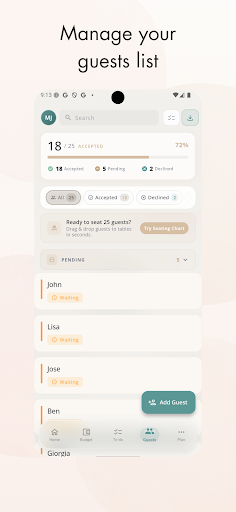
• Build a guest list with parties, plus-ones and RSVP status
• Design a seating chart with flexible table shapes and assigned seats
• Follow a wedding checklist, add custom tasks and set reminders
• Keep vendor details, contacts and payments together
• Create your wedding-day timeline and use Wedding Day Mode
• See your countdown and planning progress at a glance
Plan together, everywhere
Invite your partner and update the same wedding plan in real time. Plan on Android phones and tablets, then use the larger web workspace for seating charts and detailed edits.
Turn guest memories into a keepsake
With Wedding Pass, collect guest photos and wishes through Guest Hub, then turn them into a beautifully designed Keepsake Wedding Book PDF to save and share after the celebration. Wedding Pass is a one-time purchase and does not renew.
PlanWed includes optional Premium subscriptions and Wedding Pass for additional planning tools and keepsakes. Subscription and trial availability is shown before purchase.
Support: [email protected]
Website: https://planwed.app
User Reviews

Seems like a cool and helpful app, but I was really bummed out to find that there's (seemingly) no way to change the 'bride and groom' categories to, in my case, 'bride and bride'. I'd love to be able to pick colors to distinguish our sides of the family, or replace it with our names. I guess I didn't expect an app to ask us "so who's the man is in this relationship?" 😅

this app has a cheap price tag for one years use, and covers everything other apps do, but way more in depth. I've had it for 5 minutes and I'm already so excited!

horrible. didn't work and support email failed to deliver.

A great app, though several minor bug fixes/improvements would be helpful: * When inviting a partner, email needs to be entered in lower case, otherwise they will not be able to join. * The partner who joins, cannot see the RSVP section. * If I select the option to create wedding and go back without completing it, the wedding is created anyway, though without the useful to-do and other templates. * Possibility to manually change the app's language.
How to Download Wedding Planner by PlanWed APK
- Enter the package name
app.planwed.planwedon the APK Downloader. - Select your device architecture (ARM64 recommended for modern devices).
- Click Download to get the merged APK file.
- Transfer and install the APK on your Android device.
- Keep Updated: Visit APKDER.COM regularly to search for and download the latest secure versions of your favorite apps.
Frequently Asked Questions
Yes! Every APK download provided by APKDER undergoes rigorous security verification. We verify that the cryptographic signature of the APK file matches the official signature from the developer, ensuring the APK is original, untouched, and free from any modifications.
To install it, you first need to enable "Unknown Sources" in your Android device's security settings. After downloading the APK file from APKDER, tap it to begin the installation and follow the on-screen prompts.
Yes! As soon as the developer releases a new version of Wedding Planner by PlanWed, we will update and provide the updated APK on APKDER. You can simply download and install the new APK over the existing installation without losing your app data.
Yes. APKDER allows you to bypass geographic restrictions and download official APK files directly, even if the app or game is not officially available in your country's store.
A standard APK is a single installation package. An XAPK or Split APK contains multiple resource files (like OBB expansions or device-specific layout parts) packaged together. To install them, you can download splits individually or use dynamic helper tools like Split APKs Installer (SAI).
Security & Signature Verification
This APK download is 100% safe. We verify that the cryptographic signature of the file matches the official developer credentials. No modifications or adware are injected.


