




Download Sources
Device Configuration
Split APKs Installation Guide
Some apps are distributed as Split APKs (multiple .apk files packaged together) to optimize resources. Standard Android installers cannot open them.
What's New
In the latest version, we fixed errors and brought improvements to your daily routine: greater ease in date selection, more consistency in customer modification and order editing, and better visibility of filters.
About this app
Your store in the palm of your hand and in real time. 😎
Nex is a mobile sales application that makes it easy to manage your store!
With it, you have access to features such as:
✅ POS: Point of Sale.
✅ Sales Control.
✅ Registration and Product Control.
✅Registration and Customer Control.
✅ Category Management.
Simplify your day-to-day business with an app that allows you to manage your business in an uncomplicated way and make sales in a matter of minutes, anywhere and anytime!
Learn more about how our resources can help you in your routine:
✅ POS: Point of Sale
Make your online sales or offline sales in your point of sale app! Open the Nex application, access our POS, launch your sales quickly and that's it! It has never been so easy to sell online, on the street, at home, in your store or wherever you are.
✅ Control of orders and Registration of purchase and sale
Carry out sales quickly by registering the payment method, possible discounts, notes and share the sales receipt instantly from your cell phone!
✅ Registration and Product Control
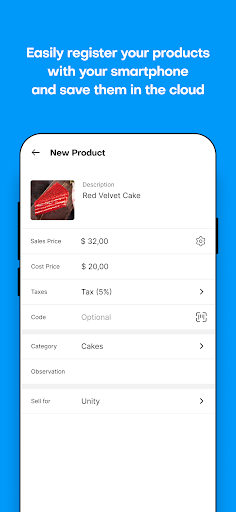
Register your store products in the app! Imagine being able to use this mobility with the registration of the products on your cell phone without having the computer nearby: now it's much more practical.
In the product registration you can include information such as:
- Description.
- Photo of the product from the gallery or registered in the app itself.
- Cost and sale price.
- Cost price.
- Code (manual or automatic using barcode reader).
- Unit of measurement.
- Category.
✅ Registration and Customer Control
Register your customers in the management app in seconds. Customer registration is a great marketing tool. The more information, the better you serve each customer, increasing the chances of loyalty.
Offer personalized service!
In the customer register you will be able to register:
- Name.
- Phone.
- Email.
- Address.
- Sales.
✅ Integration with a complete computer management system
Nex for the computer is a business management system that will make your store's routine easier. With it you can control your stock, record your sales, control the cash register, create quotations, print receipts and labels, register customers, products, suppliers, control accounts payable and much more!
Nex: created by those who understand commerce.
User Reviews

I actually just started and this is awesome I wont advise it to big store owners but its good for small and medium stores I hope the developers will optimize it for large stores, if you are looking for a large store platform I advise shopify.

basic features and function is good. the ui is good. there should be an option to change currency and also monitoring of materials used per serving of an item like food etc.

Amazing and loveable experience using this app, it allows me to even check the stats from everywhere. I was desperately waiting for this app. One suggestion, that should be added in the app, i.e. there should be open Register option.

i am using this software since last year 2022... i find it very easy and all features i want from a POS is there... The best part is that you can use it now in your mobile phone. Thanks Nextar developers.
How to Download Nex: app for stores APK
- Enter the package name
br.com.nextar.nexappon the APK Downloader. - Select your device architecture (ARM64 recommended for modern devices).
- Click Download to get the merged APK file.
- Transfer and install the APK on your Android device.
- Keep Updated: Visit APKDER.COM regularly to search for and download the latest secure versions of your favorite apps.
Security & Signature Verification
This APK download is 100% safe. We verify that the cryptographic signature of the file matches the official developer credentials. No modifications or adware are injected.


