



Download Sources
Device Configuration
Split APKs Installation Guide
Some apps are distributed as Split APKs (multiple .apk files packaged together) to optimize resources. Standard Android installers cannot open them.
About This App
Don’t just watch content — play with it 🎮✨
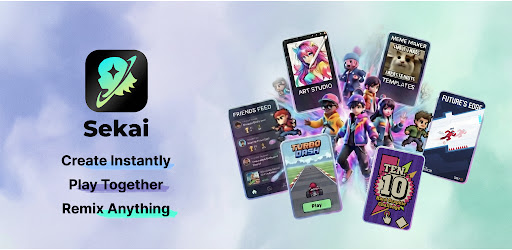
Sekai is an AI-powered interactive creation tool where you can turn your imagination into playable mini apps, in seconds 🚀
Just type what you want — no coding, no setup 🧠⚡
Sekai’s AI automatically builds interactive apps, games, quizzes, and stories that you can play, remix, and share instantly 🔁📲
From personality quizzes and interactive stories to chaotic mini games and playful experiments 🤪🎲
Sekai lets you create interactive content instead of just scrolling 👆📜
💖 WHY YOU’LL LOVE SEKAI
🤖 Create Instantly with AI
Want to make a “Who’s Most Likely To” quiz, an interactive birthday card 🎂, or a quick party game 🥳
Describe your idea, and Sekai’s AI app generator creates a working, playable mini app in seconds ⏱️✨
🔄 Remix Anything
Never start from scratch. See a Sekai you like? Hit Remix 🛠️
Change characters, questions, rules, or the entire vibe —
Turn trending interactive content into your own creation instantly 🔥
♾️ Play the Infinite Interactive Feed
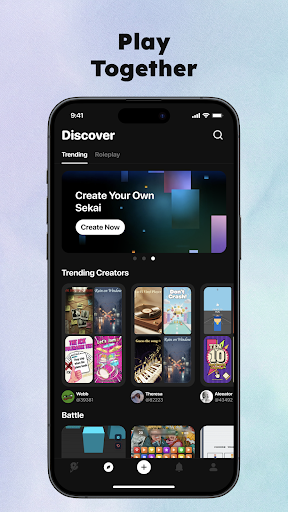
Scroll through an endless feed of interactive Sekai, mini apps, and games created by the community 🌍🎮
Every swipe is something you can actually play 👉
👯 Made for Sharing & Playing Together
Sekai are built to be shared 💬
Drop a Jam into your group chat and watch friends play, react, roast, and compete 😂🏆
It’s interactive content that turns conversations into games 🎉
🧰 BUILT AS A TOOL — NOT JUST CONTENT
Sekai is an AI-powered creation tool for building interactive apps fast ⚡
Create mini apps for social sharing, education, entertainment, or creative experiments — without writing code 💡📚🎭
Every Sekai is instantly playable and shareable as an interactive experience 🌐
👤 Perfect for anyone who wants to build interactive apps with AI — no coding required
⬇️ Download Sekai now and create your first interactive Sekai today 🚀✨
Join the community
🌐 Official website: https://sekaiapp.com
💬 Discord: https://discord.gg/vGBbp6Bmh9
👽 Reddit: https://www.reddit.com/r/sekai_multiverse/
🎵 TikTok: https://www.tiktok.com/@sekaiapp
📸 Instagram: https://www.instagram.com/sekai_multiverse
User Reviews

Five ☆'s! I've always wanted to make a visual novel type game & now, thanks to Sekai, my dreams can finally come to fruition~♡ I absolutely adore how easy it is to communicate with the ai. I may not always know how to fix a bug/issue in my game but the ai explains it to me & helps me fix it. I love that a lot actually because that way it's like a learning experience. I feel like there could be some adjustments made to this tool, to make it more practical, but I still highly recommend this app!

Not bad, but not perfect. Pros: It's completely free, the bots are pretty smart, and the avatar image generation is solid. Cons: Can't edit messages, can't edit your own bots after you make them, voices either sound weird or don't play at all, and most bots have a set roll for you so you can't chat as yourself or your own character (that's mostly an issue with other users, not the app).

Great, so far, I can make games very easily. However, I am currently experiencing a glitch where every game I play or even just pass over automatically gets liked, not to mention it, but I am currently unable to receive notifications for most things EDIT: Also the wifi isn't working even though I am at full Wifi if you understand that

I fixed the previous problem (It turns out I was on roleplay instead of stories). but Now I've run into the problem of I lost the ability to add voices to characters and you guys updated it so I can't edit my characters. that last one is a actual problem that first one is just a I don't know what's going on so I feel like it should be brought up in a review type thing.
How to Download Sekai: Create · Remix · Play APK
- Enter the package name
chat.sekai.appon the APK Downloader. - Select your device architecture (ARM64 recommended for modern devices).
- Click Download to get the merged APK file.
- Transfer and install the APK on your Android device.
- Keep Updated: Visit APKDER.COM regularly to search for and download the latest secure versions of your favorite apps.
Frequently Asked Questions
Yes! Every file hosted on APKDER undergoes rigorous security verification. We verify that the cryptographic signature matches the official signature from the developer, ensuring the app hasn't been modified or tampered with.
To install it, you first need to enable "Unknown Sources" in your Android device's security settings. After downloading the APK file from APKDER, tap it to begin the installation and follow the on-screen prompts.
Yes! As soon as the developer releases a new version of Sekai: Create · Remix · Play, we will scrape and post the updated APK on APKDER. You can simply download and install the new APK over the existing installation without losing your app data.
Security & Signature Verification
This APK download is 100% safe. We verify that the cryptographic signature of the file matches the official developer credentials. No modifications or adware are injected.


