
Download Sources
Device Configuration
Split APKs Installation Guide
Some apps are distributed as Split APKs (multiple .apk files packaged together) to optimize resources. Standard Android installers cannot open them.
Related Applications




What's New
Performance improvements,
Billing library update.
About this app
Fluent - Teleprompter widget help to read recently prepared text on your phone screen right during the recording video with any camera application.
We have developed a unique widget that works on all applications like Zoom, Team, Google Meet, Instagram live, Facebook live,YouTube live, etc.
Which provides a simple and convenient functionality, will help you perform at the very best during a live broadcast.
With Fluent Teleprompter widget you can:
- Change the size and position of the widget on the screen.
- Configure the script text size, colour and speed of its movement.
- You can change the size and position of the widget on the screen;
- At any time, play and pause the script scrolling and put it to the any position on then screen.
- Change the colour of the widget and adjust the opacity of its background.
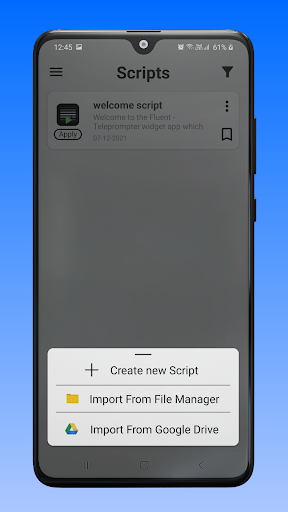
- You can take backup your all scripts on your device and also Import script from Device and Google Drive.
How to use.
- Create script or import script.
- Change your desired settings on script like Text size, Background colour, Opacity, Text colour, Font style, Text scrolling speed and Text alignment.
- Press apply button for widget on script.
How to Download Fluent Teleprompter widget APK
- Enter the package name
com.FluentAppon the APK Downloader homepage. - Select your device architecture (ARM64 recommended for modern devices).
- Click Download to get the merged APK file.
- Transfer and install the APK on your Android device.
- Keep Updated: Visit APK Downloader regularly to search for and download the latest secure versions of your favorite apps.
Security & Signature Verification
This APK download is 100% safe. We verify that the cryptographic signature of the file matches the official developer credentials. No modifications or adware are injected.