
Download Sources
Device Configuration
Split APKs Installation Guide
Some apps are distributed as Split APKs (multiple .apk files packaged together) to optimize resources. Standard Android installers cannot open them.
Related Applications


What's New
v3.91
★ add a search function to the About window
★ revamped the Settings window and added a search function.
★ bugs fixed and optimizations
v3.90
★ supports per-app language settings on devices running Android 13 or later
★ support Chinese (Traditional) and Chinese (Simplified) languages
About this app
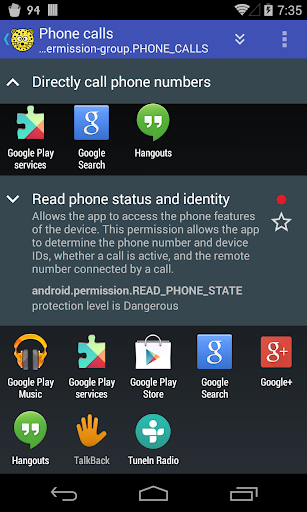
Which apps use services (like SMS) that cost your money?
Which apps use GPS to determine where you are and consume additional battery power?
aSpotCat lists installed apps by permission to help you find and uninstall the malicious apps.
It's the best permission manager for your Android device.
No Notification Ads - we don't use any notification ads.
No ads (PRO-only)
Required permissions:
* Both "Internet" and "View network status" permissions are required by Google Ad component
* "Market billing" permission is required for purchasing the "No Ads" license
* "Read/Write external storage" permission is required for reading/writing the app log to SD
We have been selected as a Google I/O 2011 Developer Sandbox partner, for its innovative design and advanced technology.
Credits:
French - Thibault Rohmer
German - Michel Mueller, Dirk Haar
Polish - Grzegorz Jabłoński
Russian - Идрис a.k.a. Мансур (Ghost-Unit), Roman Rublevskiy
Spanish - Lahiri López
Turkish - Mustafa COŞKUN
If you are interested in helping us to translate this app to your local language, please let me know. Thanks.
How to Download aSpotCat - Permission Checker APK
- Enter the package name
com.a0soft.gphone.aSpotCaton the APK Downloader homepage. - Select your device architecture (ARM64 recommended for modern devices).
- Click Download to get the merged APK file.
- Transfer and install the APK on your Android device.
- Keep Updated: Visit APK Downloader regularly to search for and download the latest secure versions of your favorite apps.
Security & Signature Verification
This APK download is 100% safe. We verify that the cryptographic signature of the file matches the official developer credentials. No modifications or adware are injected.