

ANIO watch APK Screenshots




ANIO watch App Information
Download Sources
Device Configuration
Old Versions of ANIO watch
Split APKs Installation Guide
Some apps are distributed as Split APKs (multiple .apk files packaged together) to optimize resources. Standard Android installers cannot open them.
What's New in ANIO watch
We've made anio a little better – this update includes performance improvements and bug fixes. Thanks for being with us!
About ANIO watch
Welcome to the Anio App – Your key to family communication, safety, and fun!
Our specially developed Anio App is operated on our own, 100% data-secure and GDPR-compliant servers in Germany. It allows parents and other family members to locate the child/wearer's watch and communicate directly with them. The versatile functions of the Anio 6/Emporia Watch can be activated or deactivated according to age and desire to ensure the safety and privacy of your child.
Who should use the Anio App?
• Owners of an Anio Kids Smartwatch
• Owners of an Emporia Seniors Smartwatch
What can you do with the Anio App?
• With the Anio App, you can fully set up your Anio Kids Smartwatch or Emporia Seniors Smartwatch and adapt it to the wearer's needs.
• It allows you and your family to have safe and easy-to-use everyday communication within the family circle.
The most important functions of the Anio App:
Basic settings
Start your Anio/Emporia Smartwatch and adjust all the important settings needed for everyday use of the device.
Phonebook
Store contacts in your Anio or Emporia Smartwatches phonebook. The children's watch can only call the numbers you have stored and only these numbers can reach the watch as well – unknown callers are blocked for safety reasons.
Chat
Access the chat conveniently from the home screen of the Anio App. From there you can exchange text and voice messages as well as emojis with your child. This way, you can keep each other up to date when a call is not necessary.
Location/Geofences
The map view is the home screen of the Anio App. View the last location of your child/the wearer and request a new location if needed. With the geofence function, you can set up safe zones, such as your home or school area. Every time your child enters or leaves the geofence and a new location was detected, you will receive a push notification.
SOS Alarm
When your child presses the SOS button, the SOS number on file will automatically be called and receive a message with the last known GPS location of the smartwatch.
School/Rest mode
To avoid distraction in school or disturbing ringing during a concert, you can set individual times for the rest mode in the Anio App. During this time, the display of the watch is locked and incoming calls and messages are muted. You will still be able to read the clock, however other functions are put on hold.
School route times
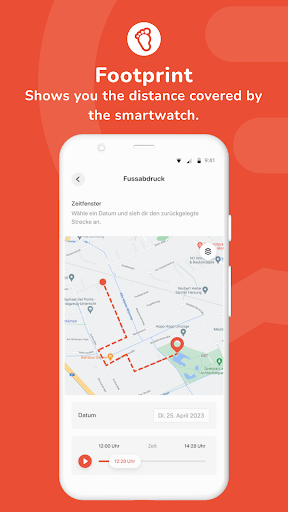
To be able to track the exact location history during the school route, you can set individual school route times in the Anio App. During these times, the watch locates itself as often as possible, so you can accurately track whether your child is taking the right way and arrives safely at school or soccer practice.
Download the ANIO Watch App now to discover these and many more features and get started with your smartwatch.
User Reviews

If I'm in a different city, and trying to find my child, I will never find them because I've no clue where I AM atm, the map doesn't even show me my own location, that means I'd never even able to follow the road to my child if lost. To the team: Have you guys ever used any maps app before?? that beats the entire purpose of the map. it's REALLY NOT that hard to do. other features works really well and are super thought through.. I just wonder what they were thinking with the map.

Terrible app. Footprint (location history) is hidden under the settings menu. theres no way to configure location period in minutes. just some predefined setting. watch claim to be able to count steps. it could send location when it detect movements and not when kid is sitting still in the class.

The watch is fine. The app is a disaster. It has its own notifications for messages which stays on your screen forever until your battery drain or you close it. You can't use some functions like voice messaging because it results the crash of the app. You can't answer using just notifications, it just doesn't work. And there are tonns of other annoying bugs. And the app was updated almost year ago, means development is abandoned and there is no hope they fix it soon.

1. Supports german and english ui, but the only way to get eng ui on phone in slovakia is to switch entire phone to english :( 2. Map zoom every time app is loaded is really annoying, should remember previous view 3. Notifications work poorly, i lost notifications from incoming voice msgs from the watch 4. Watch only in german, at least english would help
How to Download ANIO watch APK
- Enter the package name
com.anio.watchon the APK Downloader. - Select your device architecture (ARM64 recommended for modern devices).
- Click Download to get the merged APK file.
- Transfer and install the APK on your Android device.
- Keep Updated: Visit APKDER.COM regularly to search for and download the latest secure versions of your favorite apps.
Frequently Asked Questions
Yes! Every APK download provided by APKDER undergoes rigorous security verification. We verify that the cryptographic signature of the APK file matches the official signature from the developer, ensuring the APK is original, untouched, and free from any modifications.
To install it, you first need to enable "Unknown Sources" in your Android device's security settings. After downloading the APK file from APKDER, tap it to begin the installation and follow the on-screen prompts.
Yes! As soon as the developer releases a new version of ANIO watch, we will update and provide the updated APK on APKDER. You can simply download and install the new APK over the existing installation without losing your app data.
Yes. APKDER allows you to bypass geographic restrictions and download official APK files directly, even if the app or game is not officially available in your country's store.
A standard APK is a single installation package. An XAPK or Split APK contains multiple resource files (like OBB expansions or device-specific layout parts) packaged together. To install them, you can download splits individually or use dynamic helper tools like Split APKs Installer (SAI).
Security & Signature Verification
This APK download is 100% safe. We verify that the cryptographic signature of the file matches the official developer credentials. No modifications or adware are injected.


