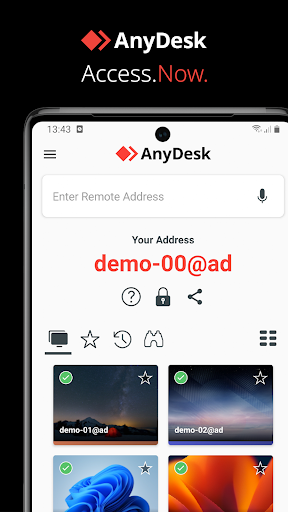
AnyDesk Remote Desktop APK Screenshots


AnyDesk Remote Desktop App Information
Download Sources
Device Configuration
Old Versions of AnyDesk Remote Desktop
Split APKs Installation Guide
Some apps are distributed as Split APKs (multiple .apk files packaged together) to optimize resources. Standard Android installers cannot open them.
What's New in AnyDesk Remote Desktop
New Features
* Added support for Android 17.
* Extended service API for profile management.
* Improved UX when requesting permissions.
* Improved privacy policy handling.
Fixed Bugs
* Fixed tutorial not showing the full text.
* Fixed a crash when custom tabs are not available.
* Fixed a bug that could cause a wrong speed dial item being deleted.
* Improved stability
About AnyDesk Remote Desktop
Powerful Remote Assistance Software. Whether you're in the office next door or on the other side of the world, remote access via AnyDesk makes the connection possible. Secure and reliable, for IT professionals as well as private users.
AnyDesk is ad-free and free for personal use. For commercial use visit: https://anydesk.com/en/order
Whether you're in IT support, working from home, or a student studying remotely, AnyDesk's remote desktop software has a solution for you, allowing you to connect to remote devices securely and seamlessly.
AnyDesk offers a wide range of remote desktop functions such as:
• File Transfer
• Remote Printing
• Wake-On-LAN
• Connection via VPN
and much more
The AnyDesk VPN feature allows the creation of a private network between local connecting and remote clients, providing additional security to users. It is important to note that it is not possible to access devices on the remote client's local network or vice versa. Nevertheless, after successfully connected over VPN, the following programs can be used over VPN:
• SSH – Ability to access the Remote Device over SSH
• Gaming – Ability to access a LAN-Multiplayer Game over the Internet.
For an overview of the features, visit: https://anydesk.com/en/features
If you are interested in more information, head to our Help Center by visiting: https://support.anydesk.com/knowledge/features
Why AnyDesk?
• Outstanding performance
• Every operating system, every device
• Banking-standard encryption
• High frame rates, low latency
• In the Cloud or On-Premises
Every operating system, every device. Download the latest AnyDesk version for all platforms here: https://anydesk.com/en/downloads
Quick Start Guide
1. Install and launch AnyDesk on both devices.
2. Enter the AnyDesk-ID that is displayed on the remote device.
3. Confirm the access request on the remote device.
4. Done. You can now control the remote device remotely.
To verify the integrity of your AnyDesk software visit https://help.anydesk.com/en/anydesk-validation
Do you have any questions? Contact us! https://anydesk.com/en/contact
User Reviews

Switch from teamviewer to this. I don't live alone, live with parents and sibling and usage of PC is limited. I am gamer...I use this to do downloads and updates from work. I can remotely turn on my PC and connect way faster and more conveniently than with teamviewer what I been using before. I switched to this since teamviewer got buggy and it's been great. It's great for quick access amd use that idle PC time for install/downlaod so I can just play in free time once I am home. Great product :D

Have used for years for personal use. I literally connect to my pc from my phone for a few minutes maybe once a week at most. All of a sudden now I'm getting a pop-up: "We are happy to see your increasing use of AnyDesk. If you're using it for business, please purchase a license. Free access is reserved for personal use." Yeah, nothing has increased or gotten any less personal.

AnyDesk is a remote access tool, so obviously, yes it can be used for scam attempts, but that's like attacking Excel because it can be used for tax fraud. The reason my score is low is because while AnyDesk's desktop product is solid, the Android app is very buggy. You can't terminate ongoing sessions. Often, sessions will just "hang", accepting input but never updating the screen. Sessions also sometimes just fail to start, but due to the first bug you can't even retry without force closing.

I can't close remote sessions! After I'm done helping, I click on the "close session" button but nothing helps and I can still access the remote device. I can't initiate a new session because the session is still active. The only way to terminate is to force close the app. Not only is this annoying, but it's a security risk! If the session doesn't close then the remote computer is still accessible without the user being aware of it! If this is fixed I'll be able to rate higher.
How to Download AnyDesk Remote Desktop APK
- Enter the package name
com.anydesk.anydeskandroidon the APK Downloader. - Select your device architecture (ARM64 recommended for modern devices).
- Click Download to get the merged APK file.
- Transfer and install the APK on your Android device.
- Keep Updated: Visit APKDER.COM regularly to search for and download the latest secure versions of your favorite apps.
Frequently Asked Questions
Yes! Every APK download provided by APKDER undergoes rigorous security verification. We verify that the cryptographic signature of the APK file matches the official signature from the developer, ensuring the APK is original, untouched, and free from any modifications.
To install it, you first need to enable "Unknown Sources" in your Android device's security settings. After downloading the APK file from APKDER, tap it to begin the installation and follow the on-screen prompts.
Yes! As soon as the developer releases a new version of AnyDesk Remote Desktop, we will update and provide the updated APK on APKDER. You can simply download and install the new APK over the existing installation without losing your app data.
Yes. APKDER allows you to bypass geographic restrictions and download official APK files directly, even if the app or game is not officially available in your country's store.
A standard APK is a single installation package. An XAPK or Split APK contains multiple resource files (like OBB expansions or device-specific layout parts) packaged together. To install them, you can download splits individually or use dynamic helper tools like Split APKs Installer (SAI).
Security & Signature Verification
This APK download is 100% safe. We verify that the cryptographic signature of the file matches the official developer credentials. No modifications or adware are injected.