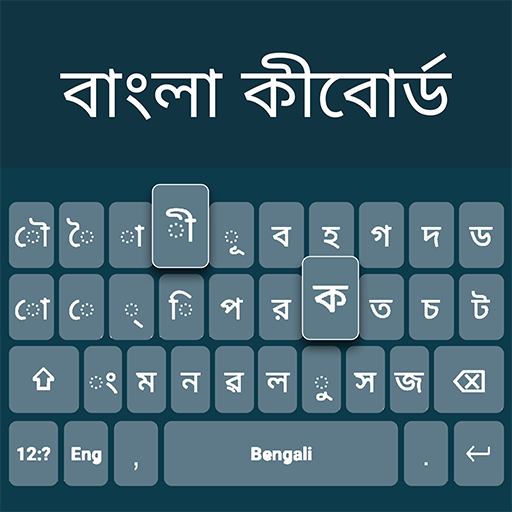

Bangla Language Keyboard APK Screenshots


Bangla Language Keyboard App Information
Download Sources
Device Configuration
Split APKs Installation Guide
Some apps are distributed as Split APKs (multiple .apk files packaged together) to optimize resources. Standard Android installers cannot open them.
About Bangla Language Keyboard
Bangla Keyboard App – Type in Your Language Effortlessly!Experience smooth and accurate typing with the Bangla Keyboard App, designed especially for users who love expressing themselves in their native language. This modern Bangla Typing Keyboard combines simplicity with smart features, allowing you to switch between English and Bangla in seconds. Whether you’re writing messages, notes, or creative stories, the Bangla Language Keyboard ensures precision and comfort every time you type.
With the Bangla Keyboard App, communication becomes seamless for speakers across the world. It supports voice typing, emoji integration, and a rich vocabulary for a faster, smarter typing experience. Stay connected, express emotions, and share ideas in your own language — easily and beautifully.
📄 Bangla Keyboard App Key Features:📄
🌐 Easy-to-use Bangla Language Keyboard for fast and accurate typing;
🎨 Customize your Bangla Typing Keyboard with colorful themes and fonts;
🎙️ Voice typing and emoji support for fun and expressive conversations;
🔄 Quick switch between English and Bangla with one tap;
💬 Smart word suggestions and auto-correction for smooth typing;
📱 Works perfectly offline with powerful predictive text;
🎭 Over 1000 emojis, stickers, and stylish backgrounds;
🖋️ Multiple font styles to match your personal taste;
🔐 100% safe and private — no personal data is collected.
Make Typing Easier with the Bangla Typing Keyboard!The Bangla Typing Keyboard makes writing in Bangla more enjoyable than ever before. The app’s intelligent design ensures accurate input and smooth transitions between English and Bangla. With the Bangla Keyboard App, you can personalize your typing space using colorful themes, fonts, and layouts. It’s ideal for chatting, writing poetry, or crafting daily notes in the Bangla Language Keyboard style.
Personalize Your Experience:🎨
Change themes, backgrounds, and key colors to match your mood. The Bangla Language Keyboard includes dozens of stylish templates, from bright tones to minimal looks, giving your typing a unique personality.
Fast and Accurate Communication:⚡
The Bangla Typing Keyboard ensures your words flow naturally. With built-in auto-correct and text prediction, typing is faster than ever. Enjoy real-time suggestions in both Bangla and English without interruptions.
Express Yourself Fully:😊
The Bangla Keyboard App features a huge library of emojis and stickers so you can show emotions effortlessly. From hearts to smiles, each emoji works perfectly with the Bangla Language Keyboard interface.
Smart Dual-Language Support:🌍
Switch instantly between Bangla and English modes. The Bangla Typing Keyboard gives users flexibility and control, making it perfect for bilingual communication and creative writing.
Start Typing with the Bangla Keyboard App Today!Bring color, accuracy, and creativity to your typing with the Bangla Typing Keyboard. Whether you’re sending messages, writing notes, or chatting online, the Bangla Language Keyboard ensures a comfortable and modern typing experience. Try the Bangla Keyboard App now and express yourself naturally in your own language!
User Reviews

A Bangla keyboard allows typing in the Bengali language, with options for both physical keyboards with a specific layout and virtual or phonetic keyboards that use English characters to represent sounds. Standardized layouts like Jatiya exist for the official standard in Bangladesh, while phonetic layouts enable typing in Bengali using the corresponding English letters. Virtual keyboards, downloadable software, and operating system settings can also provide access to these typing methods on

It's absolutely fine for writing Bangla and English..

The The topipk4ii ìiiikiimo and he is the one on 5th to do that 4th o

No privacy. password hacked in this app.
How to Download Bangla Language Keyboard APK
- Enter the package name
com.banglaesy.englishlanguage.bengali.keyboardhasseon the APK Downloader. - Select your device architecture (ARM64 recommended for modern devices).
- Click Download to get the merged APK file.
- Transfer and install the APK on your Android device.
- Keep Updated: Visit APKDER.COM regularly to search for and download the latest secure versions of your favorite apps.
Bangla Language Keyboard APK Overview
Download the latest version of Bangla Language Keyboard APK by DictionaryAndTranslator for Android for free at APKDER. Downloading the official Bangla Language Keyboard (com.banglaesy.englishlanguage.bengali.keyboardhasse) APK is faster, easier, and safer for your Android device.
Frequently Asked Questions
Yes! Every APK download provided by APKDER undergoes rigorous security verification. We verify that the cryptographic signature of the APK file matches the official signature from the developer, ensuring the APK is original, untouched, and free from any modifications.
To install it, you first need to enable "Unknown Sources" in your Android device's security settings. After downloading the APK file from APKDER, tap it to begin the installation and follow the on-screen prompts.
Yes! As soon as the developer releases a new version of Bangla Language Keyboard, we will update and provide the updated APK on APKDER. You can simply download and install the new APK over the existing installation without losing your app data.
Yes. APKDER allows you to bypass geographic restrictions and download official APK files directly, even if the app or game is not officially available in your country's store.
A standard APK is a single installation package. An XAPK or Split APK contains multiple resource files (like OBB expansions or device-specific layout parts) packaged together. To install them, you can download splits individually or use dynamic helper tools like Split APKs Installer (SAI).
Security & Signature Verification
This APK download is 100% safe. We verify that the cryptographic signature of the file matches the official developer credentials. No modifications or adware are injected.


