

SAT Vocabulary APK Screenshots




SAT Vocabulary App Information
Download Sources
Device Configuration
Split APKs Installation Guide
Some apps are distributed as Split APKs (multiple .apk files packaged together) to optimize resources. Standard Android installers cannot open them.
What's New in SAT Vocabulary
- Save history filter
- Rating level
- Pin group
- Fav menu
- Make it easier to record sentence in practice
- Unpin vocabulary from the practice screen
- Fix bugs
- Update UI/UX
About SAT Vocabulary
Ace the SAT Exam! Master high-frequency SAT vocabulary, words, and phrases through our scientifically proven Reverse Learning method—100% offline.
Are you preparing for the digital SAT exam? Achieving your target score on the Reading and Writing section requires a rock-solid foundation of vocabulary and the ability to understand words in context. Our app is designed to help you build that foundation through a proven, scientific approach.
🧠 The "Reverse Learning" Philosophy
We don’t just teach you vocabulary; we help you master it. Our "Reverse Learning" method starts with your native language, using familiar images and associations to bridge the gap to advanced English. This creates stronger mental connections, leading to rapid, long-term memorization that sticks on test day.
🌍 Supported in 30+ Languages
Study in your native language for maximum comprehension! Whether you speak Spanish, Vietnamese, Japanese, or Arabic, our app is fully localized. We provide meanings and context clues in:
Arabic, Bengali, Chinese (Simp/Trad), Czech, Danish, Dutch, Finnish, French, German, Greek, Hindi, Hungarian, Indonesian, Italian, Japanese, Korean, Malaysian, Norwegian, Polish, Portuguese, Romanian, Russian, Spanish, Swedish, Thai, Turkish, Vietnamese, and Ukrainian.
✈️ 100% Offline Support – Study Anywhere
No internet? No problem. Study for the SAT exam anytime, anywhere. Whether you are commuting on the subway, traveling, or saving data, all vocabulary words, flashcards, dictionaries, and word games work completely offline.
🌟 Core Features to Boost Your SAT Score
📚 Learning & Interactive Practice
• Vocabulary in Context: Don’t just memorize words; learn exactly how they are used in real-world contexts to ace SAT Reading passages.
• Diverse Practice Modes: Master vocabulary through interactive quizzes, writing exercises, puzzles, matching, crosswords, word searches, and audio recordings.
• Smart Reminders: Stay consistent and keep your daily learning streak alive with custom notifications.
• Free Grammar Checker: Ensure your sentence structures are completely accurate.
🛠️ Advanced Smart Tools
• Unlock & Learn: Turn screen time into study time. Learn a new SAT word every time you unlock your device.
• Home Screen Widgets: Quick access to your learning queue directly from your home screen.
• AI Document Scanner: Easily extract unknown words from your physical study materials, textbooks, or PDFs.
• Flashcards & Auto-Translation: Accelerated learning using built-in translation and spaced repetition tools.
• Practice History: Review your progress, analyze mistakes, and track your improvement over time.
🎛️ Maximum Personalization
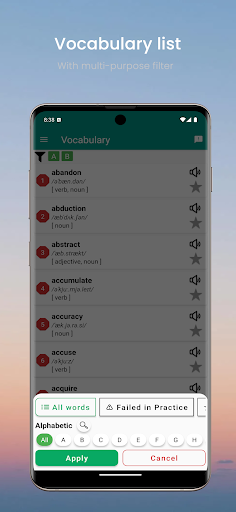
• Tailored Word Lists: Filter and organize words by your specific needs (Marked, Phrases, Suffixes, Studied status).
• Data Backup: Securely back up your data so you never lose your learning progress.
• Customizable UI: A fully customizable interface designed to make your study sessions feel unique, comfortable, and personal.
Ready to boost your SAT score and get into your dream college? Download now and start your journey with consistent daily practice!
📧 Have questions or feedback? We are constantly improving! Please reach out to us at [email protected]. Your suggestions help us build a better experience for everyone.
User Reviews

I paid for no advertising, but a BET made it through!
How to Download SAT Vocabulary APK
- Enter the package name
com.bean.edu.sat.words.basicon the APK Downloader. - Select your device architecture (ARM64 recommended for modern devices).
- Click Download to get the merged APK file.
- Transfer and install the APK on your Android device.
- Keep Updated: Visit APKDER.COM regularly to search for and download the latest secure versions of your favorite apps.
Frequently Asked Questions
Yes! Every APK download provided by APKDER undergoes rigorous security verification. We verify that the cryptographic signature of the APK file matches the official signature from the developer, ensuring the APK is original, untouched, and free from any modifications.
To install it, you first need to enable "Unknown Sources" in your Android device's security settings. After downloading the APK file from APKDER, tap it to begin the installation and follow the on-screen prompts.
Yes! As soon as the developer releases a new version of SAT Vocabulary, we will update and provide the updated APK on APKDER. You can simply download and install the new APK over the existing installation without losing your app data.
Yes. APKDER allows you to bypass geographic restrictions and download official APK files directly, even if the app or game is not officially available in your country's store.
A standard APK is a single installation package. An XAPK or Split APK contains multiple resource files (like OBB expansions or device-specific layout parts) packaged together. To install them, you can download splits individually or use dynamic helper tools like Split APKs Installer (SAI).
Security & Signature Verification
This APK download is 100% safe. We verify that the cryptographic signature of the file matches the official developer credentials. No modifications or adware are injected.


