

Download Sources
Device Configuration
Split APKs Installation Guide
Some apps are distributed as Split APKs (multiple .apk files packaged together) to optimize resources. Standard Android installers cannot open them.
About This App
🚀 **Key Features**
✅ **QR Code Generation**
Create QR codes from text, links, business cards, Wi-Fi, and more.
Customize your QR codes to fit different use cases.
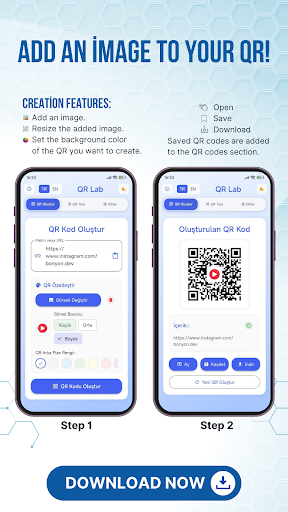
✅ **Add Images to QR Codes**
Insert any logo or image into the center of your QR code.
Reflect your brand or personal style in your QR codes.
✅ **Background Color Customization**
You don’t have to stick to just black and white.
Design aesthetic and creative QR codes by changing the background and code colors.
✅ **Save, Download & Share**
Save the QR codes you create to your device.
Download and use them anytime.
Share instantly via social media, messaging apps, or email with a single tap.
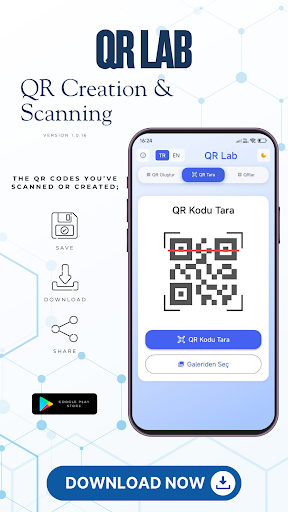
✅ **Scan QR Codes from Gallery**
Scan QR images not only from your camera but also from your gallery.
Easily analyze previously saved QR codes.
✅ **Scan QR Codes with Camera**
Use your camera to scan QR codes in real time.
Quickly access links or content from the scan results.
✅ **Dark & Light Mode**
Supports both dark and light themes to protect your eyes.
Interface design suitable for both day and night use.
🌟 **Why QR Lab?**
* **Easy to Use:** Simple, modern design makes it user-friendly.
* **Fast Scanning:** Get instant results from camera or gallery.
* **Personalization:** Add colors and logos to your QR codes for a unique touch.
* **Free:** All core features are completely free.
* **Secure:** The content of scanned QR codes is handled safely.
🎯 **What You Can Do with QR Lab**
* Design personal QR codes for business cards.
* Scan or create restaurant menus.
* Share Wi-Fi connections via QR code.
* Quickly promote your social media accounts with QR codes.
* Use QR codes in presentations, invitations, or advertising posters.
How to Download QR Lab – Create QR, Scan QR APK
- Enter the package name
com.bonyon.qron the APK Downloader. - Select your device architecture (ARM64 recommended for modern devices).
- Click Download to get the merged APK file.
- Transfer and install the APK on your Android device.
- Keep Updated: Visit APKDER.COM regularly to search for and download the latest secure versions of your favorite apps.
Frequently Asked Questions
Yes! Every file hosted on APKDER undergoes rigorous security verification. We verify that the cryptographic signature matches the official signature from the developer, ensuring the app hasn't been modified or tampered with.
To install it, you first need to enable "Unknown Sources" in your Android device's security settings. After downloading the APK file from APKDER, tap it to begin the installation and follow the on-screen prompts.
Yes! As soon as the developer releases a new version of QR Lab – Create QR, Scan QR, we will scrape and post the updated APK on APKDER. You can simply download and install the new APK over the existing installation without losing your app data.
Security & Signature Verification
This APK download is 100% safe. We verify that the cryptographic signature of the file matches the official developer credentials. No modifications or adware are injected.