

Bose SoundTouch APK Screenshots




Bose SoundTouch App Information
Download Sources
Device Configuration
Old Versions of Bose SoundTouch
Split APKs Installation Guide
Some apps are distributed as Split APKs (multiple .apk files packaged together) to optimize resources. Standard Android installers cannot open them.
What's New in Bose SoundTouch
- Fixed bugs and did some general cleaning up under the hood.
About Bose SoundTouch
Experience your favorite music from one or many SoundTouch® speakers, with the SoundTouch® app. SoundTouch® is a family of wireless speakers for your home that play the same music throughout, or different music in different rooms.
SPEED TO MUSIC
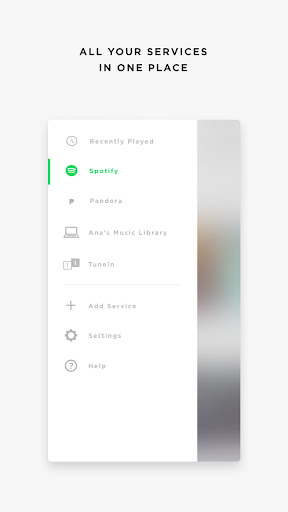
It’s faster than ever to browse and play the music you love from Spotify®, Pandora®, Amazon Music, TuneIn, SiriusXM, iHeartRadio™, Deezer and more, all from within the new SoundTouch® app.
ONE-TOUCH DISCOVERY
Personalize your home with “living” presets like Spotify’s “Discover Weekly” or Pandora’s “Thumbprint Radio.” Always have a fresh list of favorites a touch away, without having to even find your phone.
MORE STATIONS, MORE FUN
Effortlessly stream more than 100,000 radio stations from around the world with TuneIn. Check out tastemaker-curated playlists, live sports, concerts, 24/7 news coverage and great podcasts in every genre.
YOUR OLD STANDARDS
Have a library of your favorite albums and artists? Connect your laptop or NAS drive to have access to your stored music libraries.
TOTAL CONTROL
Play the same music throughout your home with “Play Everywhere,” or listen to different music in different areas, it’s up to you. The SoundTouch® app lets you control one or multiple SoundTouch® speakers in your home, from any room.
Privacy Policy
https://worldwide.bose.com/privacypolicy
California Privacy Notice of Collection
https://www.bose.com/en_us/legal/california_privacy_notice_of_collection.html
User Reviews

the soundtouch app was prefect the way it was before this last update. the app no longer supports Spotify, SiriusXM amongst other music apps. i think once they removed the cloud? you now have to connect using either Bluetooth or aux to connect to your music apps except iheart and Pandora, and whatever other music apps there might be. they still work w/ wifi. you can't even use the presets to save your favorite stations or music genre. please put the app back the way it use to be!! this is INSANE

This app used to be great. But recently our speakers have lost connection & we can't get them too hook back up. I can only listen to Pandora presets. All my station from Sirius are gone. The speaker just won't connect the WIFI to get them back. Spent soo much time with the AI bot and still nothing. Even tried the app on the computer. But speakers won't connect!!! SO FRUSTRATING!!

The speaker is connected directly to the internet (currently playing music) via ethernet cable (tried wifi also) and still cannot find my speaker through the app. This has literally happened since the day I bought my speaker about 7 years ago. I think I've gotten it to connect once since I've used it. I've signed out and in, started over, literally everything I can think of, and filled the user instructions. Still doesn't work!

This app used to be great. But recently our speakers have lost connection & we can't get them too hook back up. I can only listen to Pandora presets. All my station from Sirius are gone. The speaker just won't connect the WIFI to get them back. Spent soo much time with the AI bot and still nothing. Even tried the app on the computer. But speakers won't connect!!! SO FRUSTRATING!!
How to Download Bose SoundTouch APK
- Enter the package name
com.bose.soundtouchon the APK Downloader. - Select your device architecture (ARM64 recommended for modern devices).
- Click Download to get the merged APK file.
- Transfer and install the APK on your Android device.
- Keep Updated: Visit APKDER.COM regularly to search for and download the latest secure versions of your favorite apps.
Frequently Asked Questions
Yes! Every APK download provided by APKDER undergoes rigorous security verification. We verify that the cryptographic signature of the APK file matches the official signature from the developer, ensuring the APK is original, untouched, and free from any modifications.
To install it, you first need to enable "Unknown Sources" in your Android device's security settings. After downloading the APK file from APKDER, tap it to begin the installation and follow the on-screen prompts.
Yes! As soon as the developer releases a new version of Bose SoundTouch, we will update and provide the updated APK on APKDER. You can simply download and install the new APK over the existing installation without losing your app data.
Yes. APKDER allows you to bypass geographic restrictions and download official APK files directly, even if the app or game is not officially available in your country's store.
A standard APK is a single installation package. An XAPK or Split APK contains multiple resource files (like OBB expansions or device-specific layout parts) packaged together. To install them, you can download splits individually or use dynamic helper tools like Split APKs Installer (SAI).
Security & Signature Verification
This APK download is 100% safe. We verify that the cryptographic signature of the file matches the official developer credentials. No modifications or adware are injected.


