
Speakia: Kids English Fun APK Screenshots




App Information
Download Sources
Device Configuration
Split APKs Installation Guide
Some apps are distributed as Split APKs (multiple .apk files packaged together) to optimize resources. Standard Android installers cannot open them.
What's New
Update target API level
About This App
Conversational cartoons in a virtual world that help kids speak English with confidence!
***Download Speakia and try it for free!***
Study abroad without leaving home! Speak English like a native speaker.
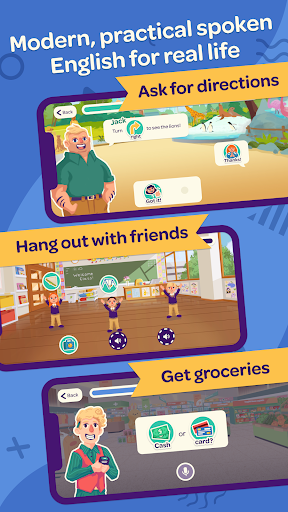
Welcome to Speakia, a virtual American town in your living room. Speakia is the missing piece of your child’s English learning- an affordable, on-demand conversational English environment at home!
Cutting-edge voice technology transports your child to a life-like English world with conversational cartoon friends!
With real-life topics and scenarios, your child will speak the same English American kids speak every day.
Speak English anytime, anywhere for affordable, accelerated results in a gamified, life-like environment that kids actually enjoy.
*How Speakia Works*
Step 1 - Visit Speakia everyday for a 10 minute English Speaking Mission.
Step 2 - Learn new, modern vocabulary, key sentence structures, and native-sounding pronunciation.
Step 3 - Apply your knowledge in true-to-life conversations.
Step 4 - Hang out for a chat in Speakia’s English speaking town.
Step 5 - Watch your spoken English accelerate with engaging, systematic, daily practice.
*From Speakia’s biggest fans- kids, parents and teachers!*
“The app design is realistic and beautiful. Speakia’s learning content is closely related to daily life. If parents encourage their children to learn everyday, or parents use Speakia together with their children, their spoken English will improve rapidly.”
- Luella- English teacher
It’s great that my child can speak English everyday, and also great that I don’t have to force them to sit down and study. My child speaks much more English in Speakia than they do in English class!
- Lucy (parent of an 8 year old girl)
I like playing Speakia. I can talk with my cartoon friends in English. I don’t feel scared and embarrassed to speak English anymore!
- Duke (6 years old)
User Reviews

I subscribed but could not login to the app afterwards. App did not send the verification code to login. Tried multiple times. Even guest login is disabled. No way to get the verification code via email. Only option is via phone. Think twice before you subscribe.

very very bad. It's not letting me even start. Asking me to enter OTP, but not sending OTP at all. Even not letting me login as Guest. Very very very bad experience.

a stunning app! kids can learn english very nice!!! they will make them interact with the app which makes it more effective,and i think thats how kids like to learn :)

This app is good for 1to 5th class students and also improve one speaking this app help you to pronounce the sentence clearly and also teach us to use which all words in which all time .
How to Download Speakia: Kids English Fun APK
- Enter the package name
com.chatterize.speakiaon the APK Downloader. - Select your device architecture (ARM64 recommended for modern devices).
- Click Download to get the merged APK file.
- Transfer and install the APK on your Android device.
- Keep Updated: Visit APKDER.COM regularly to search for and download the latest secure versions of your favorite apps.
Frequently Asked Questions
Yes! Every APK download provided by APKDER undergoes rigorous security verification. We verify that the cryptographic signature of the APK file matches the official signature from the developer, ensuring the APK is original, untouched, and free from any modifications.
To install it, you first need to enable "Unknown Sources" in your Android device's security settings. After downloading the APK file from APKDER, tap it to begin the installation and follow the on-screen prompts.
Yes! As soon as the developer releases a new version of Speakia: Kids English Fun, we will update and provide the updated APK on APKDER. You can simply download and install the new APK over the existing installation without losing your app data.
Yes. APKDER allows you to bypass geographic restrictions and download official APK files directly, even if the app or game is not officially available in your country's store.
A standard APK is a single installation package. An XAPK or Split APK contains multiple resource files (like OBB expansions or device-specific layout parts) packaged together. To install them, you can download splits individually or use dynamic helper tools like Split APKs Installer (SAI).
Security & Signature Verification
This APK download is 100% safe. We verify that the cryptographic signature of the file matches the official developer credentials. No modifications or adware are injected.

