
Download Sources
Device Configuration
Split APKs Installation Guide
Some apps are distributed as Split APKs (multiple .apk files packaged together) to optimize resources. Standard Android installers cannot open them.
Related Applications




What's New
Minor bug fixes and enhancements.
About this app
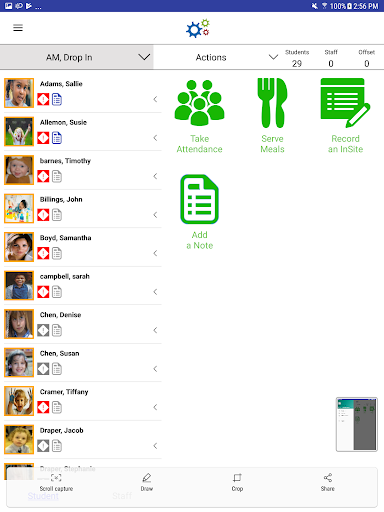
Simplify your center management with Procare Software LLC’s InSite Classroom edition for an Android device. This app is designed for a streamlined, quick and easy way for your administrators and staff to access the important features of the Provider Editions of DayCare Works and SchoolCare Works at your points of service, or wherever you need. Information is automatically linked to your Procare Software LLC hosted applications with real-time information updates and reporting capabilities. You must be registered with our online suite to use InSite Classroom.
Your administrators, staff and authorized 3rd party service providers can complete the following tasks:
• Manage To Do Checklists to keep on track
• View live attendance information
• Actively manage child and staff ratios
• Check children in/out, and easily move them from room to room
• Check staff in/out and transfer to different job duties and rooms
• Track meals including recording CACFP requirements
• Quickly access child information (parents and contacts)
• Upload photos for children, parents and contacts
• Bus rosters
• Highly secure, quick and easy to use
• Each Android device is authorized for specific locations
• Branding and images unique to your business and center
InSite Classroom integrates with the following Procare Software LLC solutions:
• DayCare Works
• SchoolCare Works
How to Download InSite Classroom APK
- Enter the package name
com.cirrus.dcwinsiteprovideron the APK Downloader homepage. - Select your device architecture (ARM64 recommended for modern devices).
- Click Download to get the merged APK file.
- Transfer and install the APK on your Android device.
- Keep Updated: Visit APK Downloader regularly to search for and download the latest secure versions of your favorite apps.
Security & Signature Verification
This APK download is 100% safe. We verify that the cryptographic signature of the file matches the official developer credentials. No modifications or adware are injected.