

AR Draw: Trace & Sketch Master APK Screenshots



AR Draw: Trace & Sketch Master App Information
Download Sources
Device Configuration
Split APKs Installation Guide
Some apps are distributed as Split APKs (multiple .apk files packaged together) to optimize resources. Standard Android installers cannot open them.
What's New in AR Draw: Trace & Sketch Master
Improve stability of the app
About AR Draw: Trace & Sketch Master
Bring your drawings to life with AR Draw: Trace & Sketch Master! This innovative app uses augmented reality to help you effortlessly trace and sketch any image onto paper, making it perfect for artists, hobbyists, students, and beginners.
Key Features:
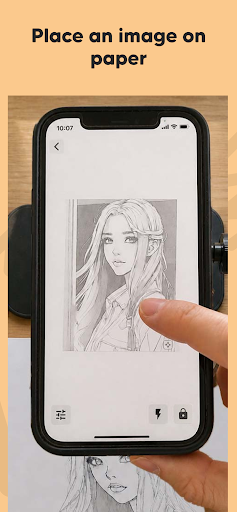
Draw Any Image on Paper: Select any image from your gallery and project it onto your real-world paper using AR technology.
Easy Image Placement: Position the image on your paper exactly where you want it, ensuring accurate sketches every time.
Adjust Image Opacity: Make tracing simple by setting the image opacity. See both your drawing and the reference image clearly as you sketch.
Zoom for Fine Details: Zoom in to capture intricate details and create precise illustrations with ease.
Image to Line Conversion: Convert your photos into clear outlines or line art for easier tracing and drawing.
How It Works:
Choose an image from your device or take a new photo.
Place the image on your drawing paper using your device’s camera and AR preview.
Adjust the opacity and zoom for perfect visibility and detail.
Start tracing—your device will show your hand and the paper with the image overlay, making it easy to sketch accurately.
With AR Draw: Trace & Sketch Master, anyone can create beautiful drawings by tracing faces, objects, landscapes, or cartoons. Whether you're practicing new techniques, learning to draw, or making custom gifts, this app makes drawing more accessible than ever.
Perfect For:
Artists & Designers
Students & Teachers
Kids & Adults
Anyone learning to draw
No expensive equipment required—just your phone, paper, and a pencil!
Download AR Draw: Trace & Sketch Master now and become a tracing and sketching pro using the power of AR!
User Reviews

I like this app I have also used it in my old phone and now in this new Samsung galaxy A50S and I am loving the app you can also try it for your children and for yourself also

theres no tracing at the front of screen only out of the screen it annoy me.

can't upload your own images without paying. ads are everywhere.

very great app for drawing folks
How to Download AR Draw: Trace & Sketch Master APK
- Enter the package name
com.domingo.ardrawtraceon the APK Downloader. - Select your device architecture (ARM64 recommended for modern devices).
- Click Download to get the merged APK file.
- Transfer and install the APK on your Android device.
- Keep Updated: Visit APKDER.COM regularly to search for and download the latest secure versions of your favorite apps.
Frequently Asked Questions
Yes! Every APK download provided by APKDER undergoes rigorous security verification. We verify that the cryptographic signature of the APK file matches the official signature from the developer, ensuring the APK is original, untouched, and free from any modifications.
To install it, you first need to enable "Unknown Sources" in your Android device's security settings. After downloading the APK file from APKDER, tap it to begin the installation and follow the on-screen prompts.
Yes! As soon as the developer releases a new version of AR Draw: Trace & Sketch Master, we will update and provide the updated APK on APKDER. You can simply download and install the new APK over the existing installation without losing your app data.
Yes. APKDER allows you to bypass geographic restrictions and download official APK files directly, even if the app or game is not officially available in your country's store.
A standard APK is a single installation package. An XAPK or Split APK contains multiple resource files (like OBB expansions or device-specific layout parts) packaged together. To install them, you can download splits individually or use dynamic helper tools like Split APKs Installer (SAI).
Security & Signature Verification
This APK download is 100% safe. We verify that the cryptographic signature of the file matches the official developer credentials. No modifications or adware are injected.


