




Download Sources
Device Configuration
Split APKs Installation Guide
Some apps are distributed as Split APKs (multiple .apk files packaged together) to optimize resources. Standard Android installers cannot open them.
What's New
Discover the perfect app for healthy summer cooking with Fddb. 🥗📱 Our recipe database is full of seasonal delicacies that will help you effortlessly reach your goals and kick off the summer. 😋☀️
About This App
Download our ai calorie counter & fasting tracker and achieve your goals: healthy eating, weight loss, or muscle building! 🎉
🏆 Top Fddb features:
• Free calorie counter & food diary - no ads
• Intermittent fasting tracker with reminder function
• Huge food database with barcode scanner
• AI food scanner / AI calorie scanner (track calories by photo)
• Connection to fitness trackers & smartwatches
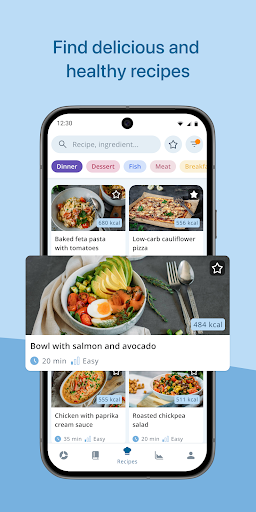
• Large selection of healthy recipes for weight loss
• Statistics on nutritional values & weight development
Fddb AI calorie counter, intermittent fasting tracker, food diary
⭐️⭐️⭐️⭐️⭐️ 4.6 stars and over 43,000 reviews
⭐️⭐️⭐️⭐️⭐️ Over 10 million satisfied users
⭐️⭐️⭐️⭐️⭐️ Android App of the Day
AI calorie scanner, food diary, fasting tracker, recipes, diet, weight loss, calorie counter, calorie calculator, macros, water & nutritional value tracker, and fitness—all in one app and without annoying ads. With our huge food database, you can easily monitor your calorie and nutrient intake, your sporting activities, and your body weight.
🌟 Over 20 years of experience in health & fitness
🙌 All food data available free of charge
🔒 Data protection & data security at the highest level
🇩🇪 Developed in Germany
Losing weight, dieting, gaining weight, or maintaining your weight is easier than you think! The Fddb app helps you with the following features:
🔥 ai calorie counter
• kcal tracker: free & easy
• Track food with photos (AI Calorie Scanner)
• Food diary with your own calorie goal
• Barcode scanner
• Nutritional values & macronutrients
• Sorting into meals & snacks or times of day
• Daily & weekly reports on calories & nutrients
• Evaluation of micronutrients (vitamins and minerals)
• Add your own or missing foods
• Create your own recipes & share them with family & friends
⏱️ Intermittent fasting tracker
• Flexibly set fasting/eating windows (16:8, 12:12, 18:6, 14:10, 20:4)
• Reminders for the start/end of fasting phases
• Fasting reports
📖 Meal planner
• Track your individual nutrition plan
• Automatic calculation of your daily requirements
• Calculation of carbohydrates (CH) & bread units (BU), Skaldeman ratio & fat-protein units (FPU)
• Create your own nutrition plan (calories & nutrients) for each individual day, ideal for meal prep
• Clear display of calories, macro & micronutrients in the food diary
• Calculation of optimal calorie & nutrient intake based on the reference values of the German Nutrition Society (DGE)
🥗 Healthy recipes for weight loss
• More than 1,000 healthy & balanced recipes
• Extensive filter options to suit your dietary style: low carb, low fat, high protein, vegan, vegetarian, and much more
• Customize recipes according to your preferences: ingredients, quantities, portions
• Detailed cooking instructions
• Enter nutritional values directly into the diary
• All macro- and micronutrients per recipe at a glance
🏃🏻 Sports & Fitness
• Over 600 integrated exercises & activities
• Track endurance sports and strength training
• Automatic calculation of calories burned
• Enter your calorie consumption yourself (ideal when using fitness trackers or sports equipment)
• Import data from Google Health Connect, Garmin, Fitbit, Samsung, and Huawei Health directly into your food diary
• Download data from many other apps via Google Fit (e.g., MiFit, Strava, Polar, runtastic, and more)
📉 Weight development
• Record your weight, body fat, and other measurements
• Motivate yourself with charts and graphical evaluations
• Enter your weight with just one click
• Set your own goals—whether it's losing weight, building muscle, or simply eating a healthier and more balanced diet
💧 Water tracker
Our support team will be happy to answer all your questions via our website https://help.fddb.info/hc
❤️ Made with love in Germany
User Reviews
Edit: Ever since a while now my, app keeps crashing when I try to cope and paste some of the meals from the past. And even more annoying is that even though I live and use the app in Germany, I can't seem to find anything from the supermarkets here in the search option anymore? Even through the barcode many of the products from the supermarket shelves aren't identified. Please fix these issues asap!

App is good though some parts are still displayed in German (optional portion sizes for example). The reason for only 3 stars is that their food database is pretty bad. You need to manually add almost every product. They just pumped AI into this too but wish they'd add regular OCR or AI OCR to automatically fill in nutrient details from a photo of the label. Also if the barcode is not recognised during search and people click on add, why scan the barcode again?

The app is good, i am coming from Fitbit app, and this one is much much better. The only thing that bothers me is that i cant change the times of the meals, for example, Lunch starts from 11:00, and at that time is actually my breakfast. It would be great if we could change that..

I've been looking for an alternative to Yazio, and Fddb seems like a good choice so far. The design is simple, fonts are a little small and I wasn't sure if the features important to me would stay free if I didn't pay (a better in-app overview would be nice), but the app offers the simple tracking and label scanning features I need. I wish I could change the predefined meal times to custom ones or decide what type of meal I am tracking. I hope the app will stay user-friendly and simple.
How to Download Fddb AI calorie counter & diet APK
- Enter the package name
com.fddbon the APK Downloader. - Select your device architecture (ARM64 recommended for modern devices).
- Click Download to get the merged APK file.
- Transfer and install the APK on your Android device.
- Keep Updated: Visit APKDER.COM regularly to search for and download the latest secure versions of your favorite apps.
Frequently Asked Questions
Yes! Every file hosted on APKDER undergoes rigorous security verification. We verify that the cryptographic signature matches the official signature from the developer, ensuring the app hasn't been modified or tampered with.
To install it, you first need to enable "Unknown Sources" in your Android device's security settings. After downloading the APK file from APKDER, tap it to begin the installation and follow the on-screen prompts.
Yes! As soon as the developer releases a new version of Fddb AI calorie counter & diet, we will scrape and post the updated APK on APKDER. You can simply download and install the new APK over the existing installation without losing your app data.
Security & Signature Verification
This APK download is 100% safe. We verify that the cryptographic signature of the file matches the official developer credentials. No modifications or adware are injected.


