


Download Sources
Device Configuration
Split APKs Installation Guide
Some apps are distributed as Split APKs (multiple .apk files packaged together) to optimize resources. Standard Android installers cannot open them.
What's New
1. Added CUE track splitting support in the multimedia service.
2. Optimized multimedia service server compatibility.
3. Optimized USB exclusive device compatibility.
4. Optimized the shuffle playback algorithm.
5. Fixed an issue where embedded lyrics occasionally failed to display.
6. Fixed an issue where songs would fail to play under the WebDAV protocol.
7. Fixed an issue of information display for some songs.
8.Fix the issue of failing to play ISO format in version 3.3.2.
About this app
Notice: Google Play has added restrictions on the application listing, which requires us to modify the way to obtain the application folders. Therefore, installing the 3.1.1 version will clear the historical data of the old version, and you need to manually add the music folder.
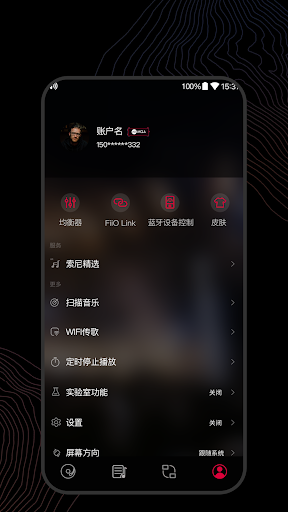
FiiO Music app is designed exclusively for mobile phone DAC/amps. It's a local player that is more suitable for audiophiles.
1.Supports raw DSD output. Enjoy native DSD on your Phone.
2.Supports playing Hi-Res music up to 384kHz/24bit and direct Hi-Res output.
3.Full audio format support - can play almost all the main-stream audio formats.
4.Supports HWA (LHDC) Bluetooth codec, which allows you to connect almost any Android phone to an LHDC enabled Bluetooth headphone to enjoy high quality music.
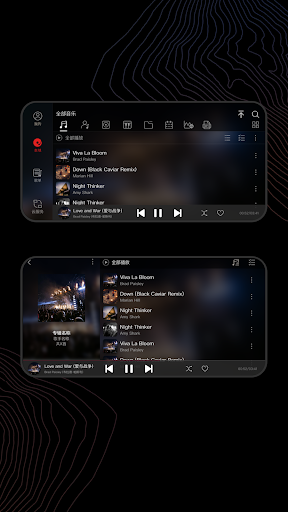
5.Supports playing all songs, playing by album (sorted by track no.), artist, genre, folder, custom playlist, etc.
6.Supports WiFi song transfer, making it easier for transferring your songs
7.Supports CUE sheet splitting.
8.Supports album art display and lyrics.
9.Supports last-position memory function.
10.Supports gapless track playback.
11.Supports replay gain.
12.Supports playing through folders.
More surprising features to be discovered!
If you have any questions of using this app or any suggestions, feel free to contact us using the below methods:
E-mail: [email protected]
FiiO website: http://www.fiio.com
Facebook: https://www.facebook.com/FiiOAUDIO
User Reviews

I've been using Fiio Music for a while now and really appreciate that it can take direct control of an external DAC for bit-perfect playback. And even without that it still has the best playback quality of any music app I've used. Probably my only gripe would be that the "play next" feature doesn't work properly when it's in shuffle mode, which I nearly always use.

It has a lot of customizablility options and features that I haven't seen in other music players. Though, I do have a couple gripes. It will often use the back cover over the front cover when trying to find the cover art, seemingly preferring whatever is ahead alphabetically, even when the images start with "front" or "back", which seems like an easy fix. There is also the issue that it only shows part of the album titles, which is quite annoying with my library especially.

Has most music playing features you would expect. UI is not bad and I like that the album art is displayed pretty big (bigger than on some other players). BUT the lack of a "shuffle play all songs" function makes it completely unusable as a music player. Clarification: technically, there is a shuffle feature, but it does not work at all. After a song ends, it'll just play the next song in the same folder or replay the same song again if there are no other songs in that folder.

I got a BTR3 and this goes with it perfect, I am excited for EQ option but for those who don't know in Android 7.1 and newer, go to Settings, Sound, Quality and Effects, Adapt Sound. It plays beeps in each ear and asks if you can hear them, which tailors an EQ that applies to the entire phone. It's super quiet so make sure you run that program with zero background noise and whatever headphones you use the most. It really makes good cans shiiiine. Please add exact battery life display for BTR3!!!!
How to Download FiiO Music APK
- Enter the package name
com.fiio.musicon the APK Downloader. - Select your device architecture (ARM64 recommended for modern devices).
- Click Download to get the merged APK file.
- Transfer and install the APK on your Android device.
- Keep Updated: Visit APKDER.COM regularly to search for and download the latest secure versions of your favorite apps.
Security & Signature Verification
This APK download is 100% safe. We verify that the cryptographic signature of the file matches the official developer credentials. No modifications or adware are injected.


