

Gallery - AI Photo Editor APK Screenshots




Gallery - AI Photo Editor App Information
Download Sources
Device Configuration
Split APKs Installation Guide
Some apps are distributed as Split APKs (multiple .apk files packaged together) to optimize resources. Standard Android installers cannot open them.
About Gallery - AI Photo Editor
Everyone wants privacy, Gallery - Hide Photos & Videos provides the perfect solution for hiding photos and videos.
Gallery - Hide Photos & Videos is the best gallery photo album app that helps to Hide every photo, Videos & file of your private life from the private gallery. Now, If you have lost or Deleted any photo you can Recover deleted photos in seconds. The Photo Viewer & Editor app can be used as a duplicate photo & video remover to remove files from the gallery. The Photo Gallery app has a Featured used to capture the Photos with Location which can explore your journey & make it memorable.
Gallery - Hide Photos & Videos is packed with features that make it perfect for hiding photos & videos from the gallery lock. In addition to its ability to hide files, the Gallery App includes a duplicate photo & video remover feature which helps to free up space on your device. The HD camera included in the Photo Recovery App is perfect for capturing moments & exploring your travel photos like the PicsArt app.
Features of the App AI Gallery - Photo Vault:
1. Gallery Photo & Album App:
With the Photo Gallery app, you can quickly & easily edit your Photo with Location & Map & photo-editing tools, such as auto-enhance. The Gallery's timeline of Geotag Photos is organized by date into multiple groups. The Image gallery manager will support multiple image formats like JPEG, GIF, PNG, etc.
2. Gallery Vault & Fake Vault App.
As Secret Photo Vault app is the best photo and video vault app to hide photos and videos, where you will have privacy protection and view locked photos, videos, audio, documents, private browse & photos Notes. Secure photo & video app is powerful that ensures the utmost privacy & security for your personal photos & videos. Experience peace of mind knowing that your private moments remain confidential & protected with Gallery Vault & Fake Vault App.
3. Duplicate File Remover:
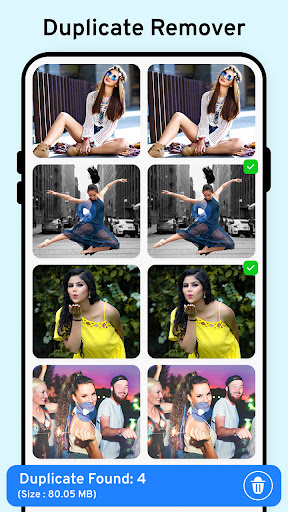
Looking for an easy way to Search Duplicate files from your device? This Secret gallery app makes it simple to find & Delete duplicate files from your device. The Duplicate File Finder & Remover app is not only easy to use but also comes with a host of features with duplicate cleaner apps that make it stand out.
4. Notepad - Handy Quicky Memo Book:
Take quick notes, organize your thoughts & stay productive with our notepad. Capture ideas, create to-do lists & Write down imp notes. Enjoy a sleek & intuitive interface, customizable formatting options & seamless syncing across devices. Whether you're a student, professional, or creative thinker, our notepad app is your digital companion for capturing & organizing your thoughts.
5. Photo backup & storage: Backup your deleted photos, videos & apps:
Do you ever worry about losing your important images & Photo Recovery App? will Recover Deleted Photos & will help you to restore any old files, photos & videos. Gallery app for Android is incredibly easy to use & can be a lifesaver in the event of accidental deletion.
6. HD Camera & Video Player:
HD Camera & Video Player brings professional-grade photography and videography capabilities to your fingertips. Capture stunning, high-definition photos and videos with our advanced camera features & apply filters & real-time effects. Additionally, enjoy smooth playback of your videos with a video player, ensuring an immersive view experience.
7. Copy/Move/Hide Images & Videos:
With the Gallery photo album app, you can access images to a clipboard as well as photo transfer to an sd card easily. The photo video hider & locker app allows you to hide images & videos from the gallery which can be useful for privacy purposes. Being able to copy images to a clipboard & move photo recovery to an sd card easily makes the Gallery.
With its easy-to-use interface & powerful features, The Private Photo Vault makes it easy to keep your private life private. Download AI Gallery - Photo Vault now to start keeping your photos & videos safe & private!
User Reviews

I get the need to use ads for a free app but there are way too many & they're intrusive. You can't hide the menu/buttons at the top & bottom of the screen when looking at pics full screen. "Editing" tools are so basic they're useless & several other negative things... I used it for about 5 minutes and it was already so annoying that I uninstalled it.

OMG Sooooo many ads just to use it. i had to watch 3 ads before i was able to select the photo i wanted from an album. That's so ridiculous and not worth it. It's just a gallery. We don't need to be watching ads for a gallery!!

Ads are so bad in this app that i couldn't even use it at all because they kept blocking the main parts of the screen. There shouldn't be ads in a gallery app, it's just getting ridiculous.

Disappointed. Yes it did find some of the old deleted photos but failed to find most of them. Also there are so many gaps in finding photos from various months. All in all yep I'm disappointed.
How to Download Gallery - AI Photo Editor APK
- Enter the package name
com.gallery.photo.image.album.viewer.videoon the APK Downloader. - Select your device architecture (ARM64 recommended for modern devices).
- Click Download to get the merged APK file.
- Transfer and install the APK on your Android device.
- Keep Updated: Visit APKDER.COM regularly to search for and download the latest secure versions of your favorite apps.
Frequently Asked Questions
Yes! Every APK download provided by APKDER undergoes rigorous security verification. We verify that the cryptographic signature of the APK file matches the official signature from the developer, ensuring the APK is original, untouched, and free from any modifications.
To install it, you first need to enable "Unknown Sources" in your Android device's security settings. After downloading the APK file from APKDER, tap it to begin the installation and follow the on-screen prompts.
Yes! As soon as the developer releases a new version of Gallery - AI Photo Editor, we will update and provide the updated APK on APKDER. You can simply download and install the new APK over the existing installation without losing your app data.
Yes. APKDER allows you to bypass geographic restrictions and download official APK files directly, even if the app or game is not officially available in your country's store.
A standard APK is a single installation package. An XAPK or Split APK contains multiple resource files (like OBB expansions or device-specific layout parts) packaged together. To install them, you can download splits individually or use dynamic helper tools like Split APKs Installer (SAI).
Security & Signature Verification
This APK download is 100% safe. We verify that the cryptographic signature of the file matches the official developer credentials. No modifications or adware are injected.


