


Download Sources
Device Configuration
Split APKs Installation Guide
Some apps are distributed as Split APKs (multiple .apk files packaged together) to optimize resources. Standard Android installers cannot open them.
What's New
It keeps getting better.
Various bug fixes and performance enhancements are live. Get out and get creating!
About this app
With Quik, editing just got easier. Get the most out of your favorite shots with Automatic Highlight videos and a suite of premium tools for custom edits [1]. Everything is backed up to the GoPro cloud so you can access and edit your footage on-the-go [1].
--- Key Features ---
Automatic Edits
The Quik app finds your best shots, syncs them to music, adds transitions and automatically creates a shareable video. [1]
Unlimited Cloud Storage at 100% Quality
Get UNLIMITED cloud storage of ALL your GoPro footage and up to 500GB from other cameras with a Premium or Premium+ subscription. All at 100% quality. [2]
Auto Upload + Cross Device Sync
Once imported into the Quik app, photos, videos, and edits automatically upload to the cloud for backup and sync across your devices for seamless cross-platform editing and content management. [1]
Premium Editing Tools
Play with color and light, trim video length, add stickers and more to take your footage to the next level.
Beat Sync
Syncs clips, transitions, and effects to the beat of the music. [1]
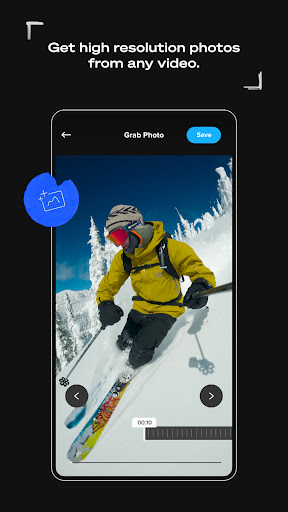
Frame Grab
Get high resolution photos by capturing a frame from any video.
Themes
Find a theme that tells your story with cinematic transitions, filters, and effects. [1]
Filters
Exclusive filters optimized for environments like snow and water.
Frame Adjust
Adjust the aspect ratio for photos and videos. You can also level the horizon, rotate and flip media.
Text Overlays
Add text and emojis for another dimension to your story. [1]
Transform 360 into Traditional Video with Reframe
Use Reframe to experiment with countless views, choose the best shots and instantly create cinematic transitions with the click of a keyframe. Then, export a traditional video or photo you can edit and share.
--- GoPro Camera Owner Features ---
Auto GoPro Detection + Transfer
Automatically detects connected GoPro cameras and transfers footage across a wired USB connection for fast and easy transfers.
Preview Shots + Delete
Check out GoPro camera photos and videos on your computer before you transfer them or delete unwanted shots from your camera's SD card.
Content Management
View and manage both local and cloud media in a single view, while camera media is organized in another view. Easily view and find media in a large, easy-to-read grid with search filters and icon overlays.
--- Footnotes ---
[1] Premium or Premium+ Subscription required. Available in select countries. Cancel anytime. See terms + conditions at our official website.
[2] Subscribe to Premium for unlimited cloud storage for footage captured with a GoPro camera plus up to 100GB (or up to 500GB with a Premium+ subscription) of footage captured on non-GoPro cameras or phones. GoPro cloud storage does not support content captured with GoPro Fusion. Cloud storage for footage captured on non-GoPro cameras or phones is limited to supported file types. See supported file types at our official website.
User Reviews

Can't do basic things like list the media files in the unit. App says there are new files but continuously can't find them and states can't download when I tap Download. I should be able to get the files onto my phone with this app so it's not very useful in its current state. The delete options in settings don't work either. I shouldn't need a subscription to anything just to accomplish these elementary tasks.

It is unfathomable how a company as big as GoPro can make an app so bad. Downloading video to your phone wirelessly takes an EXTREMELY long time to do, and it super buggy. As such, I tried downloading the videos via a physical cable. It just doesn't even work. I'm getting an Insta360 for my next camera because of how awful this app is. Also, why would this app not store videos in my gallery? Why do I have to create a second copy of a video for it to be in my gallery? It's nonsensical.

It's a cool app but I don't like that it doesn't allow you to crop pictures and if you're taking too long to edit, it doesn't automatically save your edits. For the annual price, I was expecting a little more freedom for editing or maybe make it easi6 for you to add your own music but overall, it's my go to recap/highlight app as I don't know many others

Terrible app; won't reliably connect to my Hero 13 (despite seeing it). it'll turn on my GoPro, but then not connect. even if it does connect, I then can't see the videos themselves to download off my camera. at this point, I either erase the SD card in its entirety, delete individual videos on the camera itself, or I have to plug the SD card directly into my computer to pull the files I want. I don't know what the deal is as the iOS version worked great; Android not so much...
How to Download GoPro Quik: Video Editor APK
- Enter the package name
com.gopro.smartyon the APK Downloader. - Select your device architecture (ARM64 recommended for modern devices).
- Click Download to get the merged APK file.
- Transfer and install the APK on your Android device.
- Keep Updated: Visit APKDER.COM regularly to search for and download the latest secure versions of your favorite apps.
Security & Signature Verification
This APK download is 100% safe. We verify that the cryptographic signature of the file matches the official developer credentials. No modifications or adware are injected.
Related Applications
 Captiono: AI Subtitles
VIDEO PLAYERS & EDITORS
→
Captiono: AI Subtitles
VIDEO PLAYERS & EDITORS
→
 Vmake Labs: create viral video
VIDEO PLAYERS & EDITORS
→
Vmake Labs: create viral video
VIDEO PLAYERS & EDITORS
→
 Zeemo: AI Video&Auto Captions
VIDEO PLAYERS & EDITORS
→
Zeemo: AI Video&Auto Captions
VIDEO PLAYERS & EDITORS
→
 KwaiCut - Video Editor
VIDEO PLAYERS & EDITORS
→
KwaiCut - Video Editor
VIDEO PLAYERS & EDITORS
→
 PowerDirector - Video Editor
VIDEO PLAYERS & EDITORS
→
PowerDirector - Video Editor
VIDEO PLAYERS & EDITORS
→
 Screen Recorder - Vidma Record
VIDEO PLAYERS & EDITORS
→
Screen Recorder - Vidma Record
VIDEO PLAYERS & EDITORS
→