
Download Sources
Device Configuration
Split APKs Installation Guide
Some apps are distributed as Split APKs (multiple .apk files packaged together) to optimize resources. Standard Android installers cannot open them.
Related Applications




What's New
Thank you for using Hava, the app that helps you feel fuller for longer, so you can eat as much as you want, lose weight, and live healthier.
This version of the app includes:
- Minor improvements
Now open Hava to find out how the foods you eat can help you feel fuller and healthier.
About this app
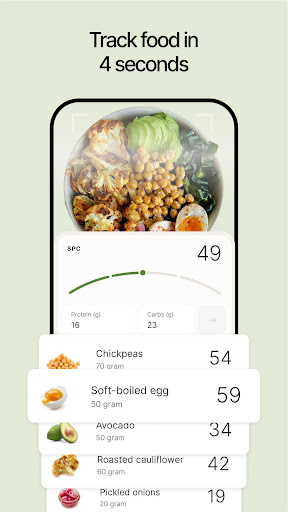
Lose weight without hunger. Our food tracker helps you stay full, eat fewer calories, and skip both calorie counting and cravings.
Just snap a picture of your meals for instant feedback and guidance. No nutrition knowledge is required to use Hava. If you can use your iPhone camera, you can use Hava.
Our groundbreaking approach helps people eat HALF as much without hunger, according to over 100,000 days of eating logged by early users.
This can help turbocharge weight loss and potentially reverse type 2 diabetes and high blood pressure. It’s also great for getting stronger and leaner, as we guide you to higher-protein foods.
Hava is flexible and sustainable and works with any dietary preference. You can keep eating foods that you love – just eat more of your high-scoring foods.
Hava gives you instant guidance and suggestions, through our 24/7 nutrition coach.
Hava is backed by cutting-edge science and built by doctors, including our founder and CEO, Andreas Eenfeldt, MD, as well as our Lead Science Advisor, Ted Naiman, MD. Together they have more than 40 years of weight loss expertise.
Instead of fighting hunger, we help you avoid it by showing you which foods naturally keep you feeling satisfied and happy, while you eat less and lose excess body fat. It’s like Ozempic, but with food.
Try Hava for free and join the movement. Your fuller, healthier life starts now.
Download Hava, and Hava great day.
SUBSCRIPTION TERMS
Enjoy every feature for free during a no-commitment trial. After the trial, continued use requires an auto-renewing monthly or yearly subscription. You can cancel or manage your subscription anytime in your App Store settings.
Hava integrates with HealthKit to optionally sync your weight data with the Health app.
Terms of use: https://www.hava.co/terms
Privacy policy: https://www.hava.co/privacy
How to Download Hava – Lose weight, feel full APK
- Enter the package name
com.hava.androidon the APK Downloader homepage. - Select your device architecture (ARM64 recommended for modern devices).
- Click Download to get the merged APK file.
- Transfer and install the APK on your Android device.
- Keep Updated: Visit APK Downloader regularly to search for and download the latest secure versions of your favorite apps.
Security & Signature Verification
This APK download is 100% safe. We verify that the cryptographic signature of the file matches the official developer credentials. No modifications or adware are injected.