

ImageLite Compress Resize Crop APK Screenshots



ImageLite Compress Resize Crop App Information
Download Sources
Device Configuration
Split APKs Installation Guide
Some apps are distributed as Split APKs (multiple .apk files packaged together) to optimize resources. Standard Android installers cannot open them.
What's New in ImageLite Compress Resize Crop
Initial release with photo compress, resize, crop, and convert features. Works fully offline.
About ImageLite Compress Resize Crop
Compress, resize, crop and convert your photos quickly and offline!
📸 ImageLite: Photo Compress, Resize, Convert, Crop is the ultimate lightweight photo editor that helps you reduce image size, change resolution, crop unwanted parts, and convert images between multiple formats, such as JPG, PNG, and WEBP, all without any internet connection and any permissions.
Whether you're sending photos on WhatsApp, uploading to websites, or just saving storage space, this app makes it fast and easy.
🔧 Key Features:
✅ Compress Photos
Reduce photo file size to save storage or share faster.
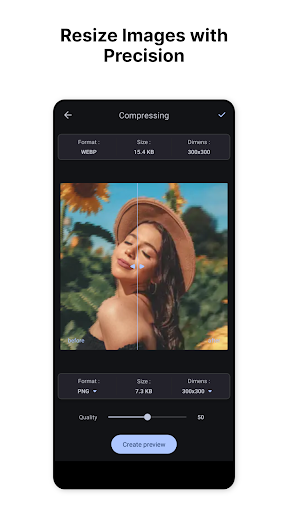
Select compression quality high, medium, or low and see the result instantly.
✅ Resize Photos
Resize by percentage or set exact width × height (pixels).
Maintain aspect ratio or adjust freely.
✅ Crop Photos
Cut out parts of the image with ease.
Use freeform crop or standard aspect ratios like 1:1, 4:3, 16:9.
✅ Convert Image Formats
Convert images to:
* JPG
* PNG
* WEBP
Great for sharing, uploading, or editing.
✅ Fully Offline & Private
No internet needed.
📸 Use It For:
* Compressing images for WhatsApp or email
* Resizing photos for blogs or websites
* Cropping pictures for social media posts
* Converting screenshots or downloads to JPG/PNG
* Making quick edits without needing a full photo editor
⚡ Why ImageLite Tools?
* Simple & easy to use
* Fast processing
* Small app size
* No hidden background processes
* No login, no account needed
* 100% offline – fully private
* Clean interface, no clutter
📤 Save & Share Easily
* Share directly to apps like WhatsApp, Instagram, Gmail, etc.
🧩 Supported Formats:
* Input: JPG, JPEG, PNG, BMP, WEBP
* Output: JPG, PNG, WEBP, BMP
🆘 Need Help or Feedback?
We value your feedback to keep ImageLite tools simple and useful.
Please use the in-app support option or contact us directly from the settings screen.
📲 Download now and simplify your photo tasks
With Photo Compress, Resize, Convert, Crop, powered by ImageLite.
No complex steps. Just a smooth experience.
How to Download ImageLite Compress Resize Crop APK
- Enter the package name
com.hitrolab.imagelite.photo_convert_compress_resizeon the APK Downloader. - Select your device architecture (ARM64 recommended for modern devices).
- Click Download to get the merged APK file.
- Transfer and install the APK on your Android device.
- Keep Updated: Visit APKDER.COM regularly to search for and download the latest secure versions of your favorite apps.
Frequently Asked Questions
Yes! Every APK download provided by APKDER undergoes rigorous security verification. We verify that the cryptographic signature of the APK file matches the official signature from the developer, ensuring the APK is original, untouched, and free from any modifications.
To install it, you first need to enable "Unknown Sources" in your Android device's security settings. After downloading the APK file from APKDER, tap it to begin the installation and follow the on-screen prompts.
Yes! As soon as the developer releases a new version of ImageLite Compress Resize Crop, we will update and provide the updated APK on APKDER. You can simply download and install the new APK over the existing installation without losing your app data.
Yes. APKDER allows you to bypass geographic restrictions and download official APK files directly, even if the app or game is not officially available in your country's store.
A standard APK is a single installation package. An XAPK or Split APK contains multiple resource files (like OBB expansions or device-specific layout parts) packaged together. To install them, you can download splits individually or use dynamic helper tools like Split APKs Installer (SAI).
Security & Signature Verification
This APK download is 100% safe. We verify that the cryptographic signature of the file matches the official developer credentials. No modifications or adware are injected.


