


Download Sources
Device Configuration
Split APKs Installation Guide
Some apps are distributed as Split APKs (multiple .apk files packaged together) to optimize resources. Standard Android installers cannot open them.
What's New
Meet the Homey Heroes! 🌟
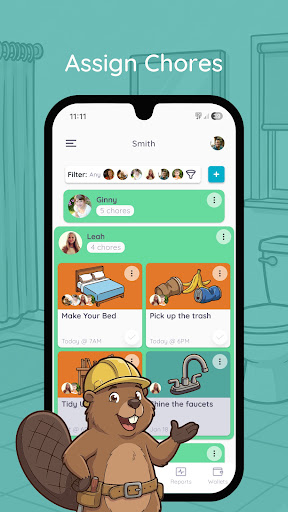
Homey has a brand new look! Say hello to our new companions designed to motivate kids and make chores fun.
The New Squad:
Felix: Turns chores into quests.
Ruby: Master of daily streaks.
Bea: The focused builder.
Benny: Your biggest cheerleader.
Gordy: Wise goal mentor.
Plus:
✨ Total visual revamp.
🚀 Performance & bug fixes.
👀 More hero features coming soon!
About This App
The perfect app to teach your kids about money through completing chores and working towards goals.
Features:
- set daily, weekly or monthly recurring or one time chores for the whole family
- set chores that are responsibilities and you won't pay for and jobs to teach kids how to earn money or rewards
- manage allowance and extra money rewards for each child
- transfer allowance to bank account (US only)
- track IOU
- add or remove funds from wallet
- set saving jars with financial goals
- kids learn to manage funds for each of their goals
- Homey syncs across all devices in the household
SHOW KIDS HOW MONEY IS EARNED
With Homey you can pay kids commissions based on chores they do around the house like taking out the trash, cleaning their room, or mowing the grass. And you can also set responsibilities that are required to teach kids that everyone needs to contribute to the household.
SUPPORT LONG-TERM GOALS AND SAVING
Teach kids delayed gratification and financial responsibility by providing them with incentives that differ in value. With Homey kids learn they need to work longer or harder to earn more.
TEACH REAL LIFE FINANCIAL SKILLS
Homey enables you to transfer allowance and money kids earn directly to their savings or checking account or tracks the money as IOU and pay it out in cash. This way you can teach your child how banking works, they can accumulate interests on their savings and you can be sure that their money will stay safe.
By subscribing to Homey Premium or Homey Unlimited you'll get access to other great features like:
Connecting your bank account and safely transferring allowance and chore money directly to your child's savings account. (US only)
Multiple saving jars for each child.
Adding or deducting money from the wallet.
Customizable permissions.
• You can subscribe on a month-to-month ($4.99) or yearly ($49.99) basis.
• The payment will be charged to your Google Play when you confirm the purchase.
• The subscription automatically renews for the same price and duration period as the original monthly/yearly plan unless canceled at least 24-hours before the end of the current period.
• Free trial automatically converts to a paid subscription unless canceled at least 24-hours before the end of the trial period. From that point onwards, subscription automatically renews unless canceled at least 24-hours before the end of the current period.
• You can cancel the subscription or the free trial anytime via the subscription setting through your Google Play Store app: Open the Google Play Store. Tap Menu, Account,Subscriptions. Find the subscription you want to cancel. Tap Cancel. Do it at least 24 hours before the end of the free trial or subscription period to avoid being charged. Learn more: https://support.google.com/googleplay/answer/7018481?co=GENIE.Platform%3DAndroid&hl=en
• Any unused portion of a free trial period will be forfeited when the user purchases a subscription.
Terms and Conditions: http://www.homeyapp.net/homey-terms-conditions/
User Reviews

Rating a 4 because it is very simple and easy to understand, it does almost exactly what I want. Most apps are banking OR allowance. However, not a 5 star because one device using it closes out the app on another device. This bug is especially frustrating when I'm trying to create a new entry. Also not a 5 because the Child account can see too many settings in my opinion, and there are no icons available to choose for jobs and chores besides a broom or else you have to take a photo yourself.

Very easy to do the things required, but whenever I take a picture, it lags because of the amount of darkness. In other words, it doesn't recognize dark pictures as actual pictures. And it doesn't have to be dark in the room; the floor can be black and the desk as well, so it is very difficult to take some pictures because of that reason. Also, if I switch tabs too fast, the application crashes, and that is very annoying. I very rarely write 2 star reviews, so I hope you see and understand this.

BEWARE! I would not recommend this app. I opted for the 7 day trial of the premium version. Seven days is not enough time to use the app long enough to see whether it will be worth the $50 price tag. We have a large family, and it took me quite some time to get it set up for everyone, which didn't really leave enough time to get through a couple of cycles of weekly chores to see if was worth it. When I signed up, I was told I would receive a notification reminder that my trial was almost up before I would be charged. I did NOT receive the reminder notification. I promptly contacted the developer to request a longer trial or to cancel. They took several days to respond, and said they could not refund my money. They said I would have to contact Google. By then, the Google window for refund had passed and Google said my request for refund did not meet their requirements - although it DID - "app did not work as expected". It was constantly crashing on our devices to the point of being unusable. I am so frustrated with this company and with Google for taking my money for an app that doesn't work. Shame on both companies.
It's not bad, just not good. One major complaint is not having an option to record payments for jobs like there is for the allowance. A second one is the in app purchases. The pack descriptions are vague at best and since I want to know what I would be getting before paying not likely to entice. Has a few bugs that need fixing. In all, a great idea poorly executed. Won't be renewing a subscription as the value return is not equal to the monetary output.
How to Download Homey - Chores and Allowance APK
- Enter the package name
com.homey.appon the APK Downloader. - Select your device architecture (ARM64 recommended for modern devices).
- Click Download to get the merged APK file.
- Transfer and install the APK on your Android device.
- Keep Updated: Visit APKDER.COM regularly to search for and download the latest secure versions of your favorite apps.
Security & Signature Verification
This APK download is 100% safe. We verify that the cryptographic signature of the file matches the official developer credentials. No modifications or adware are injected.


