




Download Sources
Device Configuration
Split APKs Installation Guide
Some apps are distributed as Split APKs (multiple .apk files packaged together) to optimize resources. Standard Android installers cannot open them.
What's New
• Fixed some bugs. Download and try it
About this app
The official app for Amazfit, the Zepp app is free to use and trusted by top athletes such as running back Derrick Henry and sprinter Gabby Thomas.
Built for sports and performance, it’s where you’ll track your training, health and recovery data, log your nutrition, and get easy-to-understand scores with AI-powered coaching and guidance — all protected with the highest level of data security.
TRACK MACROS: Snap a photo of your meal and instantly get calories, weight, and macronutrients. No watch required, just the Zepp App. Perfect for athletes balancing training with strict diets. Log as many meals as you want with no limits, or enter them manually if that’s easier.
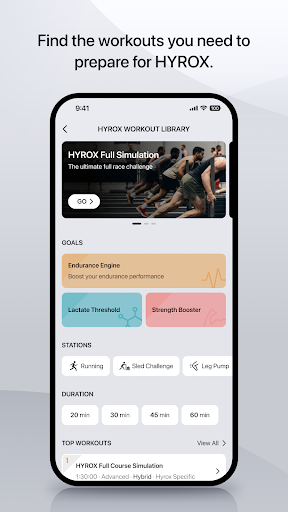
HEALTH & FITNESS DATA: Vital health metrics like heart rate, sleep, stress, and blood oxygen, the Zepp App tracks your fitness progress in detail. It captures daily activity such as steps and calories burned, and advanced training data like pace, distance, speed, strength logs, and recovery insights.
SLEEP MONITORING: The Zepp App monitors sleep with precision sensors and syncs the data to the Zepp App for full recovery analysis. You'll find detailed metrics on stages, duration, breathing, and recovery quality so you know if your body is ready to train hard or needs more rest to perform at its best.
HEART HEALTH: See all your essential heart health data in one place. Track heart rate, HRV, and resting heart rate (RHR), and manually add blood pressure and blood glucose from external devices for a complete view of the most important muscle in your body.
CUSTOMIZE YOUR WATCH: The Zepp App is where you’ll find software updates for your Amazfit smartwatch, band, or ring. It also gives you access to the Zepp Store, with hundreds of downloadable mini apps and watch faces to choose from.
DATA SECURITY: The Zepp App delivers the highest level of data security, keeping your information safe and private. Safeguarded by Amazon Web Services (AWS), all data is regionally stored, encrypted, fully GDPR compliant, and never sold.
FREE TO USE: The core experience of the Zepp App is free. You won't need to pay to view data tracked by your Amazfit device, upgrade software, or import maps. You'll also get free access to a core version of Zepp Aura, your very own wellness coach. For personalized wellness advice powered by AI, Zepp Aura Premium Subscription is available for a monthly or yearly fee, but there's no obligation to sign up.
ZEPP AURA PREMIUM: Unlocking unlimited access to Zepp Aura will provide in-depth health assessments, a personal wellness assistant, sleep music and more (region specific).
- Available in: Most countries and regions
- Subscription Plans: Monthly or yearly options
- Subscriptions are confirmed via your Google account and renew automatically unless canceled at least 24 hours in advance. Any unused portion of a free trial is forfeited once a purchase is made.
- Details: https://upload-cdn.zepp.com/tposts/5845154
PERMISSIONS: Granting these permissions is optional. If you refuse, the related features will not function, but you may continue to use other services without restriction:
- Location Access: Used for automatically tracking running or cycling routes, and to show local weather
- Storage: Used to import or export workout data, as well as save workout photos
- Phone, Contacts, SMS, Call Logs: Used to display calls/notifications/texts on your watch and enable call reminders
- Physical Activity: Used to synchronize step counts and workout information
- Camera: Used for taking pictures and scanning QR codes to pair your devices
- Calendar: Sync and manage schedules
- Nearby Devices: Used to discover and connect to smart devices through bluetooth
- Microphone: Used to support voice assistants and related features
DISCLAIMER: Zepp is not a medical device and is intended for general fitness and health management purposes only.
User Reviews

App has changed radically since I first started using it. But still has stupid issues. Like, if I allow notifications, I get notifications all the time about keeping the band running. And if I tap the notification it doesn't clear. And if I turn off notifications then every single time I enter the app, I have to close 2 popups about allowing notifications. Seriously annoying! Also, I frequently get chided for sitting too long WHILE I AM MOVING AROUND!!! Disappointing - could be so much better!

Overall good but few things: 1. BMI is incredibly incorrect. i can run 5k and 10ks and it lists me as obese. 2. The phones performance is taking a noticeable hit. Everything is very slow when its connected to watch. You can fix this by making it so that the watch can't receive notifications. You get a much longer battery life on the watch+phone. 3. If you're using this for running it isnt bad for the price. Just remember that it isn't perfect. Treadmill distance off, and altitude is off.

Solid app. Everything works and syncs up nicely. A very comprehensive fitness app! Update: I'm using the Amazfit GTS2e, and I'm noticing two problems. First, the heart rate tracker seems to stop tracking when you have a lot of wrist perspiration, and does not track at all when cycling. Second, it syncs very poorly with Google Fit. Maybe Google intentionally hinders this, to encourage purchasing a Wear OS smartwatch/band? Three years later (2025), and the app is even better than it was before.

overall good and worth it. no true text capabilities. most models say they do, but it's through WhatsApp only. you can only use quick text options. I also don't like the fact that when my heart rate is above a certain level it doesn't detect that I'm exercising but if the watch is wet it thinks I'm swimming. I do like the watch and the style of it. really good location capabilities. really long battery compared to others. I've had mine a few years and I charge it once a week.'
How to Download Zepp APK
- Enter the package name
com.huami.watch.hmwatchmanageron the APK Downloader. - Select your device architecture (ARM64 recommended for modern devices).
- Click Download to get the merged APK file.
- Transfer and install the APK on your Android device.
- Keep Updated: Visit APKDER.COM regularly to search for and download the latest secure versions of your favorite apps.
Security & Signature Verification
This APK download is 100% safe. We verify that the cryptographic signature of the file matches the official developer credentials. No modifications or adware are injected.


