

Nimo TV for Streamer APK Screenshots



Nimo TV for Streamer App Information
Download Sources
Device Configuration
Split APKs Installation Guide
Some apps are distributed as Split APKs (multiple .apk files packaged together) to optimize resources. Standard Android installers cannot open them.
What's New in Nimo TV for Streamer
Bug Fixes and App optimization.
About Nimo TV for Streamer
【Nimo TV for Streamer - One-click broadcast, interact with audiences】
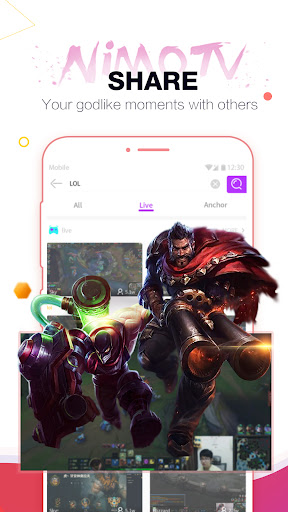
Nimo official broadcast tool. Free to everyone. One click to start your game live. Everyone can be a streamer. Automatically record the games on your phone in real time and broadcast to the audience on Nimo TV. Enjoy sharing game experience with
【Highlight】
★Easy to broadcast
Anyone can be a streamer! One click to create your channel and share your unique gaming tips and findings with other game lovers! Just one steps, you can be a superstar!
★Realtime and interactive
Share your game and interact with your audience in real time. As long as your performance is splendid enough, you can get cool gifts from your audience. Don't forget they can become real money.
Want to have a try? DO NOT DELAY AND ACTION.
Just a click of “DOWNLOAD”, you will OWN THE WHOLE WORLD in your hand.
If you have any questions or suggestions, feel free to contact us via:
Customer Service Email: [email protected]
Instagram: https://www.instagram.com/nimotelevision
Facebook: https://www.facebook.com/nimotelevision/
User Reviews

Good app. to stream with even while playing games! Although just a suggestion, it would be great if one won't need to unplug headphones just so your stream will have a sound or a mic. It's pretty uncomfortable as a PUBG player to keep my phone on loudspeaker because hearing the game is so important. Would love to see such addition! I know OBS is another option but I still need to upgrade my PC. Thanks and best regards!

I've allowed Microphone, but still can't start livestream. I've contacted CS but only Bot replied. I've re-login and also re-install the app, but still can't do live stream. It always says "Allow the mic permission", but I've turned it on!

I have a quiestion the most important for this app when I locked the app and I'd been playing 16 mins the nimo app nd the overlay just closed itself suddenly even though my phone is performing very well no lag no other issue when steaming so please fix this issue asap thank you.

It wasn't that bad however Instead of having the microphone be mutable and the sound of the game being livestreamed hear-able as a normal feature you seriously decided to delete the option to mute the mic entirely?! That's not development at all its more like downgrading
How to Download Nimo TV for Streamer APK
- Enter the package name
com.huya.nimogameassiston the APK Downloader. - Select your device architecture (ARM64 recommended for modern devices).
- Click Download to get the merged APK file.
- Transfer and install the APK on your Android device.
- Keep Updated: Visit APKDER.COM regularly to search for and download the latest secure versions of your favorite apps.
Frequently Asked Questions
Yes! Every APK download provided by APKDER undergoes rigorous security verification. We verify that the cryptographic signature of the APK file matches the official signature from the developer, ensuring the APK is original, untouched, and free from any modifications.
To install it, you first need to enable "Unknown Sources" in your Android device's security settings. After downloading the APK file from APKDER, tap it to begin the installation and follow the on-screen prompts.
Yes! As soon as the developer releases a new version of Nimo TV for Streamer, we will update and provide the updated APK on APKDER. You can simply download and install the new APK over the existing installation without losing your app data.
Yes. APKDER allows you to bypass geographic restrictions and download official APK files directly, even if the app or game is not officially available in your country's store.
A standard APK is a single installation package. An XAPK or Split APK contains multiple resource files (like OBB expansions or device-specific layout parts) packaged together. To install them, you can download splits individually or use dynamic helper tools like Split APKs Installer (SAI).
Security & Signature Verification
This APK download is 100% safe. We verify that the cryptographic signature of the file matches the official developer credentials. No modifications or adware are injected.


