



Download Sources
Device Configuration
Split APKs Installation Guide
Some apps are distributed as Split APKs (multiple .apk files packaged together) to optimize resources. Standard Android installers cannot open them.
About this app
Home Planner AI - dream it, plan it, live in it. This room planner is trusted by 20 million+ users to create millimeter-perfect 3D floor plans, restyle every space with AI, and visualize your house design in stunning 4K renders before a single renovation decision is made.
No measuring tape needed. Scan your room with a phone and our AI floor plan generator builds a precise house plan in seconds - walls, doors, and windows included. Then furnish it from 400,000+ real-brand items, each with store-accurate dimensions. What you see is exactly what fits.
AI FLOOR PLAN CREATOR & ROOM DESIGNER
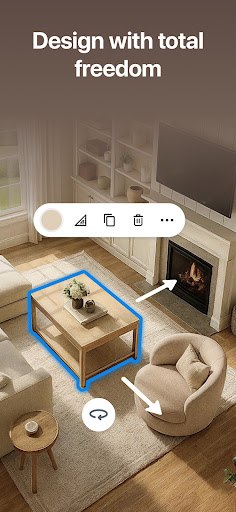
Start from a photo scan, a sketch, or a blank canvas - your floor plan comes to life instantly. Add walls, roofs, stairs, and arches with millimeter precision. The plan creator handles every detail: set wall thickness, place windows, and position every door. Export your design 3D model or generate a full renovation PDF report complete with measurements and a shopping list - shareable in one tap.
AI INTERIOR DESIGN IN BREATHTAKING 3D
Our AI design planner restyling any room across 20+ design styles - Scandinavian, industrial, Mediterranean, and more - in seconds. Swap real materials: wood, tile, fabric, paint. Capture 4K photos and 360° panoramas that bring your home design to life in remarkable detail. Let the AI design generator refine every palette and texture, then tour every room from every angle before spending a cent.
ROOM PLANNER FOR EVERY SPACE
From a single bedroom to a complete house renovation, our floor planner adapts to any project:
- Bathroom design with a dedicated bathroom designer for precise fixture layouts
- Kitchen planner loaded with real brand catalogs and AI suggestions
- House planner for new builds, extensions, and full-scale renovations
- Planner 3D mode for immersive 360° walkthroughs room by room
- Home renovation tracker with budget management and a shopping list
- Plan AI for instant layout recommendations based on your space
400K+ CATALOG & SMART SHOPPING
Browse 400,000+ items from 30,000+ world-famous brands - all with store-accurate measurements. Use our AI generator to match any photo to real products and find them in nearby stores. Add home decor, swap finishes, and explore every room design style until every detail feels exactly right.
DISCOVER & COLLABORATE
Browse 155,000+ real house plan designs shared by our community. Get inspired by trending home interior ideas, save any look you love, and recreate it room by room. Share a live project link with your partner, architect, or contractor - they can view the latest layout and leave comments before a wall is touched. Every home plan and plan design is backed up to the cloud automatically.
FEATURES AT A GLANCE
✓ AI room designer & floor plan creator
✓ Phone scan → precise floor plan in seconds
✓ 4K renders, 360° panoramas & 3D house export
✓ 400,000+ items - 30,000+ real brands
✓ Kitchen planner, bathroom designer & house design tools
✓ Floor planner for millimeter-accurate measurements
✓ House planner for whole-home renovation projects
✓ Planner AI - instant layout ideas from any room scan
✓ Renovation PDF with shopping list & plan 3D export
✓ Home interior, home decor & AI generator tools
✓ Design AI, design generator & plan generator
✓ Room designer, plan creator & 3D home explorer
✓ Works online and offline
Premium features - full catalog, HD renders, unlimited rooms - via auto-renewable subscription (weekly, monthly, or yearly). Payment charged to your Google Play account at confirmation. Manage renewals in Google Play settings at any time. Any unused free trial is forfeited upon subscribing.
User Reviews

I'm really loving this app! It's easy to use and runs smoothly, making it feel very realistic. It brings my ideas to life in real-time, and I can't believe I didn't find this platform earlier. The helpful tutorials on YouTube are great if I get stuck. The only minor issue is that the free version lets you add up to 10 floor plans, and some features require a purchase. Overall, it's fantastic, especially for free. I can't imagine what it's like when you pay for the pro, I bet it's even better.

An amazing and best Home Designer app for DIY. Being able to choose real products and budget for customers is great. And an added bonus of a AI redesigner. The one thing that ruins it, is the subscription. I have the PC version and it's $50 period for the pro version. No subscriptions, nothing, $50 buys the program. It should be that way for mobile. Not $182 for 6 months!

Just trying a few diff apps. This one was the simplest and easiest to work on. Took a lot less time to put together than the others. No acct required. There are paid options for furniture but i did not need exact pieces, just general idea. I dont think it's necessary to go for the paid plan unless you need exact measurements. Lets you adjust size of walls, doors, furniture pieces, fixtures. There is a 3d jump into the room option so you can see it from more than just a 2d blueprint. Good app.

Controls were infuriating. It took me so long trying to just make the walls the right length. I wanted to make some blueprints to see how I could fit my furniture into a small room. I hoped I could just put in the dimensions of my furniture, but you have no choice but to use the furniture in their catalog as a marketing method. I feel like I was tricked into just browsing overpriced furniture. The worst part really was the controls though. I even tried using a stylus, but it was still impossible
How to Download Home Planner AI: Room Interior APK
- Enter the package name
com.icandesignapp.allon the APK Downloader. - Select your device architecture (ARM64 recommended for modern devices).
- Click Download to get the merged APK file.
- Transfer and install the APK on your Android device.
- Keep Updated: Visit APKDER.COM regularly to search for and download the latest secure versions of your favorite apps.
Security & Signature Verification
This APK download is 100% safe. We verify that the cryptographic signature of the file matches the official developer credentials. No modifications or adware are injected.


