Barcode/QR Scanner & Generator APK Screenshots

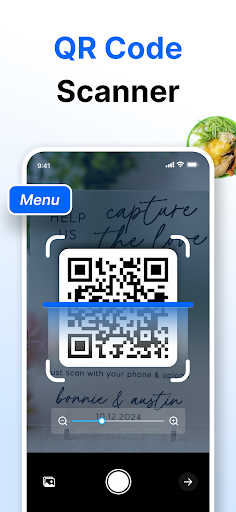


Barcode/QR Scanner & Generator App Information
Download Sources
Device Configuration
Split APKs Installation Guide
Some apps are distributed as Split APKs (multiple .apk files packaged together) to optimize resources. Standard Android installers cannot open them.
What's New in Barcode/QR Scanner & Generator
Update the Barcode & QR Code Scanner and Generator app!
– Create barcodes faster with ready-to-use templates.
About Barcode/QR Scanner & Generator
Our QR Code Scanner and QR Code Generator are free app for android designed to help you effortlessly scan QR Codes. It can generate QR codes for different kinds of content. Additionally, our app offers a Barcode Generator to create barcode and a Barcode Scanner to easily scan barcodes of any type within seconds. This scanner app uses smart technology to accurately scan, decode, and generate QR codes and barcodes.
Our Barcode & QR code scanner/generator free app can serve as a versatile, all-in-one solution for users. It can generate and scan QR codes as well as barcodes of different types, including:
1 - Plan Texts (like Messages)
2 - URLs of websites (Social Media links)
3 - Contact Details (Full Name, Phone, Emails, Company Name, Job Title, Address
4 - Phone Numbers
5 - Emails
6 - Wifi codes
7 - Location
How to Use the QR Code & Barcode Generator & Scanner App?
Download and Install the QR Code Scanner/Generator. Then, follow the steps to Generate and Scan QR code.
QR Code/Barcode Scanner Option
👉 Point the App’s integrated Camera at the QR code or barcode.
👉 It will automatically scan your barcode or QR codes and decode information.
👉 Now, you can Save, Share, or Copy the extracted results.
QR Code/barcode Generator Option
👉 Select the type of QR code/barcode you want to generate, including Text, URL, SMS, Email, etc.
👉 Input your details in the designated areas and click the “Generate” button.
👉 Our QR code generator will swiftly generate a QR code or barcode as per your selection, which you can share or download.
Key Features of Our Barcode/QR Code Scanner & Generator App?
📱 Simple UI
Our QR Code and Barcode reader app offers a sleek interface for maximum user convenience. Its navigation is crystal clear and requires a few clicks.
🤖 Dual Functionality
This app offers both barcodes & QR code scanning and generating options. This dual functionality of the scanner app makes it a versatile option for both personal and professional users.
𝄃𝄂𝄂𝄀𝄁𝄃𝄂𝄂𝄃 Different Types of Barcodes
It can generate & scan different types of barcodes, including General, EAN-13, UPC-A, UPC-E, Code 39, and Code 128.
📷 Integrated Camera
Another key feature that makes our QR code scanner a worthy app is the integrated camera. You can use it to directly scan QR codes and barcodes from images, documents, shops, products, etc.
🎯 Accuracy
The QR code scanner app is equipped with advanced technology to accurately generate all types of QR codes.
🚀 Fast
Our QR/barcode reader is efficient in swiftly reading and generating. Its perfect blend of speed that saves users’ time.
🏾 Versatile Scanner
Whether you need to generate or scan QR code for a URL, Message, Email, Address, Contact Number, or location, our QR code reader app can help you. It can handle a wide range of QR codes.
Additional Features
● This QR/barcode scanner app is free to use.
● It allows users to save and share results.
● Our barcode scanner app offers Dark and Light Theme options.
● It saves a history of your scanned data and generates.
● You can add the results to the Favorite list.
● For better scanning, it offers Zoom IN and OUT slide.
● The QR code scanning app ensures 100% protection of user privacy.
Use Cases
➤ You can scan barcodes & QR code on products or ads for quick details.
➤ Event managers can send QR-coded tickets.
➤ Social media users can create QR codes or scan barcode.
➤ Business professionals can effortlessly share their contact details via QR codes.
➤ Users can redeem discounts with scannable QR codes.
Our innovative Barcode & QR code generator/scanner is the perfect app to decode or generate a wide range of barcodes & QR codes. Download and install it now to enjoy seamless QR code/barcode scanning and quick barcode/QR code generation.
User Reviews

Always difficult to see is scanned

Very easy to use, no adds, no in app purchases, this is so far a good app, I just hope the developers aren't stealing our information... 🤨

it's cool and all... but I recommend updating it to where u can get deals

The App came through with designing the QR Code with ease..looking forward to using it more for my projects.
How to Download Barcode/QR Scanner & Generator APK
- Enter the package name
com.imagetotext.qrcodescanneron the APK Downloader. - Select your device architecture (ARM64 recommended for modern devices).
- Click Download to get the merged APK file.
- Transfer and install the APK on your Android device.
- Keep Updated: Visit APKDER.COM regularly to search for and download the latest secure versions of your favorite apps.
Frequently Asked Questions
Yes! Every APK download provided by APKDER undergoes rigorous security verification. We verify that the cryptographic signature of the APK file matches the official signature from the developer, ensuring the APK is original, untouched, and free from any modifications.
To install it, you first need to enable "Unknown Sources" in your Android device's security settings. After downloading the APK file from APKDER, tap it to begin the installation and follow the on-screen prompts.
Yes! As soon as the developer releases a new version of Barcode/QR Scanner & Generator, we will update and provide the updated APK on APKDER. You can simply download and install the new APK over the existing installation without losing your app data.
Yes. APKDER allows you to bypass geographic restrictions and download official APK files directly, even if the app or game is not officially available in your country's store.
A standard APK is a single installation package. An XAPK or Split APK contains multiple resource files (like OBB expansions or device-specific layout parts) packaged together. To install them, you can download splits individually or use dynamic helper tools like Split APKs Installer (SAI).
Security & Signature Verification
This APK download is 100% safe. We verify that the cryptographic signature of the file matches the official developer credentials. No modifications or adware are injected.