

Inventro Pocket APK Screenshots



Inventro Pocket App Information
Download Sources
Device Configuration
Split APKs Installation Guide
Some apps are distributed as Split APKs (multiple .apk files packaged together) to optimize resources. Standard Android installers cannot open them.
What's New in Inventro Pocket
☑️ Live Dashboard: Track today's revenue, sales count, and total dues at a glance.
☑️ Inventory Tracking: View your product list, see what's selling fast, and monitor low stock items.
☑️ Accounts Overview: Keep track of customer dues and business cash flow in real-time.
☑️ Smart Notifications: Get instant push alerts on your phone for large sales, settled customer dues, and low stock warnings.
☑️ Quick Pairing: Easily link multiple store branches using a simple QR code scan from your desktop.
About Inventro Pocket
Inventro Pocket lets you keep an eye on your store from your phone. It works with Inventro POS and shows your latest business data, so you can check what's happening without being at the counter.
Pair the app by scanning the QR code in Inventro POS, and your latest data is always available on your device. Even without an internet connection, you can continue viewing the most recently synced information.
Key Features
📊 Dashboard
View today's sales, revenue, profit, expenses, and pending purchase orders at a glance.
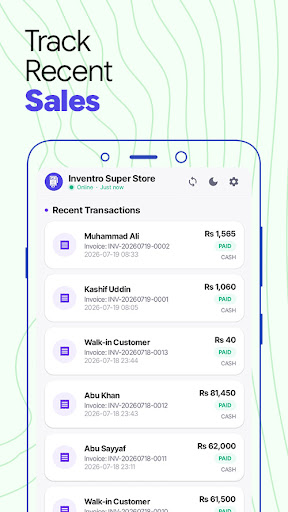
🧾 Sales
Browse your sales history, view sale details, payment status, and receipts.
📦 Inventory
Search your product catalog, check stock levels, and receive low stock alerts.
💼 Banking & Accounts
Monitor cash registers, bank balances, and business cash flow.
👥 Customer & Supplier Dues
Track customer dues, supplier payments, and view individual account ledgers.
📈 Reports
View business reports with charts and performance summaries.
📱 Offline Access
Your latest synced data is stored on your device, so you can view sales, inventory, accounts, and reports even when you're offline.
🔔 Notifications
Receive alerts for:
Low stock items
Customer dues
Large sales
🔒 Secure Pairing
Connect the app by scanning the QR code displayed in Inventro POS. Your data remains secure throughout the connection.
⚙️ Sync Options
Sync automatically every 30 seconds to 10 minutes, or switch to manual sync.
Note: Inventro Pocket is a companion app and requires Inventro POS (Desktop). It cannot be used on its own.
How to Download Inventro Pocket APK
- Enter the package name
com.inventro.pocketon the APK Downloader. - Select your device architecture (ARM64 recommended for modern devices).
- Click Download to get the merged APK file.
- Transfer and install the APK on your Android device.
- Keep Updated: Visit APKDER.COM regularly to search for and download the latest secure versions of your favorite apps.
Frequently Asked Questions
Yes! Every APK download provided by APKDER undergoes rigorous security verification. We verify that the cryptographic signature of the APK file matches the official signature from the developer, ensuring the APK is original, untouched, and free from any modifications.
To install it, you first need to enable "Unknown Sources" in your Android device's security settings. After downloading the APK file from APKDER, tap it to begin the installation and follow the on-screen prompts.
Yes! As soon as the developer releases a new version of Inventro Pocket, we will update and provide the updated APK on APKDER. You can simply download and install the new APK over the existing installation without losing your app data.
Yes. APKDER allows you to bypass geographic restrictions and download official APK files directly, even if the app or game is not officially available in your country's store.
A standard APK is a single installation package. An XAPK or Split APK contains multiple resource files (like OBB expansions or device-specific layout parts) packaged together. To install them, you can download splits individually or use dynamic helper tools like Split APKs Installer (SAI).
Security & Signature Verification
This APK download is 100% safe. We verify that the cryptographic signature of the file matches the official developer credentials. No modifications or adware are injected.


