



Download Sources
Device Configuration
Split APKs Installation Guide
Some apps are distributed as Split APKs (multiple .apk files packaged together) to optimize resources. Standard Android installers cannot open them.
What's New
Minor bug fixes and performance improvements to enhance your experience.
About This App
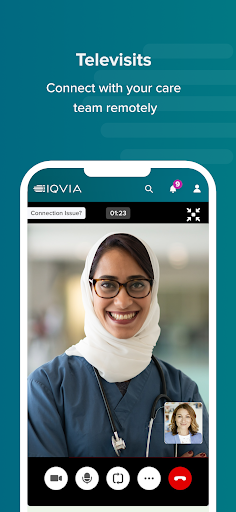
The IQVIA Study Hub app supports your clinical trial journey by providing a platform to interact with study team members, view upcoming visits, complete eDiaries, track study progress, access study related documents and tap into 24/7 support.
Contact your study assistant with questions or concerns related to your clinical trial participation.
Like the app? Have challenges or concerns you’d like to raise? We always appreciate feedback. We actively monitor the app store reviews and continually work towards addressing your needs.
User Reviews

They have made some changes for the better. It's less awful than it was. I don't like that I can't access the day's input screen until after 8:00 or 8:30 PM. Some nights I manage to get to bed early. They still don't use texts to remind that today requires input. But at least it doesn't take three screens to get out any more. Still lousy as apps go, but way better than it was

This app is the most painful part of the study I'm in, including the blood draws. Every few months this app starts sending me multiple notifications for messages that aren't there when I got to check. It's super annoying, and when I reach out to tech support they want to call me during business hours, and I don't want to take time from my workday to troubleshoot a medical study app. That being said, it is easy to do my diary so I guess it gets 2 stars.

App was just annoying but functional. Latest 'fix' corrected that and now it's totally non-functional. It does push notifications, but the diary is blank so there's no way to record results. That on top of erroneous alerts to do the training endlessly, no contact with support and calendar not connected with study. Might just be an issue with hot patch. Reinstalling help... Today. Also password manager takes three times as long compared to normal apps, so that might be what others see (android)

On a Pixel 4, the biometric login doesn't work at all. It constantly complains that I need to enable it even though it is enabled. While it appears to properly send eDiary entries to the study staff, it doesn't show what you've completed and it randomly adds tasks you've already completed back to your task list, requiring you to keep track of what you've done in the study. This app needs significant work!
How to Download IQVIA Study Hub APK
- Enter the package name
com.iqvia.virtualtrials.studyhubon the APK Downloader. - Select your device architecture (ARM64 recommended for modern devices).
- Click Download to get the merged APK file.
- Transfer and install the APK on your Android device.
- Keep Updated: Visit APKDER.COM regularly to search for and download the latest secure versions of your favorite apps.
Security & Signature Verification
This APK download is 100% safe. We verify that the cryptographic signature of the file matches the official developer credentials. No modifications or adware are injected.


