


Download Sources
Device Configuration
Split APKs Installation Guide
Some apps are distributed as Split APKs (multiple .apk files packaged together) to optimize resources. Standard Android installers cannot open them.
About this app
The Perfect Spot helps photographers scout better locations before the light is gone.
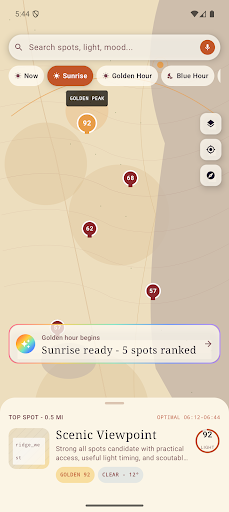
Use a map-first scouting experience to discover nearby photo spots ranked by lighting conditions, weather, distance, and your shooting intent. Whether you are planning for golden hour, blue hour, portraits, city views, water access, or easy overlooks, The Perfect Spot helps you choose where to go and when to arrive.
Features:
• Discover nearby scenic spots by shooting intent
• Rank locations by light, weather, distance, and timing
• Plan around golden hour and blue hour windows
• Save favorite spots for future shoots
• View spot scores, route timing, weather cues, and scouting reasons
• Get on-device AI-style scouting guidance and composition tips
• Use Pro features for expanded planning, unlimited boards, alerts, visual guidance, and advanced photo scouting tools
The Perfect Spot is built for photographers, travelers, creators, and anyone who wants to find a stronger frame before the best light disappears.
How to Download The Perfect Spot APK
- Enter the package name
com.jamsoftinc.perfectspoton the APK Downloader. - Select your device architecture (ARM64 recommended for modern devices).
- Click Download to get the merged APK file.
- Transfer and install the APK on your Android device.
- Keep Updated: Visit APKDER.COM regularly to search for and download the latest secure versions of your favorite apps.
Security & Signature Verification
This APK download is 100% safe. We verify that the cryptographic signature of the file matches the official developer credentials. No modifications or adware are injected.


