


Download Sources
Device Configuration
Split APKs Installation Guide
Some apps are distributed as Split APKs (multiple .apk files packaged together) to optimize resources. Standard Android installers cannot open them.
What's New
We've made improvements and fixed bugs to help your app run smoothly and support your teams.
About This App
Homebase is the easy-to-use app for small business owners who need to build schedules, set up a time clock, run payroll, hire employees, manage HR and more. Join 150,000+ small businesses already using Homebase to run their hourly teams, and save 5+ hours every week!
Track employee hours, enable a mobile time clock, manage costs, and monitor sales with Homebase. Employee scheduling and hours are automatically sent into timesheets for managers to review for compliant payroll data.
Homebase payroll management makes it easy to pay your team. Payroll tools save hours for team managers, and built-in compliance monitoring for labor laws.
Employee scheduling is easier. Build and share schedules in minutes. Manage multiple teams or departments, approve time off requests, enable shift trades, and record team availability. Create schedule templates or use the AI scheduling assistant to save even more time.
Top-rated app for small business:
Best Payroll Services 2026, Forbes
Best Employee Time Clock Software Reviewed in 2026, People Managing People
Best Employee Scheduling Software, B2B Reviews (2025)
Best Payroll Services for 2025, PC Mag
Best workforce scheduling software for small businesses – Zendesk
Best overall time clock for small business 2025 – Fit Small Business
Best for Overall Experience, Best Employee Scheduling Software, – Business.com
“Best employee communication tool ever!” - Theresa Fouquette, Owner, Bliss Small Batch Creamery
“I’m saving hundreds of hours.” – Primo Stropoli, owner of Tetta’s Market
Homebase is the all-in-one app for small business management. Manage shifts, payroll, HR, hiring, timesheets, team attendance and more from your phone.
Download Homebase today and start your payroll management and employee schedule planner!
HOMEBASE FEATURES
EMPLOYEE PAYCHECK & PAYROLL MANAGEMENT
- Payroll management made simple with automated calculations
- Generate time clock sheets with our payroll app
- Time clock sheets and paycheck processing is streamlined with in-app clock-in & clock-out
- Payroll app that works with providers like Gusto, Intuit Quickbooks Online Payroll, or Square Payroll app
SMALL BUSINESS SHIFT SCHEDULING APP
- Use templates to quickly build & share schedules
- Send shift reminders through our schedule planner
- Use an employee availability schedule tracker
- Manage time-off requests
EMPLOYEES CAN CLOCK IN & OUT WITH ATTENDANCE TRACKING
- See employee scheduling, hours, breaks, overtime, clock-in, and clock-out time
- Get alerts when employees approaching overtime
- Clock in with top POS systems like Clover, Square, Toast, & more
TEAM ATTENDANCE & SCHEDULE PLANNER
- Payroll & scheduling app capabilities that make wages seamless
- Clock in and clock out directly with Homebase small business scheduling tools
- Scheduling app lets you see shift notes, expected earnings, & access seamless employee scheduling
- See time clock data, time-off requests, & shift trades
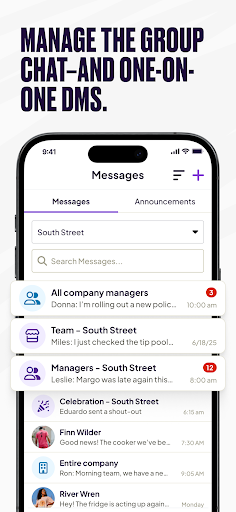
EMPLOYEE & TEAM COMMUNICATION
- Create group chats & connect with the team
- Message employees & coworkers across your company
Get support via phone, email, & chat.
Homebase Plans
- Free basic plan for up to 20 employees
- Essentials plan for $24.49/mo with advanced employee scheduling
- Plus plan for $59.99/mo with hiring & PTO
- All-in-one plan for $99.95/mo with hiring, onboarding & HR
- Payroll, Tip Manager, Task Manager, Background Checks, & more available as add-on
Subscribe to a paid plan for add-on features. The Account charges payment upon confirmation of purchase. Subscription automatically renews unless turned off at least 24 hours before the end of the current period. The Account will be charged for renewal within 24 hours prior to the end of the current period. Auto-renewal may be disabled at any time in your settings after purchase. For more info, see the Terms of Use and Privacy Policy.
Terms of use: https://app.joinhomebase.com/terms
Privacy policy: https://app.joinhomebase.com/privacy
User Reviews

its been 2 years using this app and it's perfect. Never had any issues with it. My team haves access to all features. There are many forms to use this app and even on basic mode you can control with their second app the clock ins & outs or for breaks event though they can do it directly on their phones when they are in the location pinpoint. I still prefer for them to clock in from the tablet in store. it is really a great app, modern and with options that fits for everybody

I had to download this for work, and honestly I hate it. The mobile clock-in/out is fine, but requesting time off is literally impossible. I just want to take a specific date off, not have every day of the week it falls on as off. Would much prefer it being an actual calender, where you can click on a day/days and have a request time off or specific hours option. Call me old-school but i still much prefer a physical time clock and filling out request time off sheets.

This app is a fortress, it's so bad that their OWN AI system can't properly navigate it. When I have technical issues with Homebase, I'm navigated back and forth from the app to the online platform. Spoiler! Neither worked to find a solution to my problem, which I highly doubt I am alone in. As an employee, you cannot receive assistance from a live supervisor you are stuck with an AI system that cannot and will not fix any technical issues you run into, and you will run into a lot.

It now makes me log in with a text or email verified code every time I use the app, which is constantly wasting my time. If you have this issue or any other account problems you can't talk to a person, it's trash ai only even if you request a human. You can't even reset your password with their own prompts on their own app. The issue has still not been resolved.
How to Download Homebase: Scheduling & Payroll APK
- Enter the package name
com.joinhomebase.homebase.homebaseon the APK Downloader. - Select your device architecture (ARM64 recommended for modern devices).
- Click Download to get the merged APK file.
- Transfer and install the APK on your Android device.
- Keep Updated: Visit APKDER.COM regularly to search for and download the latest secure versions of your favorite apps.
Security & Signature Verification
This APK download is 100% safe. We verify that the cryptographic signature of the file matches the official developer credentials. No modifications or adware are injected.
