


Download Sources
Device Configuration
Split APKs Installation Guide
Some apps are distributed as Split APKs (multiple .apk files packaged together) to optimize resources. Standard Android installers cannot open them.
What's New
Fix:
- We've squashed some bugs to make the app run more smoothly.
About this app
Notta: Your AI-Powered Notetaker for Smarter Workflows
Notta is an intelligent AI notetaking assistant that seamlessly transforms speech into text with outstanding precision and speed. Say goodbye to manual transcription—Notta simplifies the process, helping you effortlessly capture meeting minutes, interview insights, and important AI notes in real time.
Focus on the Conversation, Not the Notes—Let Notta Handle the Rest!
Key Features
- 98.86% transcription accuracy
- AI-powered summarization feature for instant insight
- Supports transcription in 58 languages
- Translate text into 42 languages
- Compatible with various file formats
- AI removes noise and delivers clear, high-quality audio
- Auto-sync across multiple devices
Who is Notta for?
- Salespeople and consultants managing frequent meetings or negotiations
- Remote workers, telecommuters, and those working from home
- Media professionals like journalists, writers, interviewers, and bloggers
- Multilingual speakers or students learning new languages
-Security Certifications
Notta obtained the SOC 2 Type II certification, and received ISO/IEC 27001:2013 certification for its information security management system, reinforcing the reliability and security of our services.
-Real-Time Transcription and Summarization
Start transcription with a single click on your PC, smartphone, or tablet. Notta converts spoken words into text in real-time, letting you focus on the conversation instead of taking notes. The AI summarization feature quickly extracts key points from meetings, lectures, and interviews.
- Integration with Hardware
By pairing with devices like Notta Memo or Zenchord, you can save and summarize audio recordings from various scenarios such as business meetings, interviews, and lectures directly to Notta. Notta Memo can also record audio independently, and once connected to the Notta app later, the recordings are automatically transferred.
-Multiple Transcription Options
Notta supports both live transcription and automatic transcription of pre-recorded files. Import audio or video files, and get a one-hour recording transcribed in about five minutes.
-Streamlined Editing Experience
Add bookmarks during transcription to mark important statements, making post-meeting edits faster and more efficient. Searching through recordings is effortless—simply enter keywords to locate specific segments.
-Easily Share Transcription Data
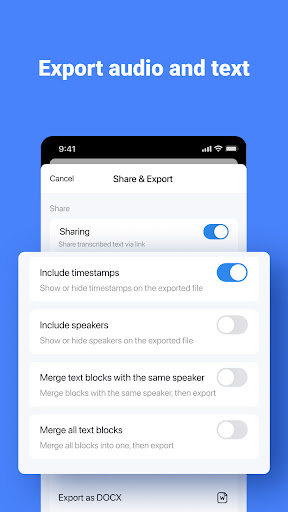
Save transcribed text in formats such as txt, docx, excel, pdf, or srt (subtitles). Export transcriptions with recorded timestamps and timelines, or share them via a link with colleagues and friends.
-Automatic Translation for Global Meetings
Notta supports 58 languages for transcription and can translate text into 42 languages instantly. This feature is ideal for international meetings, helping users understand unfamiliar terms and even improve language skills.
Plans and Pricing
Free Plan
- Real-time transcription: 3 minutes per recording
- Auto-transcription of web meetings (Zoom, Microsoft Teams, Google Meet, Webex): 3 minutes per session
- Import audio files and view the first 3 minutes of transcription for free
- Dictionary: Add up to 3 custom terms
Premium Plan
- 1,800 minutes of transcription per month
- Real-time transcription
- Import audio and video files
- Auto-transcription for web meetings (Zoom, Microsoft Teams, Google Meet, Webex)
- Export transcription data
- Dictionary: Add up to 200 custom terms
- Translate transcription into 42 languages
- Auto-proofreading
- Hide time markers
- Speed up audio playback
- Edit speaker names
- Unlock advanced features and enjoy extensive transcription capabilities.
With Notta, streamline your workflow and elevate your productivity!
Notta Terms of Service:https://www.notta.ai/en/terms
Privacy Policy: https://www.notta.ai/en/privacy
If you have any questions, please feel free to contact us at [email protected].
User Reviews

Very useful for language learning. Can accurately transcribe bilingual text, such as lessons. Records the audio and transcribes. Works for any audio playing in a web page. Minus one star doesn't work for audio playing from an app, except YouTube. I wish it could transcribe directly from the internal android audio so you could use it on anything. But there are audio recorders that will do that and then you can upload the file to Notta to be transcribed. Overall great and easy to use.

The app has been really useful. I've been able to take notes faster by speaking them out and be able to read them later when they're transcribed. The problem is that recently, it has been stopping my recording without explanation. "Recording has stopped due to interruption." But there was no interruptions, so I don't know why it stops. It has been doing it more and more often lately.

It's a transcription app that utilizes AI. Do note there isn't a functional "free" version. Only a "premium" that is offered as your only option once you have already made a recording & go to retrieve the transcript, only to be told there's a $14 a month fee & $100 yearly fee. If people can't access your app for convenience's sake, there's no way they're willing to pay more for this. Just another app that doesn't disclose it's not free, makes every effort to get your money, & overvalues itself.

Too expensive, lots of limitations considering how much they charging you on a yearly basis. No monthly options, which would've have been overpriced anyway. There are so many better options available that are reasonably priced and don't have limitations. Also, for the ridiculously overpriced yearly fee they want you to pay, they don't offer all the features available for mobile devices.
How to Download Notta-Transcribe Audio to Text APK
- Enter the package name
com.langogo.transcribeon the APK Downloader. - Select your device architecture (ARM64 recommended for modern devices).
- Click Download to get the merged APK file.
- Transfer and install the APK on your Android device.
- Keep Updated: Visit APKDER.COM regularly to search for and download the latest secure versions of your favorite apps.
Security & Signature Verification
This APK download is 100% safe. We verify that the cryptographic signature of the file matches the official developer credentials. No modifications or adware are injected.
