




Download Sources
Device Configuration
Split APKs Installation Guide
Some apps are distributed as Split APKs (multiple .apk files packaged together) to optimize resources. Standard Android installers cannot open them.
What's New
NEW:
Copy community content – You can now copy comments and song descriptions in the community, e.g. to paste them into a translator.
FIXED:
* Startup tutorial – no longer accidentally skipped on first launch.
* Loop Selector – now correctly highlights the active loop when opened.
* images – in "My Mix Packs" list
* Various crash fixes and stability improvements.
About This App
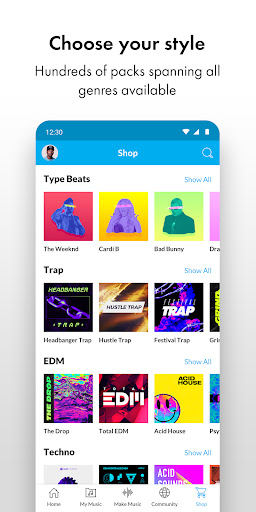
Music Maker JAM: The music maker & beat maker free music app for all music creators, DJs and producers, whatever your level is. Music Maker JAM is an easy-to-use song maker: create or remix amazing music beats and tracks using loops from a variety of musical genres including Trap, EDM, Rap, Dubstep, Hip-Hop, House, Garage, Pop, Rock, and more.
Whether you’re an experienced beat maker or just exploring for the first time, this is the perfect way to make music!
✨ Our free beat maker features will give you the music studio experience:
• Make music or remix music beats: Choose from over 300 Mix Packs with more than 500,000 loops.
• Make it your style: Available musical genres include Trap, EDM, Rap, Hip-Hop, House, Pop, Rock, Dubstep, Jazz, Latin, Techno, Garage, DnB and many more - the possibilities are endless.
• Be a music production pro: Record your tracks with a perfect mix on the 8-channel mixer, or just jam live for your friends at a party.
• Be creative: Change tempo and harmonies, arrange song parts and play around with spectacular real-time effects like reverb, stutter, delay, and more.
• Make beats and remix tracks by simply shaking your smartphone or tablet.
• Sing or rap on your tracks: Record your voice and mix your vocals into your beats, then apply autotune effects for ultimate results, like a real trap beat maker.
• Choose from all the instruments you could want - who needs a garage band!
• Share your songs directly on YouTube, SoundCloud, Facebook, TikTok and other social networks.
• Join our music community: Connect and become friends with artists, influencers, fans, followers, DJs, music producers and more.
Music Maker JAM is a user-friendly and free music app for DJs, beat makers, producers, or simply music lovers of all levels, beginners or pros. Make beats and create music with our song mixer - anytime and anywhere!
Our Music Maker JAM community has created and uploaded more than 10 million tracks. Join it now!
Get Music Maker JAM to create your own music and become a beat maker today. Unleash your creativity and your music production skills now.
ℹ️ MORE INFO ℹ️
• www.musicmakerjam.app
• www.youtube.com/c/musicmakerjam
• www.twitter.com/musicmakerjam
• www.facebook.com/MusicMakerJam
• www.instagram.com/musicmakerjam
💥 YOU ARE THE MUSIC REVOLUTION, WE ARE THE SPARK 💥
User Reviews

I made some of my first music with this app, still on YouTube as DJ Satin Dollar & my name I love some of the features, like being able to overlap my voice in layers to sound like a choir in my song "Oh, Why??". Great styles to choose from but I just started playing with it again recently AND IT ATE UP ALL MY MEMORY AGAIN in just a few days!!I BandLab saves my data for me! LOUDLY SEEMS TO BE SELLING MY SONGS! Now they seem to have all disappeared! I'm FURIOUS! LAWSUIT!!

I absolutely love the app - how it lets you create music easily, with many harmonies and melodies and tracks to choose from. I love how you can record your own music and add it in to your songs, and how you can adjust each part's volume and everything! The one and only problem I have is that the songs I've already made and saved to my account aren't able to be automatically transferred when I switch devices. I had to redo my favorite songs all the way just to transfer them between devices. I don't tend to upload a lot of my songs, but I would REALLY appreciate it if my songs could automatically transfer between devices when linked to my account. I feel that I've lost a lot of my good projects because of this. Please fix and I'll give this app the 5 stars it really deserves!
The app is overall really good. However, I have one small complaint. Sometimes, whenever I make a recording, that recording replaces another existing one. And when I delete the recording, the replaced recording also gets deleted. I'm not entirely sure what's going on, but I hope you will hear me out and fix this dilemma. Thank you for your time.
It's fun and easy. It does put a little strain on the resources of the device it's loaded on. Save your progress often in case the app blows a gasket and reboots. I listen to the same loop several zillion times to get a handle on weather it rings true to the ear. The more sound pool samples you buy the more you'll want to test the "flavor" of each. If your machine is new and has gobs of memory and a slick cpu, this tunesmith app is for you. Oh, God. I'm rhyming the review.
How to Download Music Maker JAM: Beatmaker app APK
- Enter the package name
com.magix.android.mmjamon the APK Downloader. - Select your device architecture (ARM64 recommended for modern devices).
- Click Download to get the merged APK file.
- Transfer and install the APK on your Android device.
- Keep Updated: Visit APKDER.COM regularly to search for and download the latest secure versions of your favorite apps.
Security & Signature Verification
This APK download is 100% safe. We verify that the cryptographic signature of the file matches the official developer credentials. No modifications or adware are injected.


