

Mercedes-Benz Stories APK Screenshots




Mercedes-Benz Stories App Information
Download Sources
Device Configuration
Split APKs Installation Guide
Some apps are distributed as Split APKs (multiple .apk files packaged together) to optimize resources. Standard Android installers cannot open them.
What's New in Mercedes-Benz Stories
Mercedes-Benz Stories & Mercedes-Benz Community join forces
• Become a Community member or connect your existing Community profile to unlock new exclusive features for sharing and liking
Other optimizations:
• Bug Fixes & Design Upgrades
About Mercedes-Benz Stories
EXPLORE TRACKS: Find challenging Race Tracks and exciting All-Terrain Areas. Thanks to an interactive map, you can search both in your area and worldwide. Mark Tracks and Areas to save them and access them in your vehicle when you line up at the start.
RACE TRACKS: The app provides you with detailed information about official Race Tracks and the specific on-site track layouts. Take advantage of the insights ahead of racing and prepare your performance at its best.
ALL-TERRAIN AREAS: The app contains detailed information on official All-Terrain Areas. Find out which challenges and obstacles await you there and prepare thoroughly for your adventure off the beaten track.
VIDEO RECORDING: Easily create videos of your rides on your smartphone. This provides you with high-quality shots – in addition to and synchronised with the documentation of your ride*. You can even record videos from multiple angles (depending on the features of your smartphone).
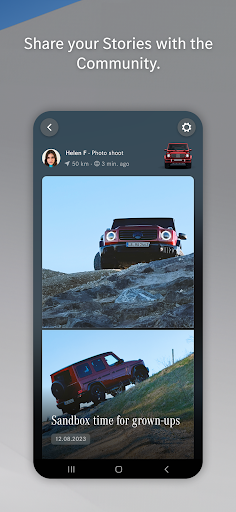
STORIES: Turn your photos and videos into Stories and share them with the app community. Discover contents of other app users and get in touch with like-minded people.
HOME FEED: The home feed is your personal homepage. Here you find new activities posted by the app community. Scroll through new Stories shared by other users and let yourself be inspired.
MERCEDES DIARY: Capture your Racing or All-Terrain experiences with the Mercedes-Benz in-car apps "AMG TRACK PACE" or "OFFROAD TRACK". Collect special memories with your vehicle in your personal Mercedes Diary – and relive them anywhere and at any time.
Please note: Connecting Mercedes-Benz Stories to your vehicle only works if it is equipped with the Mercedes-Benz on-demand features "AMG TRACK PACE" or "OFFROAD TRACK" (available from December 2024).
* The error-free usage of the feature with MBUS is only guaranteed with the latest available software version. Please contact your local dealership to update your cars infotainment system. Your dealership may charge your for a necessary MBUX update.
User Reviews

Mercedes Benz Stories, The premium feel synonymous with Mercedes-Benz. The interface is sleek, intuitive, and easy to navigate, reflecting the brand’s design philosophy. The layout is simple yet elegant, with high-quality images, videos, and interactive content. It feels luxurious from the moment you open it.

Thia app allows users to create personalized tours, publish driving tracks, and share their experiences. It fosters a platform for exploring new routes and sharing immersive journeys.

the app keep crashing and wont open please advise.

Amazing application. To get in touch with other Mercedesbenz enthusiasts
How to Download Mercedes-Benz Stories APK
- Enter the package name
com.mercedesbenz.stories.eceon the APK Downloader. - Select your device architecture (ARM64 recommended for modern devices).
- Click Download to get the merged APK file.
- Transfer and install the APK on your Android device.
- Keep Updated: Visit APKDER.COM regularly to search for and download the latest secure versions of your favorite apps.
Frequently Asked Questions
Yes! Every APK download provided by APKDER undergoes rigorous security verification. We verify that the cryptographic signature of the APK file matches the official signature from the developer, ensuring the APK is original, untouched, and free from any modifications.
To install it, you first need to enable "Unknown Sources" in your Android device's security settings. After downloading the APK file from APKDER, tap it to begin the installation and follow the on-screen prompts.
Yes! As soon as the developer releases a new version of Mercedes-Benz Stories, we will update and provide the updated APK on APKDER. You can simply download and install the new APK over the existing installation without losing your app data.
Yes. APKDER allows you to bypass geographic restrictions and download official APK files directly, even if the app or game is not officially available in your country's store.
A standard APK is a single installation package. An XAPK or Split APK contains multiple resource files (like OBB expansions or device-specific layout parts) packaged together. To install them, you can download splits individually or use dynamic helper tools like Split APKs Installer (SAI).
Security & Signature Verification
This APK download is 100% safe. We verify that the cryptographic signature of the file matches the official developer credentials. No modifications or adware are injected.
