



Download Sources
Device Configuration
Split APKs Installation Guide
Some apps are distributed as Split APKs (multiple .apk files packaged together) to optimize resources. Standard Android installers cannot open them.
About This App
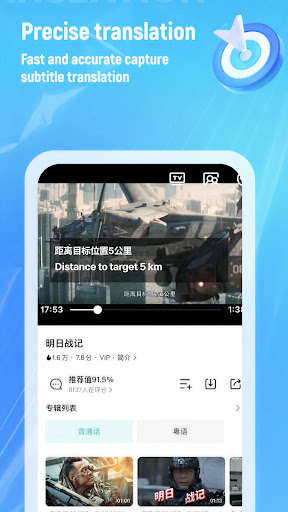
Translate Videos Instantly With Smart AI Subtitles!Enjoy global content without language barriers using Translate Video: AI Subtitle Generator, designed to make foreign videos easy to understand. With intelligent processing and fast performance, this tool helps turn any spoken dialogue into clear Subtitles For Videos in seconds. Whether you watch series, films, or short clips, language differences no longer stop your entertainment or learning experience.
Skip the struggle of guessing meanings—Video Translator: Add Subtitles gives you smooth, accurate translations that keep up with what you watch.
📄 AI Subtitle Translation Key Features: 📄
🌍 Support for over 100 languages worldwide;
⚡ Fast and synchronized subtitle processing;
📶 Offline and regional translation support;
📋 Copy translated text with ease;
🧠 Multiple text recognition modes;
🔄 Flexible translation options for different needs;
🎥 Accurate Subtitles: Captions For Videos in real time.
Watch Any Video With Real-Time Understanding!With Auto Subtitles: Transcribe Video To Text, spoken audio is instantly converted into readable captions that stay perfectly timed. Combined with Translator: Video Captions, you can follow conversations naturally while enjoying content from different regions. Auto Subtitles: Transcribe Video To Text ensures smooth playback without delays, while Subtitles For Videos remain clear and readable throughout.
Fast and Synchronized Translation:⚡
Translate Video: AI Subtitle Generator keeps translation speed aligned with the original dialogue. Video Subtitle Translate works in real time, ensuring that Subtitles: Captions For Videos never lag behind the action on screen. This makes long viewing sessions comfortable and distraction-free.
Accurate and Natural Results:🎯
Video Translator: Add Subtitles delivers reliable translations with high accuracy. By using Translator: Video Captions, users receive natural phrasing that feels easy to read and understand. Video Subtitle Translate adapts to different languages and accents, improving subtitle quality across regions.
Flexible Use for Any Situation:🌐
From offline viewing to regional content, Auto Subtitles: Transcribe Video To Text adapts to your needs. Subtitles For Videos can be customized, copied, and reused, making learning and comprehension more convenient. Subtitles: Captions For Videos help users follow every detail without missing key moments.
Start Enjoying Global Videos With AI Subtitles Today!Unlock a smoother way to understand international content with Translate Video: AI Subtitle Generator. By combining Video Translator: Add Subtitles, Translator: Video Captions, and Video Subtitle Translate, this solution transforms how you watch and understand videos. Experience clear Subtitles For Videos and accurate Subtitles: Captions For Videos every time you press play.
User Reviews

App is lying to you. It is not free and the captions do not work correctly. It will never translate audio. It only translates images, and doesn't even do it correctly. It also costs money to actually get it to work, and can't translate anything if you're watching a video in full-screen. App is garbage.

Oh damn, I found it very useful I just translate the live captions from the phone integrated already by Google and translating that caption in which ever the language i want by using this app. Seriously it's a damn helpful thing when watching the old animes online which don't have any subs or any other translation more than japanese so it's very helpful for me. Ignore all the negative reviews it might possible that they just don't know how to use it. Good job to the app team.👍

This app is good for translation of video subtitles but it has biggest flow which annoy anyone. In free version video will translate, when pausing you will see ads but app will disappear in 5 minute you have to go again in app and re activate the translate button and same goes with paid version. But most annoying thing is disappearing app in 5 minute. If this issue can resolve it will be best translator for any video app. I hope team will understand and fix this issue

Its the best app for translation doesnt need money and is quick and easywhy i didnt give it 5 stars is because they can add more languages like thai etc and the accuracy of subtitles and words can improve but other than that amazing app
How to Download Video Subtitle Translate APK
- Enter the package name
com.mg.subtitle.googleon the APK Downloader. - Select your device architecture (ARM64 recommended for modern devices).
- Click Download to get the merged APK file.
- Transfer and install the APK on your Android device.
- Keep Updated: Visit APKDER.COM regularly to search for and download the latest secure versions of your favorite apps.
Frequently Asked Questions
Yes! Every file hosted on APKDER undergoes rigorous security verification. We verify that the cryptographic signature matches the official signature from the developer, ensuring the app hasn't been modified or tampered with.
To install it, you first need to enable "Unknown Sources" in your Android device's security settings. After downloading the APK file from APKDER, tap it to begin the installation and follow the on-screen prompts.
Yes! As soon as the developer releases a new version of Video Subtitle Translate, we will scrape and post the updated APK on APKDER. You can simply download and install the new APK over the existing installation without losing your app data.
Security & Signature Verification
This APK download is 100% safe. We verify that the cryptographic signature of the file matches the official developer credentials. No modifications or adware are injected.


