

Solaris- sunrise, sunset times APK Screenshots


Solaris- sunrise, sunset times App Information
Download Sources
Device Configuration
Split APKs Installation Guide
Some apps are distributed as Split APKs (multiple .apk files packaged together) to optimize resources. Standard Android installers cannot open them.
What's New in Solaris- sunrise, sunset times
- Code optimization
- AM/PM option added
- Text to speech (English)
About Solaris- sunrise, sunset times
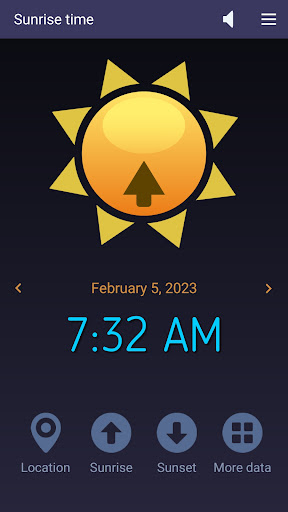
This easy-to-use app accurately computes the sunrise and sunset times based on your current location and current day of the year. Also, it can show those solar times for yesterday and tomorrow if you tap the left or, respectively, right arrow buttons. Solaris works on tablets and smartphones connected to the Internet. At first, it gets the local coordinates (latitude and longitude) from your device's GPS and then retrieves the solar data from an Internet server. In addition to the time values we already mentioned, our app also reads the First and Last Light times, Dawn and Dusk moments, Solar Noon, Golden Hour, and Day Length and shows them when you tap the four-dots button.
What do these solar data indicate?
Sunrise and Sunset times are determined by the position of the sun relative to the observer on the Earth's surface. Latitude affects sunrise and sunset times because it determines the observer's position north or south of the equator, which affects the angle at which the sun's rays reach the surface. The closer a location is to the equator, the more directly overhead the sun will be at solar noon, leading to faster sunrise and sunset times. Longitude affects sunrise and sunset times because it determines the observer's position east or west of the Prime Meridian, which affects the observer's local time. A location that is further west will have an earlier sunrise and a later sunset compared to a location that is further east.
First light is the first appearance of natural light in the morning, before sunrise. It signals the beginning of a new day.
Dawn is the period of time between first light and sunrise, characterized by a gradual brightening of the sky.
Dusk is the period of time between sunset and nightfall, also characterized by a gradual darkening of the sky.
Solar noon is the time when the sun is at its highest point in the sky, and is directly overhead at the observer's location. It occurs at different times for different longitudes and occurs twice a year for a location on the equator.
The Golden Hour mostly refers to the last hour of sunlight in the day, when the sun is low on the horizon and the light is soft and warm. Photographers often prefer to take photos during the golden hour because of the quality of the light.
How it works
When it starts, Solaris shows the sunrise time in the universal 24-hour format (tap this label once for the AM/PM format).
- To find the sunset time, tap the Sunset button.
- Tap the Four-dots button for more solar data.
- Tap the Speaker button to toggle the text-to-speech feature on and off.
- Tap the Location button to refresh your GPS position (if it has changed since your last run).
Features
-- accurate sunrise and sunset times
-- short measurement interval
-- simple, intuitive commands
-- AM/PM option
-- Text-to-speech capability
-- free app - no ads, no limitations
User Reviews

It has good information, but it needs to work offline without GPS. The app still doesn't work offline!
How to Download Solaris- sunrise, sunset times APK
- Enter the package name
com.microsys.Solarison the APK Downloader. - Select your device architecture (ARM64 recommended for modern devices).
- Click Download to get the merged APK file.
- Transfer and install the APK on your Android device.
- Keep Updated: Visit APKDER.COM regularly to search for and download the latest secure versions of your favorite apps.
Frequently Asked Questions
Yes! Every APK download provided by APKDER undergoes rigorous security verification. We verify that the cryptographic signature of the APK file matches the official signature from the developer, ensuring the APK is original, untouched, and free from any modifications.
To install it, you first need to enable "Unknown Sources" in your Android device's security settings. After downloading the APK file from APKDER, tap it to begin the installation and follow the on-screen prompts.
Yes! As soon as the developer releases a new version of Solaris- sunrise, sunset times, we will update and provide the updated APK on APKDER. You can simply download and install the new APK over the existing installation without losing your app data.
Yes. APKDER allows you to bypass geographic restrictions and download official APK files directly, even if the app or game is not officially available in your country's store.
A standard APK is a single installation package. An XAPK or Split APK contains multiple resource files (like OBB expansions or device-specific layout parts) packaged together. To install them, you can download splits individually or use dynamic helper tools like Split APKs Installer (SAI).
Security & Signature Verification
This APK download is 100% safe. We verify that the cryptographic signature of the file matches the official developer credentials. No modifications or adware are injected.


