
Download Sources
Device Configuration
Split APKs Installation Guide
Some apps are distributed as Split APKs (multiple .apk files packaged together) to optimize resources. Standard Android installers cannot open them.
Related Applications




What's New
Added support for 3M™ PELTOR™ PIC-100 Professional In Ear Communication Headset.
About this app
Make the most out of your connected 3M product and start to use the 3M Connected Equipment app.
This mobile app helps you to intuitively interact with your 3M™ PELTOR™ or 3M™ Speedglas™ product.
You can set up the equipment and store pre-sets in the mobile app. Reminders can help you to ensure proper maintenance of the high-performance product. Have instant access to support with user manuals, etc. in the app.
Supported 3M™ PELTOR™ WS™ ALERT™ headsets:
• XPI+ Headset
• XP+ Headset
• XPV Headset
• XPI Headset (after August 2019)
• XP Headset (after September 2022)
• X Headset
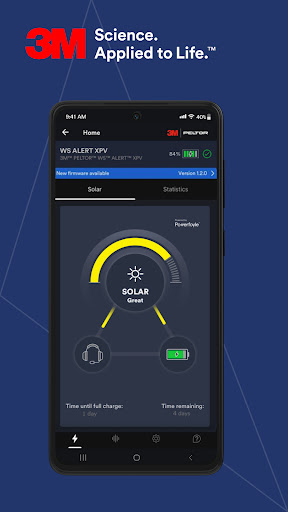
Depending on the specific product, the app offers different functionalities, e.g.: Easy evaluation of solar energy flow and solar power statistics. Choose between predefined functions on Multi-function Button. Simple selection and storage of FM-radio stations. Reminder for hygiene-kit (foam + cushion) exchange. Easy adjustment of audio settings: FM-radio volume, bass-boost, side-tone volume, ambient sound, ambient equalizer etc.
If there is a new firmware update available, you can get it via the mobile app (OTA).
Supported 3M™ Speedglas™ welding lens models:
• G5-01TW
• G5-01VC
• G5-02
• G5-01/03TW
• G5-01/03VC
Depending on the specific product, the app offers different functionalities, e.g.: Storage of up to ten pre-sets (settings for shade, sensitivity, delay, etc.) in your phone. Easily record your welding helmet maintenance log to the app. Adjust the TAP functionality for quickly changing between grind/cut and welding mode. Name your device and digitally lock the name for recognition of ownership. Instantly know statistics, including hours in the dark state/light state, number of on/off cycles of your Auto Darkening Filter (ADF) etc. Log the statistics of your ADF to different projects. Easily export your project data and settings to your email client or clipboard for later analysis.
How to Download 3M™ Connected Equipment APK
- Enter the package name
com.mmm.csceon the APK Downloader homepage. - Select your device architecture (ARM64 recommended for modern devices).
- Click Download to get the merged APK file.
- Transfer and install the APK on your Android device.
- Keep Updated: Visit APK Downloader regularly to search for and download the latest secure versions of your favorite apps.
Security & Signature Verification
This APK download is 100% safe. We verify that the cryptographic signature of the file matches the official developer credentials. No modifications or adware are injected.