
Download Sources
Device Configuration
Split APKs Installation Guide
Some apps are distributed as Split APKs (multiple .apk files packaged together) to optimize resources. Standard Android installers cannot open them.
Related Applications



What's New
Thanks for using Capital Bikeshare! We update our app regularly to make your bike rides even better. Every update of the CaBi app includes improvements in speed and reliability. As new features are released, we'll highlight them in the app.
Here is what you can find in our latest update:
- Bug fixes and performance improvements
About this app
Capital Bikeshare is DC, Virginia, and Maryland’s bike share system, and the first large scale bikeshare in the nation. Capital Bikeshare (CaBi) has thousands of bikes at hundreds of stations across Washington DC, Arlington, Alexandria, Tysons, Reston, Silver Spring, Takoma Park, Bethesda and Chevy Chase. Best of all, it’s available 24/7.
CaBi consists of a fleet of specially designed, sturdy and durable bikes that are locked into a network of docking stations throughout the city. The bikes can be unlocked from one station and returned to any other station in the system, making them ideal for one-way trips. People use bike share to commute to work, meet friends for dinner, or simply cruise around and see new sights. After signing up, all trips under 30 minutes are free.
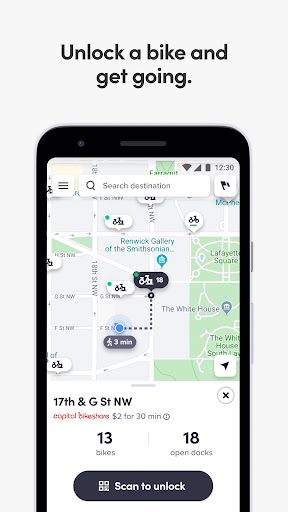
The CaBi App lets you purchase rides, unlock a bike, and ride right away. You can also view all station locations, see available bikes and docks, and get walking directions to them to start your ride.
The Capital Bikeshare app also shows upcoming public transit departures, including WMATA Metrorail, Metrobus, and shuttle lines, DC Circulator buses, Fairfax Connector buses, Montgomery RideOn buses, Alexandria DASH buses, Prince George’s County TheBus buses, Arlington Regional Transit buses, VRE trains, and the Silver Line Express.
Within the app, you can purchase the following:
Single Ride
Access Pass
Membership
Happy riding!
How to Download Capital Bikeshare APK
- Enter the package name
com.motivateco.capitalbikeshareon the APK Downloader homepage. - Select your device architecture (ARM64 recommended for modern devices).
- Click Download to get the merged APK file.
- Transfer and install the APK on your Android device.
- Keep Updated: Visit APK Downloader regularly to search for and download the latest secure versions of your favorite apps.
Security & Signature Verification
This APK download is 100% safe. We verify that the cryptographic signature of the file matches the official developer credentials. No modifications or adware are injected.