



Download Sources
Device Configuration
Split APKs Installation Guide
Some apps are distributed as Split APKs (multiple .apk files packaged together) to optimize resources. Standard Android installers cannot open them.
What's New
[v5.4.57]
- MYBOX+ 연간 구독 상품이 새로 출시되었습니다.
- 사진 여러 장을 선택하여 촬영 날짜, 장소 정보를 한번에 변경할 수 있습니다.
- 앱 주요 기능 사용법을 확인할 수 있는 사용 가이드가 추가되었습니다.
- 최소 지원 버전이 Android 12로 변경되었습니다.
- 성능 및 안정성을 개선하였습니다.
About this app
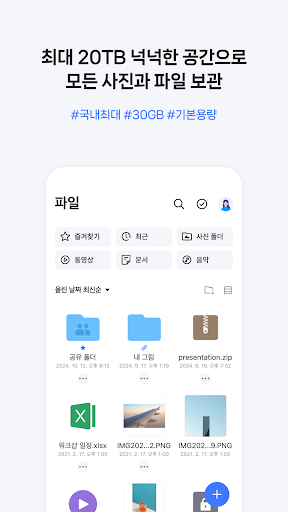
Ample storage space and smart organizational functionality, experience NAVER MYBOX
1. The best in the country, offering a vast 30 GB storage for free.
2. Back up and save your photos by auto-uploading to MYBOX
3. Effectively organize your space in MYBOX with photo sorting and duplicate cleaning functions.
4. Share the vast storage space of MYBOX with the whole family, by purchasing an expansion of up to 10TB .
5. MYBOX will suggest animations so you can travel back to the special moments in your photos.
6. Sort your precious photos by using the location tag and album functions.
7. Use the Date/Place/Theme smart search function to browse photos.
8. You can easily share files and folders stored in MYBOX via other apps such as KakaoTalk and BAND.
* Some features, including shared storage, are only available to paid users.
[Details on the rights required to access the app]
Common
○ Camera: Take a picture or video and save it to MYBOX right away.
○ Contacts: Invite people from Contacts when sharing a folder.
○ Location: Check the location of the device on a map.
Used only on devices with OS version 13.0 or lower
○ Files and Media: Download files stored in MYBOX to the device or upload files stored on the device.
Used only on devices with OS version 13.0 or higher
○ Notifications: Receive notifications such as file transfer results, shared folder invitations, and new comments.
○ Photos and Videos: Download files stored in MYBOX or upload files stored on the device.
○ Music and Audio: Download audio files stored in MYBOX or upload audio files stored on the device.
If you have questions or issues while using the app,
Contact NAVER MYBOX’s customer center (http://naver.me/G0CkNlk9) to get them resolved.
----
Developer’s phone number:
+82-35-1588-3820
User Reviews
This app does have English interface, so language is not an issue. Although you do need to have a Naver account that has been name verified, which I am glad that I do have. I am still rather new to the Naver services, so it would take me sometimes to explore the capabilities and features.

After signing up you are made to login with your newly added credentials except it also asks for a code from a fake store receipt with no discernable code of any kind. I tried the audio option but it doesn't work either. Stupid app. Uninstalled.

Naver Mybox is the one of my favorite Cloud Storage. This app has awesome user interface and options. Thanks Naver corporation for developing it 🇰🇷🇰🇷🇰🇷

I pay for Naver plus and the app doesn't allow me to upload files bigger than 5gb! I have 30 but can't upload big files. What a joke.
How to Download NAVER MYBOX APK
- Enter the package name
com.nhn.android.ndriveon the APK Downloader. - Select your device architecture (ARM64 recommended for modern devices).
- Click Download to get the merged APK file.
- Transfer and install the APK on your Android device.
- Keep Updated: Visit APKDER.COM regularly to search for and download the latest secure versions of your favorite apps.
Security & Signature Verification
This APK download is 100% safe. We verify that the cryptographic signature of the file matches the official developer credentials. No modifications or adware are injected.


