




Download Sources
Device Configuration
Split APKs Installation Guide
Some apps are distributed as Split APKs (multiple .apk files packaged together) to optimize resources. Standard Android installers cannot open them.
What's New
* New Android Tablet App available.
* Bug fixes.
About This App
Logo Design at Your Fingertips!
DesignEvo is an easy and fast app that lets you create stunning logos in the palm of your hand. With 3500+ customizable logo templates, 100+ fonts, lots of graphics and powerful editing tools, you can turn your ideas into a compelling and unique logo in minutes, even if you have no professional design skills.
Whether you are looking to create an amazing logo for using on your website, social media, company wall, email signature, letterhead, business card, stationery, or T-shirt, DesignEvo helps spark your inner creativity. It satisfies everyone from newbies to professionals.
-----------------------------------------------
HIGHLIGHTED FEATURES
-----------------------------------------------
• 3500+ professionally designed logo templates in different categories such as Abstract, Animal, Business, Fashion, Letter and Technology.
• Lots of preset graphics including Badge, Decoration, Line, Shape, Banner and Symbol.
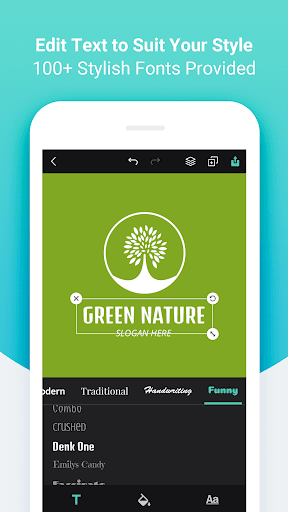
• 100+ hand-picked fonts in Bold, Modern, Traditional, Handwriting and Funny styles.
• Adjust font size, color, spacing, alignment, uppercase, opacity, curved effect and more to create unique typography artwork.
• Adjust opacity, color, flip & mirror effect for the selected graphic.
• Customize background with a preset solid color or add custom color to use.
• Undo/redo every step of your logo editing.
• Manage layers for the selected object - move it forward or backward.
• Freely move, resize and rotate any objects with your fingers.
• Duplicate or delete any objects at will.
• Save your logo as JPG, PNG or transparent PNG images.
• Share your logo via email, message or other favorite social media apps.
User Reviews

Really happy with this app. You could customize your logo different sizes and shapes, with no ads. When you save your logo, it doesn't have a watermark and it's clear to see. But there are limited choices to customize your logo. I understand that it's free, but more choices would make people like the app more. I saw some other people's ratings and they had problems. I am using a mobile phone, so I don't know what happens on a computer. But overall, this app is the best out of all the other ones.

So many bugs... You can't import... You can't save for "work later"... I paid for the whole food package of labels, totally regretting doing it. If can't find what you need on the FREE VERSION, I wouldn't recommend spending a dime here. Tons of other apps that can do a better job for free. What a shame, I had high spectations :-(

The app is good, you can try out few of the logos pre-made for free and can edit them,however there is an error that you can't load more images, moreover they should have added option to apply the graphics tools to the images in your Gallery images, but we don't have it here. (the only demerits) i found.

The app is really good but I've a shrewd suggestion that have to be prioritized. It's about it's inability to edit the colors using the hexadecimal value. Like, I wanted my logo to be in a Teal color but unfortunately I can't achieve it due to inefficiency. Developers prioritize and develop, me come here and edit my review to 5 stars ratings. Hope u understand my language!!!
How to Download DesignEvo - Logo Maker APK
- Enter the package name
com.pearlmountainsoft.designevo.androidon the APK Downloader. - Select your device architecture (ARM64 recommended for modern devices).
- Click Download to get the merged APK file.
- Transfer and install the APK on your Android device.
- Keep Updated: Visit APKDER.COM regularly to search for and download the latest secure versions of your favorite apps.
Security & Signature Verification
This APK download is 100% safe. We verify that the cryptographic signature of the file matches the official developer credentials. No modifications or adware are injected.


