

Sticker Maker - WAStickers APK Screenshots


Sticker Maker - WAStickers App Information
Download Sources
Device Configuration
Split APKs Installation Guide
Some apps are distributed as Split APKs (multiple .apk files packaged together) to optimize resources. Standard Android installers cannot open them.
What's New in Sticker Maker - WAStickers
- "Create new sticker" button after saving a sticker
- More color palette combinations
- New fonts styles
- Shortcuts for the app (create sticker, load template, open sticker gallery)
About Sticker Maker - WAStickers
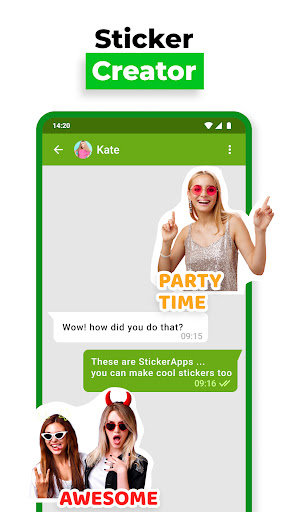
This is the perfect app add-on for your messaging experience! Sticker maker for everyday use! If you are looking for a tool to create personal stickers you found the solution - Sticker Maker.
#1 Stickers Maker with 45M+ users
Ultimate Sticker Maker The easiest way to make stickers from a photo.
It is a cool sticker maker App! Make stickers powerful!
Create Stickers in two simple steps!
Create your own custom stickers using our sticker maker with decorations, emojis, text effects, and more. Save picture stickers from your chats.
Creating your colorful stickers is easy with our sticker studio - select an image, add decorations or text, save it and add it to messages.
Customize your messaging experience with WASticker. Design colorful stickers from your favorite photos, add text, emojis, and more. Try it today!
Make stickers as add-ons for your messages!
The best Sticker Maker App!
Discover fantastic features in our Sticker Creator app and make stickers in less than 1 minute!
Create cool stickers with ease! Use a photo from your gallery and write custom text with amazing fonts and styles. Add your favorite sticker creator to your phone to make stickers!
Make and share stickers easily!
You can easily share the top stickers you created with the WASticker app! Share custom stickers with your friends and surprise them with personal stickers.
Download the best Sticker creator app that provides you a number of popular text sticker fonts selection.
Make stickers with ease:
⭐ Do you want to make a sticker out of a photo? Use Top Stickers Maker and crop the photo or erase the background instantly.
⭐ Add personalized text with amazing fonts and styles.
⭐ Add emojis and make stickers stand out!
⭐ Sticker Maker add-ons let you customize emojis and photos with hue, color, and saturation changes.
⭐ Choose any kind of shape.
⭐ Share it with your friends effortlessly!
⭐Check out why this is the best app to create stickers
Create stickers and surprise your friends!
Looking for stickers maker app on your phone? What about creating personal stickers quickly and easily? This is the perfect sticker creator application you need.
Our sticker creator app provides a variety of special functions which make stickers more charming. Various text sticker colors, texts stickers’ special effects, such as text sticker curve, sticker text shadows, text sticker templates, etc.
Q&A
How to make perfect stickers?
Simple, use our Sticker Maker app ☑
Which app is the best Sticker Creator?
That’s easy - Sticker maker: Create Custom Stickers app! ☑
Should I use another app to erase the background from photos?
No need! With the top Stickers Maker app, you have a background eraser option as well!
Is there a decent app to make stickers quickly?
You found it! Make stickers easily and share them with your friends!
The one and only Stickers Maker you'll ever need!
Disclaimer
All product names, logos, brands, trademarks and registered trademarks, which are not owned by us, are property of their respective owners.
All company, product and service names used in this app are for identification purposes only. Use of these names, trademarks and brands does not imply endorsement.
Sticker Maker app is owned by us. We are not affiliated, associated, authorized, endorsed by, or in any way officially connected with any 3rd party apps or companies.
User Reviews

the app is good tho you can make so many stickers by just take a picture and put it as a sticker. good appi give 5 star rating

I like it,it so useful and now I can create the stickers that I really want

the app is honestly amazing to use but sometimes I have a hard time using it but overall it's good!!

I do like the app a lot, but there's something about the advanced sync feature that really bugs me: I can't add new stickers later, as they will just disappear from the folder again. That means I have to delete the folder and create a new one, but if some of the stickers I want in it are further down, then I can't put them all at the folder at once which causes the same problem again. Would be nice if you could fix that The rest is great though ^^
How to Download Sticker Maker - WAStickers APK
- Enter the package name
com.photoappworld.photo.sticker.creator.wastickerappson the APK Downloader. - Select your device architecture (ARM64 recommended for modern devices).
- Click Download to get the merged APK file.
- Transfer and install the APK on your Android device.
- Keep Updated: Visit APKDER.COM regularly to search for and download the latest secure versions of your favorite apps.
Frequently Asked Questions
Yes! Every APK download provided by APKDER undergoes rigorous security verification. We verify that the cryptographic signature of the APK file matches the official signature from the developer, ensuring the APK is original, untouched, and free from any modifications.
To install it, you first need to enable "Unknown Sources" in your Android device's security settings. After downloading the APK file from APKDER, tap it to begin the installation and follow the on-screen prompts.
Yes! As soon as the developer releases a new version of Sticker Maker - WAStickers, we will update and provide the updated APK on APKDER. You can simply download and install the new APK over the existing installation without losing your app data.
Yes. APKDER allows you to bypass geographic restrictions and download official APK files directly, even if the app or game is not officially available in your country's store.
A standard APK is a single installation package. An XAPK or Split APK contains multiple resource files (like OBB expansions or device-specific layout parts) packaged together. To install them, you can download splits individually or use dynamic helper tools like Split APKs Installer (SAI).
Security & Signature Verification
This APK download is 100% safe. We verify that the cryptographic signature of the file matches the official developer credentials. No modifications or adware are injected.


