
Download Sources
Device Configuration
Split APKs Installation Guide
Some apps are distributed as Split APKs (multiple .apk files packaged together) to optimize resources. Standard Android installers cannot open them.
Related Applications


About this app
Calvia makes healthy eating easier.
Track your meals, calories, macros, fasting, and progress in one simple app. Snap a photo of your food, get instant nutrition estimates, plan your meals, explore recipes, and stay on track with tools built around your goals.
Whether you want to lose weight, maintain your weight, or build better eating habits, Calvia helps you stay consistent without making tracking feel like a chore.
SNAP IT. WE’LL DO THE MATH.
Skip manual logging. Calvia uses AI to recognize your food from a photo and estimate calories and macros in seconds.
Just snap, review, and log.
Fast, simple, and built for real life.
BUILT AROUND YOUR GOALS
Set your current weight, goal weight, and nutrition goal, and Calvia creates a personalized daily calorie target based on your needs.
Track calories, protein, carbs, fat, and more with a clean dashboard that keeps everything clear and easy to follow.
TRACK WHAT MATTERS
Log breakfast, lunch, dinner, and snacks in seconds.
See your daily intake, remaining calories, and macro balance at a glance.
No clutter. No overthinking. Just the numbers you need.
PLAN MEALS WITH LESS EFFORT
Stay organized with a built-in meal planner that helps you prepare for the day ahead.
Build meals around your calorie target, reduce decision fatigue, and make healthier choices more consistently.
DISCOVER RECIPES YOU’LL ACTUALLY USE
Browse a growing collection of meals and recipes with nutrition information included.
From quick breakfasts to balanced lunches, lighter dinners, and healthy snacks, Calvia helps you find meals that fit your goals and your routine.
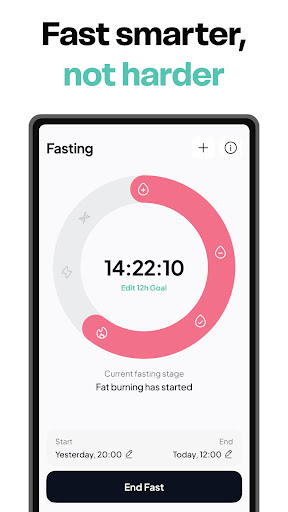
FAST SMARTER
Use the built-in fasting timer to track your fasting windows with ease.
Set your schedule, monitor your progress, and stay consistent with a simple fasting tool that works alongside your nutrition plan.
SEE YOUR PROGRESS WEEK BY WEEK
Track your weight, nutrition, and daily habits with visual insights designed to keep you motivated.
See how small actions add up over time and stay focused on long-term progress.
FEATURES
• AI food scanner for quick meal logging
• Instant calorie and macro estimates
• Personalized daily calorie goals
• Macro tracking for protein, carbs, and fat
• Built-in meal planner
• Fasting timer
• Large recipe library
• Weight and progress tracking
• Clean, easy-to-use design
Some features, including AI-powered food recognition and certain advanced tools, require an active subscription.
Terms and Conditions: https://calviaapp.ai/terms
Privacy Policy: https://calviaapp.ai/privacy
How to Download Calvia AI Food Calorie Tracker APK
- Enter the package name
com.pixerylabs.pixcalon the APK Downloader homepage. - Select your device architecture (ARM64 recommended for modern devices).
- Click Download to get the merged APK file.
- Transfer and install the APK on your Android device.
- Keep Updated: Visit APK Downloader regularly to search for and download the latest secure versions of your favorite apps.
Security & Signature Verification
This APK download is 100% safe. We verify that the cryptographic signature of the file matches the official developer credentials. No modifications or adware are injected.