


Download Sources
Device Configuration
Split APKs Installation Guide
Some apps are distributed as Split APKs (multiple .apk files packaged together) to optimize resources. Standard Android installers cannot open them.
What's New
We’re constantly making this app better. Find new features and enhancements in this release, along with a few fixes.
About This App
Screen Recorder: Facecam - Record, Capture, and Share Your Screen and Emotions!
Introducing Screen Recorder: Facecam, the all-in-one screen capture solution for anyone looking to effortlessly capture and share content, apps, gaming action, and even their reactions in real-time! With a powerful array of features and a user-friendly interface, this camera recorder app revolutionizes recording, making it faster and easier than ever! 📽️
📸 Record Screen - Facetime Recorder! 📸
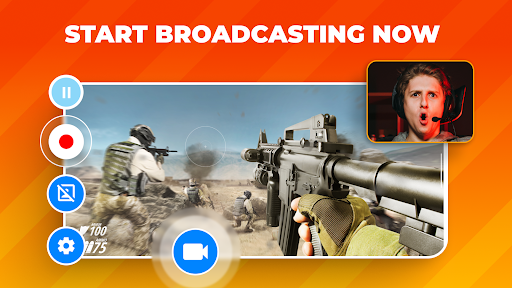
Screen Recorder: Facetime Recorder lets you capture what you are playing and yourself using the camera recorder in real-time. With the Facetime recorder option, your face, emotions, and reactions can be recorded in a customizable overlay window, which you can resize and reposition to your liking.
Video Capture Key Features:
✅ Simultaneous Facecam and screen recording;
✅ Camera Recorder - UHD, HD, and SD screen recording options;
✅ Choose between the device microphone or internal audio;
✅ Video Capture - Customizable Facecam overlay;
✅ Record games in unlimited recording length;
✅ Video Recorder with quick and easy sharing options!
🖥️ Flexible Screen Recording Options! 🖥️
We offer multiple screen recording quality options, including UHD, HD, and SD. Whether you need top-notch quality for professional presentations or just capturing some casual gameplay, this video recorder has got you covered. You can decide whether to record audio from your device's microphone or utilize internal audio, giving you complete control over your content.
🎮 Record Game and App Play! 🎮
Gamers, this one's for you! Screen Recorder: This Camera Recorder is the perfect video recorder and screen capture tool to record game sessions and share your epic wins, strategies, and reactions. Record screen and showcase your gaming prowess and easily build your online presence.
📢 Unlimited Video Capture Length! 📢
Are you worried about time constraints? With our video capture app, you won't have to be! Enjoy unlimited recording length with this Video Recorder, ensuring you can screen capture every moment, whether a short tutorial or an extended gaming session.
🔗 Record Screen And Easily Share! 🔗
Once you've finished screen recording, the Video Recorder - Record Screen app simplifies the sharing process. Share your video capture content with friends, family, or your online audience.
Enjoy The Wonders Of Screen Recording!
Screen Recorder: Facetime Recorder is the ultimate screen capture and video recorder tool, whether creating instructional videos, sharing gameplay, or capturing Facetime moments. Capture, create, and share like never before with Screen Recorder: Facecam. Download the Screen Recorder app today and start recording your apps, games, and Facetime moments confidently and easily. It's time to take your content to the next level! 🌟
User Reviews

for some reason, whenever I record, it never shows the sound. I thought that it was my headphones, but it still wasn't working. Turns out you need to pay just to get the audio. it also took a long time to even figure out how to use this app. I had two options that I PERSONALLY don't need, but it's very easy to record. this app is very useless if you don't have audio, just money grabs. PLEASE MAKE THE AUDIO FREE FOR NON PREMIUM USERS

App works quite well, video quality is amazing and it records for a decent amount of time. But audio recording shouldn't be locked behind a pay wall. Nor should recordings longer than two minutes. I'd be willing to pay for the premium if devs didn't force you to pay to access these features. Paid subscription should be used to allow video editing, not the recorder itself..

This app was amazing at first because it has a smaller watermark than most screenrecorders, it has a file area of all your videos you've made using the app (they delete once you delete them from your camera roll), it has a camera to use as a face-cam, and it is good while recording, it also has a 3 second countdown for when you are about to record. The only thing that has been really annoying is just recently (today) it has started flashing off and on mid-recording. If possible,please fix this.

It really is a high quality screen recorder but that's about it. Won't record any audio and there will be a constant icon on your screen that you can't even mover around to a different location. All of these issues alcan be fixed if you buy premium but not even letting us change the position tof the icon is too much and the ads are also so annoying. The only thing you get with this is a recording. I tried using my built in recorder for audio but it won't even let me do that.
How to Download Screen Recorder: Facecam Audio APK
- Enter the package name
com.rec.screenon the APK Downloader. - Select your device architecture (ARM64 recommended for modern devices).
- Click Download to get the merged APK file.
- Transfer and install the APK on your Android device.
- Keep Updated: Visit APKDER.COM regularly to search for and download the latest secure versions of your favorite apps.
Security & Signature Verification
This APK download is 100% safe. We verify that the cryptographic signature of the file matches the official developer credentials. No modifications or adware are injected.


