Splitteroo: Vocal Remover APK Screenshots




Splitteroo: Vocal Remover App Information
Download Sources
Device Configuration
Split APKs Installation Guide
Some apps are distributed as Split APKs (multiple .apk files packaged together) to optimize resources. Standard Android installers cannot open them.
What's New in Splitteroo: Vocal Remover
Added search button
Improved layout
About Splitteroo: Vocal Remover
Remove vocals or instruments from any song.
Unlimited uploads and audio tracks export.
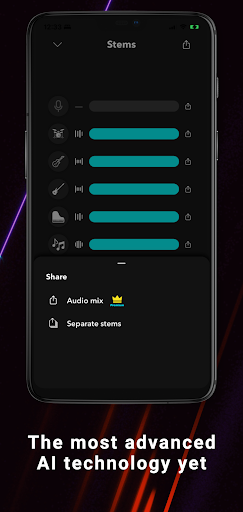
“The most advanced AI technology yet”.
The must-have app for every musician.
Introducing Splitteroo, the most advanced AI vocal or instruments remover application yet, the perfect solution for all musicians out there! This incredible app is designed to extract vocals or instruments from any audio in only a few seconds, using the power of artificial intelligence. It is like having a backing track maker and a vocal remover app in the palm of your hand.
Select a song on your device, and Splitteroo will isolate the vocals and instruments according to your preferences. The resulting high-quality stem audio files can be exported as separate audio tracks or as an audio mix.
FEATURES:
Free unlimited songs
Free unlimited audio tracks exports
Import songs from your music library, cloud services, camera roll, public URL, etc.
Split the song into 2, 4, and 6 tracks
Vocal remover
Drums remover (Drums backing track)
Guitar remover (Guitar backing track)
Bass remover (Bass backing track)
Instrumental remover
Whether you're a professional musician, an amateur enthusiast, or a karaoke fan, Splitteroo is an essential tool for your practice sessions. Download it today and unlock a world of musical possibilities!
User Reviews

the app keeps restarting or just closing completely and won't let me save my songs now. I have premium and I feel like I've been screwed over. I shouldn't have to pay while the app isn't working or should at least be able to save the songs I paid to have separated so I can just cancel my monthly subscription. I want the songs I paid for.

it's cool, but it constantly stops playing when the screen times out, which gets very tedious when trying to learn a music part with guitar while having to keep waking up the screen to get it to play again

Amazing. I've tried so many music separator. Most of them consumed too much memory space (and money). Finally found this one. Fits my requirement and fast without sacrificing quality. The only minor probs is sometimes it cannot separate between guitar elect and piano elect/ fr horn properly. But it depends on source audio quality, too. Overall. I loved this. Great job, team.

This app is kinda useful sometimes. BUT, I bet you to allow this music played in the background through the media player on the control center or notification or even lockscreen too without forcing kill the app while closing the phone or put into sleep. ( depends how OS operates this ). Plus, it can be played in a loop, skip to the next music and skip the music for 10 seconds or 5 seconds ( this can be customizable ).
How to Download Splitteroo: Vocal Remover APK
- Enter the package name
com.ribeirop.dksplitteron the APK Downloader. - Select your device architecture (ARM64 recommended for modern devices).
- Click Download to get the merged APK file.
- Transfer and install the APK on your Android device.
- Keep Updated: Visit APKDER.COM regularly to search for and download the latest secure versions of your favorite apps.
Frequently Asked Questions
Yes! Every APK download provided by APKDER undergoes rigorous security verification. We verify that the cryptographic signature of the APK file matches the official signature from the developer, ensuring the APK is original, untouched, and free from any modifications.
To install it, you first need to enable "Unknown Sources" in your Android device's security settings. After downloading the APK file from APKDER, tap it to begin the installation and follow the on-screen prompts.
Yes! As soon as the developer releases a new version of Splitteroo: Vocal Remover, we will update and provide the updated APK on APKDER. You can simply download and install the new APK over the existing installation without losing your app data.
Yes. APKDER allows you to bypass geographic restrictions and download official APK files directly, even if the app or game is not officially available in your country's store.
A standard APK is a single installation package. An XAPK or Split APK contains multiple resource files (like OBB expansions or device-specific layout parts) packaged together. To install them, you can download splits individually or use dynamic helper tools like Split APKs Installer (SAI).
Security & Signature Verification
This APK download is 100% safe. We verify that the cryptographic signature of the file matches the official developer credentials. No modifications or adware are injected.