



Download Sources
Device Configuration
Split APKs Installation Guide
Some apps are distributed as Split APKs (multiple .apk files packaged together) to optimize resources. Standard Android installers cannot open them.
What's New
◆ Improvements and bug fixes
If you have questions, suggestions or problems, please contact [email protected].
About This App
SafeInCloud Password Manager allows you to keep your logins, passwords, and other private info safe and secure in an encrypted database. You can synchronize your data with another phone, tablet, Mac or PC via your own cloud account.
KEY FEATURES
◆ Easy to Use
◆ Material Design
◆ Black Theme
◆ Strong Encryption (256-bit Advanced Encryption Standard)
◆ Cloud Synchronization (Google Drive, Dropbox, Microsoft OneDrive, NAS, WebDAV)
◆ Login with Fingerprint, Face, Retina
◆ Autofill in Apps
◆ Autofill in Chrome
◆ Browser Integration
◆ Wear OS App
◆ Password Strength Analysis
◆ Password Generator
◆ Free Desktop App (Windows, Mac)
◆ Automatic Data Import
◆ Cross-Platform
EASY TO USE
Try it yourself and enjoy an easy-to-use yet powerful user interface.
MATERIAL DESIGN
SafeInCloud was completely redesigned to match new Material Design user interface language by Google. In addition to the standard Light theme SafeInCloud also has a Dark theme option to help you saving a significant amount of battery life.
STRONG ENCRYPTION
Your data is always encrypted on a device and in a cloud with a strong 256-bit Advanced Encryption Standard (AES). This algorithm is used by the U.S. Government for protection of a top secret information. AES is also widely adopted worldwide and became the de facto encryption standard.
CLOUD SYNCHRONIZATION
Your database is automatically synchronized with your own cloud account. Thus you can easily restore your entire database from a cloud to a new phone or computer (in case of a loss or an upgrade). Your phone, tablet and computer are also automatically synchronized between each other via a cloud.
LOGIN WITH FINGERPRINT
You can instantly unlock SafeInCloud with a fingerprint on devices with a fingerprint sensor. This feature is available on all Samsung devices. Devices from other manufacturers should have Android 6.0 or higher.
AUTOFILL IN APPS
You can autofill login and password fields into any app on your phone directly from SafeInCloud. You don't need to copy and paste them manually.
AUTOFILL IN CHROME
You can autofill logins and passwords on webpages in Chrome. For that you should enable SafeInCloud Autofill service in the phone's Accessibility settings.
WEAR OS APP
You can put some selected cards on your wrist to easily access them on the run. These could be your credit card PINs, door and locker codes.
PASSWORD STRENGTH ANALYSIS
SafeInCloud analyses your password strengths and shows a strength indicator next to each password. The strength indicator displays an estimated crack time for a password. All cards with weak passwords are marked with a red sign.
PASSWORD GENERATOR
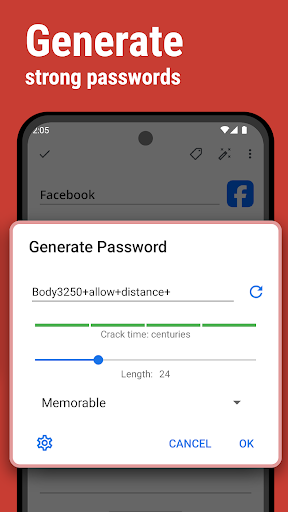
The password generator helps you generating random and secure passwords. There is also an option to generate memorable, but still strong passwords.
FREE DESKTOP APP
Download a free Desktop application for Windows or Mac OS from www.safe-in-cloud.com to be able access your database on your computer. The Desktop application also makes data entry and editing fast and easy using a hardware keyboard.
AUTOMATIC DATA IMPORT
The Desktop application can automatically import your data from another password manager. You don't need to manually reenter all your passwords.
CROSS PLATFORM
SafeInCloud is available on the following platforms: Mac (OS X), iOS (iPhone and iPad), Windows, and Android.
User Reviews

Best I've used. I've tried numerous password manager app and for me, Safe in Cloud Pro offers the best cross platform experience. I use it on Android, iOS, Chromebook and Windows and for the most part, things are always synced and available. As long as you have the discipline to make the entry every time you create an account or change a password, you will never get locked out of an account.

I love this app. I thought I only had a few accounts with passwords. How about 50+! (I keep entering them as I encounter them and it seems like I'll never get finished.) Specifically I like that it syncs across devices, it uses one of my cloud accounts to sync, it's easy to use and simple to configure. And the best part? I haven't had ANY problems with it since I installed it such a long time ago. It even came through a phone upgrade with NO problems. Thank you Safe-In-Cloud for a great app!
I am very happy with this app. It does exactly what I initially needed, which is keeping passwords organized and accessible. I like that I was able to make a one-time purchase without an obligation to maintain a subscription. Additionally, I find the Firefox extension incredibly useful and I have deemed the ability to sync passwords for PC & mobile devices indispensable.
Finally I have a stable and secure password manager that works across all my devices. There are many features to help you get organized and be more productive. I highly recommend you check it out! My only disappointment is when exporting to a file. Not all fields export correctly or certain fields are missing. Hope SafeInCloud can correct this in the near future. I like to have the ability to back up all passwords in a separate file like .csv or .pdf that I can secure with a password.
How to Download SafeInCloud 1 APK
- Enter the package name
com.safeincloudon the APK Downloader. - Select your device architecture (ARM64 recommended for modern devices).
- Click Download to get the merged APK file.
- Transfer and install the APK on your Android device.
- Keep Updated: Visit APKDER.COM regularly to search for and download the latest secure versions of your favorite apps.
Security & Signature Verification
This APK download is 100% safe. We verify that the cryptographic signature of the file matches the official developer credentials. No modifications or adware are injected.


