

Sleepagotchi APK Screenshots


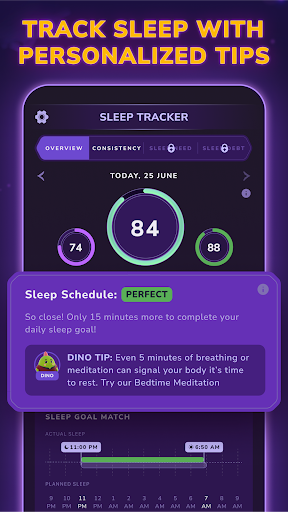


Sleepagotchi App Information
Download Sources
Device Configuration
Split APKs Installation Guide
Some apps are distributed as Split APKs (multiple .apk files packaged together) to optimize resources. Standard Android installers cannot open them.
What's New in Sleepagotchi
Bugs fixes
About Sleepagotchi
Mornings were never fun... until today!
Sleepagotchi is a sleep-based game that rewards you every morning for sticking to a healthy sleep schedule.
Earn rewards while you sleep, then use them to unlock new heroes, explore magical worlds, and decorate the cozy room of your new virtual friend—Dino!
Here’s how it works:
1. Set your ideal bedtime and wake-up time.
2. Stick to your schedule to build better sleep habits.
3. Start each morning with rewards—the better your sleep, the better the reward!
4. Use rewards to play: follow Dino on a unique story quest, meet new friends, and defeat bad dreams together.
5. Sleep, play, repeat! Come back each day to keep your streak and see your mornings improve.
By going to bed and waking up at the same time every day, you can start waking up fully refreshed — without an alarm.
Track your sleep with or without wearables — just stay consistent!
Sleepagotchi is here to show that better sleep can be fun.
Download now and start your journey — brighter mornings are just one good night’s sleep away!
Product of the Day on Product Hunt: https://www.producthunt.com/products/sleepagotchi
Discord: https://discord.gg/sleepagotchi
Twitter: https://twitter.com/sleepagotchi
Medium:https://sleepagotchi.medium.com/
Find out more on https://sleepagotchi.com/
Note: Tech details
- Activate sleep mode on your phone before going to bed or wear your Watch to bed to track your sleep automatically.
- Sleepagotchi integrates with Health Connect to enable Watch-based and sleep mode tracking.
Privacy Policy: https://app.termly.io/embed/terms-of-use/ef492468-c4c4-4fc6-b698-bb1d0c236060#sociallogins
Terms of Service: https://app.termly.io/embed/terms-of-use/ca046a5a-4020-4889-941a-e965756c1cd2#agreement
User Reviews

let's get the positives out of the way. no ads, let's you enter sleep data manually to avoid tracker compatibility problems. now then, game crashes eventually every single time it's run (freezes in arena battles), there's a total of 5 paths (game levels), there's 10 unlockable characters, Dino's room "customizations" are chosen by roulette and not permanently unlocked (there's no system for selecting what decorations you want from the decorations you've "won" as sleep rewards) could be better.

Great idea in theory but the execution needs reevaluating. I found the whole demon battling theme peculiar and at odds with the goal of achieving a restful sleep. I think a calm peaceful theme would be more helpful for individuals needing assistance to become drowsy. On the + side, the Sleepogotchi is an adorable character and the accompanying graphics are well done. 👌

I can't log in "Sleep Coach" anymore.

Earned reward through SweatCoins and this app was featured on their site. I thought it sounded interesting and followed the link to the website and then downloaded the app through Google Play. The App flashed, froze, flashed and froze some more. My experience ended with my Pixel totally froze and after a bit, my phone shut down and then restarted. The idea behind the app sounds really cool and fun, but until I know that the developers have found and resolved the glitches with the app.. I'm out
How to Download Sleepagotchi APK
- Enter the package name
com.sleepagotchi.soft.appon the APK Downloader. - Select your device architecture (ARM64 recommended for modern devices).
- Click Download to get the merged APK file.
- Transfer and install the APK on your Android device.
- Keep Updated: Visit APKDER.COM regularly to search for and download the latest secure versions of your favorite apps.
Frequently Asked Questions
Yes! Every APK download provided by APKDER undergoes rigorous security verification. We verify that the cryptographic signature of the APK file matches the official signature from the developer, ensuring the APK is original, untouched, and free from any modifications.
To install it, you first need to enable "Unknown Sources" in your Android device's security settings. After downloading the APK file from APKDER, tap it to begin the installation and follow the on-screen prompts.
Yes! As soon as the developer releases a new version of Sleepagotchi, we will update and provide the updated APK on APKDER. You can simply download and install the new APK over the existing installation without losing your app data.
Yes. APKDER allows you to bypass geographic restrictions and download official APK files directly, even if the app or game is not officially available in your country's store.
A standard APK is a single installation package. An XAPK or Split APK contains multiple resource files (like OBB expansions or device-specific layout parts) packaged together. To install them, you can download splits individually or use dynamic helper tools like Split APKs Installer (SAI).
Security & Signature Verification
This APK download is 100% safe. We verify that the cryptographic signature of the file matches the official developer credentials. No modifications or adware are injected.


