
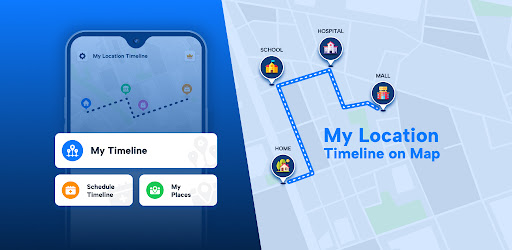
My Location Timeline on Map APK Screenshots


My Location Timeline on Map App Information
Download Sources
Device Configuration
Split APKs Installation Guide
Some apps are distributed as Split APKs (multiple .apk files packaged together) to optimize resources. Standard Android installers cannot open them.
About My Location Timeline on Map
Do want to know all details of your visited locations ??? Yes ?
In today's world, we all travel long routes & visit so many places in a day...& sometimes you might forget what was the place that you visited on so & so date and time. Use this app to save your travel timeline with all locations and time details. Get your visited places timeline - day by day or date by date.
App features :
- Get a timeline of all locations that you visited with details like location, time & duration.
- Track your all location details with timings.
- Check location history with pin code, city, state, country, from date to date & even you can share these all details with anyone.
- Get the current location marker with the full location address.
- Schedule your own Timeline & get reminders.
# Key Points:
1) My Timeline: In this feature, User will see full timeline of your visited places for any particular date from there & even calendar view is also available so user can pickup any date easily & see their timeline. If some of your location were not track by any situation & user remembered so user can use "Add new place below" feature & can add new places between locations.
-Location History: Get the full location address with pin code, city, state, country, from date to date & time details with map view of your location.
-Location Route: You will see the Full route of your noted timeline on Map view.
-Insights: User can see how many minutes they are walking , Running, Bicycling or Driving date by date & also access calendar view to see it.
2) My Places: User will get detail of a particular location by visits & by Time.
- By Visits: Get the list of a particular location by visits like 1 visit, 2 or more visits selecting from date to date.
- By Time: Get the list of a particular location based on Time like 2mins, 4mins etc. selecting from date to date.
3) Schedule Timeline : Users can schedule places by adding details like title, location, time, voice notes, reminders, photos, and text notes.
for an example if user entered Supermarket location with some of notes for 10:30 am then This app will give notification reminder at 10:20 am like you will supposed to be at Super Market at 10:30 am & also notify there notes if user entered so it's easy to get something with exact time right on the screen.
by this feature user can see their attend location & missed location by schedule.
They can set different themes for each location, create a full-day schedule, export it as a PDF, and share it with others. Shared schedules show the route on a map, and users can view their schedule timeline by date, including past entries and details.
Location permission: We Required this permission to allow you to get location and see location history with a timeline.
Physical Activity : We required this permission to allow you to see user activity on Map timeline how user move to one destination to other destination ex : by Walk, by running, by cycle, etc.
Audio Permission: We need this permission to allow you to use or add voice notes feature by scheduling your timeline.
User Reviews

I have only been using for 1 day, and it seems really good so far, but there's one specific feature I'm looking for: the ability to add custom labels or tags to My Places. I work on a large, wide-spread ranch, which means I have several "unnamed roads" and several places that are simply labeled with the name of the nearest town. It would be much more useful to me if I saw "equipment barn," "haystack," or "horse pens" instead of unnamed road. I would upgrade to the paid version for that.

No Option to Edit Places, No Option to Manually Mark Check in & Check Out, No Options for Data Export & Backup/Restore. App is very slow.

I've had the free app 1 day. The app is installed on a Samsung Tab S7. The purpose for this app is to provide an alternative to Google Maps timeline, since Google changed Timeline to operate only on one device. terrible! ads are presented with great interference to the app. Although the map is accurate, the labels and the timeline are blank from any meaningful information. Everything is labeled "Missing Timeline". There is no way to edit timeline to add detail I can find.

The app didn't always automatically record, and pop-up ads are annoying and often confusing with the ads looking like the program rather than an ad. Too commercialized without adequate function. I un-installed as I found it to be a waste of time along with irritating.
How to Download My Location Timeline on Map APK
- Enter the package name
com.sm.maptimelineon the APK Downloader. - Select your device architecture (ARM64 recommended for modern devices).
- Click Download to get the merged APK file.
- Transfer and install the APK on your Android device.
- Keep Updated: Visit APKDER.COM regularly to search for and download the latest secure versions of your favorite apps.
Frequently Asked Questions
Yes! Every APK download provided by APKDER undergoes rigorous security verification. We verify that the cryptographic signature of the APK file matches the official signature from the developer, ensuring the APK is original, untouched, and free from any modifications.
To install it, you first need to enable "Unknown Sources" in your Android device's security settings. After downloading the APK file from APKDER, tap it to begin the installation and follow the on-screen prompts.
Yes! As soon as the developer releases a new version of My Location Timeline on Map, we will update and provide the updated APK on APKDER. You can simply download and install the new APK over the existing installation without losing your app data.
Yes. APKDER allows you to bypass geographic restrictions and download official APK files directly, even if the app or game is not officially available in your country's store.
A standard APK is a single installation package. An XAPK or Split APK contains multiple resource files (like OBB expansions or device-specific layout parts) packaged together. To install them, you can download splits individually or use dynamic helper tools like Split APKs Installer (SAI).
Security & Signature Verification
This APK download is 100% safe. We verify that the cryptographic signature of the file matches the official developer credentials. No modifications or adware are injected.


