
Download Sources
Device Configuration
Split APKs Installation Guide
Some apps are distributed as Split APKs (multiple .apk files packaged together) to optimize resources. Standard Android installers cannot open them.
Related Applications


What's New
Bug fixes and performance improvements.
About this app
Unleash your dream ride with the Specialized app.
With ride recording, advanced performance tracking, and Turbo e-bike management, the Specialized app takes your cycling experience to the next level. Plus, premium ride data and analytics motivate you to achieve your cycling goals while a seamless partner app connection supports your active lifestyle.
GET THE MOST OUT OF YOUR BIKE
Turbo E-bike Management: Manage your Turbo bike settings directly in the app.
• Register your bike directly in the app to activate the lifetime warranty and receive critical updates about your bike.
• Fine-tune your bike’s power delivery and battery output to support your riding style.
• Customize the stats and layout you see on the bike display.
• Deter bike theft with Turbo System Auto-Lock.* When activated, your system automatically locks when you power off your bike. The system will automatically unlock when you’re near your bike and power it on.
• Monitor battery level, charge cycles, odometer, etc.
• Receive real-time error log alerts when your bike needs attention. Resolve issues with our helpful troubleshooting tips, or share system status and logs with your preferred retailer for remote diagnosis.
• Get service reminders to keep your bike operating at peak performance.
• Manage bike settings, including battery beeper, stealth mode*, and range extender use.*
*Available on select models.
ENJOY THE RIDE
Advanced Ride Recording: Track activity and monitor your ride data in real-time with GPS recording.
• View real-time metrics, including speed, distance, elevation gain, calories burned, and more.
• Customize the ride recording dashboard to see your preferred stats.
• Turbo riders can stream stats directly from their bike, including assist mode, battery level, and motor power.
Smart Control (Turbo e-bikes only): Effortlessly manage your Turbo e-bike's battery use on any ride. Set your desired battery percentage remaining for the end of your ride, and the app will intelligently adjust motor assistance to ensure you reach your destination with the right amount of charge.
CELEBRATE YOUR EFFORTS
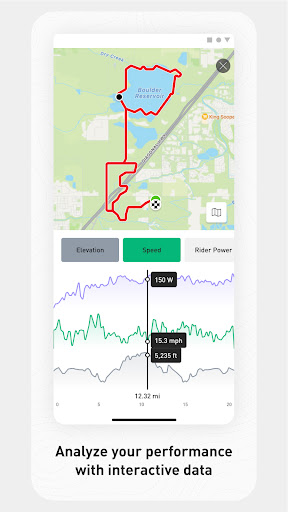
Premium Performance Data: Get a comprehensive summary of every ride with a detailed analysis of where you rode and what you accomplished.
• Stats include speed, distance, elevation gain, calories burned, and more.
• Interactive graphs allow you to analyze your ride further.
• Rides recorded on a Turbo e-bike will display Turbo-specific metrics, including levels of assistance used during the ride, battery usage over time, and average motor power use.
Seamless Partner App Connection: Easily sync your ride data with your preferred apps that track and support your active lifestyle.
• Connect your Garmin or Wahoo account to the app and sync the rides you record with either device. Rides will be imported to your activity library, allowing you to analyze the collected data.
• Sync activity to Strava for sharing with friends and getting kudos.
Designed to empower all riders, the Specialized app revolutionizes your cycling experience with innovative features and an intuitive user experience. It’s your ultimate riding partner.
Download and start riding today.
How to Download Specialized APK
- Enter the package name
com.specialized.androidon the APK Downloader homepage. - Select your device architecture (ARM64 recommended for modern devices).
- Click Download to get the merged APK file.
- Transfer and install the APK on your Android device.
- Keep Updated: Visit APK Downloader regularly to search for and download the latest secure versions of your favorite apps.
Security & Signature Verification
This APK download is 100% safe. We verify that the cryptographic signature of the file matches the official developer credentials. No modifications or adware are injected.